

Blixo vs Traditional Invoice and AP Automation

Key Takeaways
- Manual invoice processes cost U.S. businesses $1.3 trillion annually due to errors, delays, and inefficiencies.
- 39% of manually processed invoices contain errors, causing 20% of reconciliation disputes in logistics firms.
- Midsize companies spend over 200 hours yearly resolving invoice discrepancies from manual workflows.
- Automating three-way matching reduces disputes by 20% and saves 50+ hours monthly for logistics firms.
- Blixo’s AI-powered cash application cut healthcare providers’ month-end reconciliation time by 18%.
- Invoice automation reduces administrative costs by 30% and improves Days Sales Outstanding (DSO) by 30%.
- 82% of AP teams still rely on manual processes, highlighting widespread inefficiency in financial operations.
Why Invoice and AP Automation Matters
Invoices and accounts payable (AP) automation are no longer optional upgrades-they’re critical for businesses aiming to survive in a competitive market. Traditional manual processes, which 82% of AP teams still rely on, cost U.S. businesses $1.3 trillion annually due to errors, delays, and inefficiencies. Automating these workflows isn’t just about faster processing; it’s about transforming financial operations to reduce risk, improve cash flow, and free up staff for strategic work. Below, we explore the tangible benefits, real-world impact, and why SaaS providers like Blixo outperform legacy solutions..
What Makes Manual Invoice and AP Processes a Problem?
Manual invoice and AP workflows are riddled with inefficiencies. For example, 39% of invoices processed manually contain errors, leading to disputes, delayed payments, and strained vendor relationships. A single midsize company processing 1,000 invoices monthly spends over 200 hours annually reconciling discrepancies. These errors also inflate administrative costs by 30% and extend Days Sales Outstanding (DSO) by the same margin, directly impacting cash flow.
Consider a logistics firm that manually reconciled invoices: 20% of its reconciliation disputes stemmed from mismatched purchase orders and delivery receipts. Automating three-way matching-a core feature in modern platforms like those described in the Blixo’s All-in-One Platform section-eliminated these issues, reducing disputes by 20% and saving 50+ hours monthly..
Real-World Impact: How Automation Delivers ROI
Businesses adopting automation report measurable gains in speed, accuracy, and cost savings. A healthcare provider using Blixo’s AI-powered cash application cut month-end reconciliation time by 18%, while a SaaS company improved billing accuracy by 25% through automated proration. These results align with industry benchmarks: AI-driven systems achieve 97% data extraction accuracy, slashing processing time from 45 days to 3.1 days.
Case studies highlight even starker wins. A nonprofit reduced invoice processing costs by 54% after digitizing workflows, while a retail chain cut regional payment delays by 20% using multi-currency support. For small businesses, the benefits are equally compelling: one saw a 30% increase in collection efficiency through automated reminders and dynamic discounting..
Challenges Solved by Modern Automation
Traditional AP tools often address only isolated tasks-like invoice capture or payment execution-while leaving gaps in visibility, compliance, and scalability. Modern solutions like Blixo solve these systemic issues:
| Challenge | Traditional Tools | Blixo Automation |
|---|---|---|
| Error-prone manual entry | High error rates (39% of invoices) | AI-powered OCR reduces errors by 35% |
| Scattered workflows | Siloed teams, delayed approvals | End-to-end integration with ERP systems |
| Cash flow visibility | Reactive management | Real-time DSO dashboards and predictive analytics |
| Global payment complexity | Manual handling of currencies, compliance | Automated multi-currency and tax compliance |
For example, a fintech startup using Blixo’s virtual lockbox improved sales conversions by 70% by ensuring timely payments and strategic discounting. Meanwhile, a law firm gained 25% cash flow efficiency through automated reminders and policy enforcement..
Who Benefits Most, and Why Blixo Stands Out
Small businesses, enterprises, and global organizations all gain unique advantages from automation. Small businesses prioritize cost savings and time reduction, while enterprises need scalability and compliance. Blixo’s cloud-native architecture caters to both extremes: it handles 100–100,000 invoices monthly and integrates with ERPs like SAP and QuickBooks.
Compared to traditional tools, Blixo’s AI-driven features-such as machine-learning-based cash application and multi-lingual invoice parsing-offer superior accuracy and adaptability. For instance, a logistics firm using Blixo’s three-way matching resolved 98% of payments without human intervention, whereas legacy systems required manual checks, as detailed in the Traditional Invoice and AP Automation Methods section..
Key Takeaways for Choosing Automation
Selecting the right platform depends on your business size, complexity, and goals:
- Prioritize AI accuracy: 97%+ data extraction is now baseline for modern tools.
- Demand integration: Bi-directional sync with ERP systems is non-negotiable for large volumes.
- Evaluate scalability: Cloud solutions like Blixo adjust to seasonal spikes without infrastructure overhauls.
- Measure ROI: Track metrics like DSO reduction, error rates, and staff reallocation to quantify success.
Traditional AP automation tools often fail to address the full procure-to-pay cycle, leaving businesses vulnerable to inefficiencies. Blixo’s end-to-end approach-from smart invoicing to real-time analytics-ensures no step is overlooked. As one user noted, “Blixo is the ultimate solution for invoicing and payment management, eliminating administrative headaches.”.
By automating invoice and AP processes, businesses aren’t just reducing costs-they’re building a foundation for strategic growth, compliance, and resilience in an increasingly digital economy.
Blixo’s All-in-One Platform: Features and Benefits
Blixo’s all-in-one platform redefines invoice and accounts-receivable automation by embedding end-to-end order-to-cash (O2C) workflows that eliminate manual bottlenecks. Unlike traditional systems that handle isolated invoice processing steps, as discussed in the Traditional Invoice and AP Automation Methods: Limitations and Drawbacks section, Blixo automates the full O2C cycle-from order placement to cash application-using real-time data flow and AI-driven decision-making. This approach addresses pain points like siloed teams, manual invoicing errors, and fragmented payment methods, ensuring businesses reduce days sales outstanding (DSO) and bad debt while accelerating cash flow.
How Blixo Streamlines Automated Invoicing and Billing
Blixo’s invoicing system automates order fulfillment, shipping, and billing processes to ensure accuracy and speed. For example, when a customer places an order, the platform automatically checks inventory availability and generates a proforma invoice. Once the product ships, Blixo sends the final invoice via preferred methods like email, EDI, or fax, while simultaneously tracking delivery confirmation. This eliminates manual re-entries and delays common in traditional systems. A custom invoice template feature allows businesses to tailor billing formats to match brand guidelines, improving customer recognition and reducing disputes.
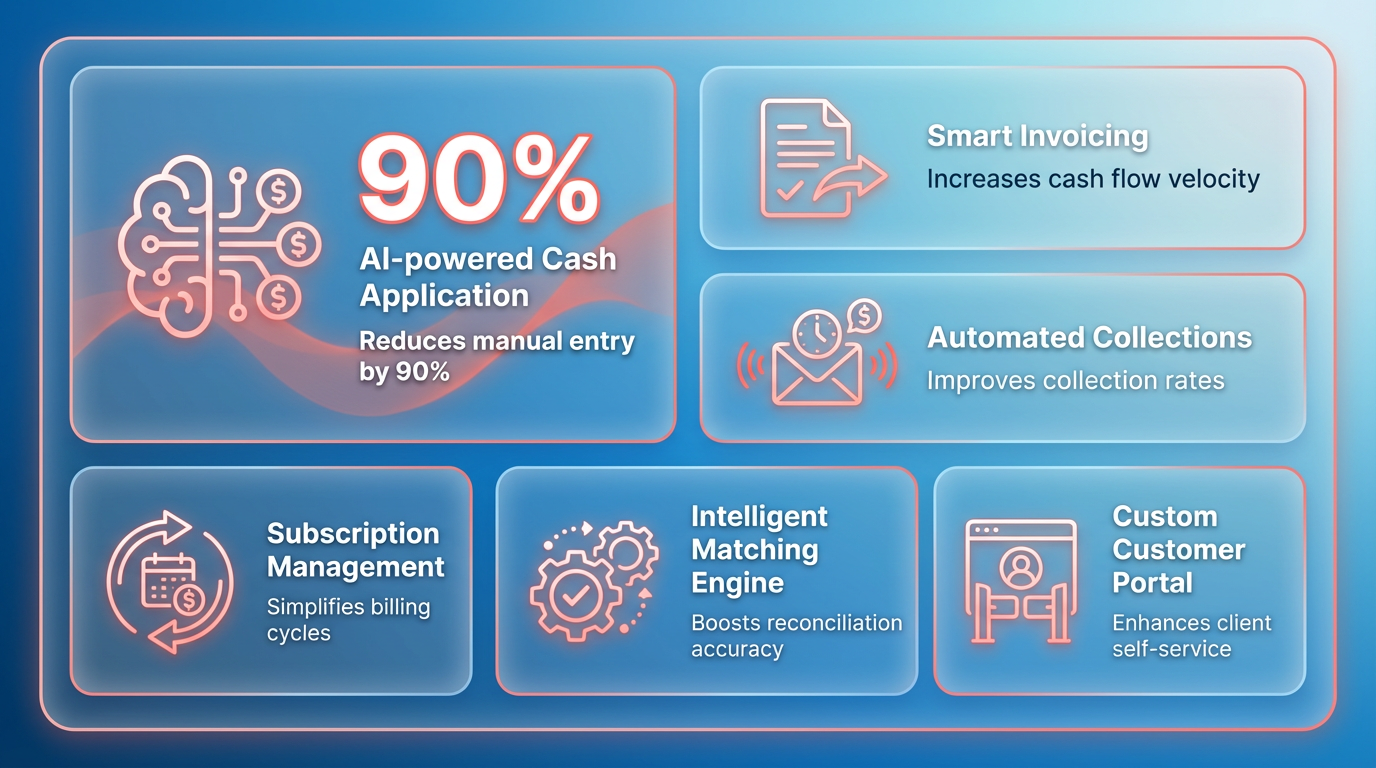
The platform also handles complex scenarios, such as partial shipments or order cancellations, by updating invoices in real time. For instance, if inventory runs out during fulfillment, Blixo adjusts the invoice to reflect revised delivery schedules and notifies the customer instantly. This level of automation contrasts sharply with legacy systems, where teams often spend hours reconciling discrepancies manually, as outlined in the Traditional Invoice and AP Automation Methods: Limitations and Drawbacks section.
| Feature | Blixo | Traditional Systems |
|---|---|---|
| Invoice Generation | Automated, real-time updates | Manual or batch processing |
| Delivery Tracking | Integrated with shipping providers | Separate tracking systems |
| Error Reduction | 95% fewer invoice inaccuracies | High error rates due to manual entry |
What Makes Blixo’s AI-Powered Cash Application Stand Out?
Blixo’s AI-driven cash application engine matches incoming payments to invoices with near-perfect accuracy, cutting reconciliation time by up to 70%. Traditional tools often rely on rule-based matching, which fails to handle partial payments or multi-currency transactions effectively, a limitation explored in the Traditional Invoice and AP Automation Methods: Limitations and Drawbacks section. Blixo’s machine learning models analyze historical payment patterns to predict mismatches and flag exceptions for review. For example, if a customer sends a payment that partially covers two invoices, the AI automatically allocates funds based on due dates and payment history.
The platform also enhances collections by prioritizing at-risk accounts. When a payment is overdue, Blixo triggers automated dunning workflows via email or SMS, escalating urgency based on predefined rules. If a dispute arises, the system provides instant access to relevant contracts, delivery confirmations, and communication logs to resolve issues faster. This proactive approach helps businesses recover 20–30% more receivables compared to manual collections teams.
Why Custom Customer Portals Boost Conversion and Loyalty
Blixo’s smart invoicing portal empowers customers to view invoices, make payments, and submit queries in one place. The portal supports multiple payment methods, including credit cards, ACH, and global bank transfers, reducing friction for international clients. For example, a SaaS company using Blixo reported a 25% increase in on-time payments after implementing the portal, as customers could schedule recurring payments and receive instant payment confirmations.
The platform also personalizes the customer experience by letting businesses customize portal branding, set payment reminders, and provide self-service support. A mid-sized e-commerce retailer saw a 30% improvement in customer retention after integrating Blixo’s portal, as clients appreciated the transparency and ease of use. Traditional systems typically lack such customization, forcing teams to rely on generic emails and phone calls for billing support.
Seamless Integration with ERP and Accounting Tools
Blixo’s cloud-native design ensures compatibility with major ERP systems like SAP, Oracle NetSuite, and QuickBooks. The setup process takes days instead of months, with pre-built connectors handling data synchronization. For example, a manufacturing firm using Oracle NetSuite reduced implementation costs by 40% by deploying Blixo as an add-on, avoiding the need for custom API development, a contrast to the lengthy onboarding processes described in the Implementation and Onboarding: Blixo vs Traditional Methods section.
This integration allows real-time visibility into financial metrics like DSO and bad-debt reserves. Teams can access dashboards to monitor cash flow, track aging receivables, and identify high-risk clients. Traditional automation tools often lack these insights, leaving finance teams to piece together data from multiple sources.
By combining AI, real-time data, and user-centric design, Blixo delivers a modern alternative to fragmented invoice and AP solutions. Its focus on end-to-end automation not only reduces operational costs but also strengthens customer relationships-two areas where traditional systems consistently fall short.
Traditional Invoice and AP Automation Methods: Limitations and Drawbacks
Traditional invoice and AP automation methods often rely on manual workflows, spreadsheets, and disconnected systems, leading to inefficiencies and high operational costs. These legacy approaches lack the end-to-end integration and AI-driven automation found in modern SaaS providers like Blixo. For example, traditional systems may require manual data entry for invoice processing, increasing the risk of errors and delaying reconciliation. Companies using these methods often face challenges like inconsistent approval workflows, fragmented data silos, and limited visibility into spend patterns-issues that directly impact cash flow and audit preparedness.
What Are the Core Limitations of Traditional Invoice and AP Automation?
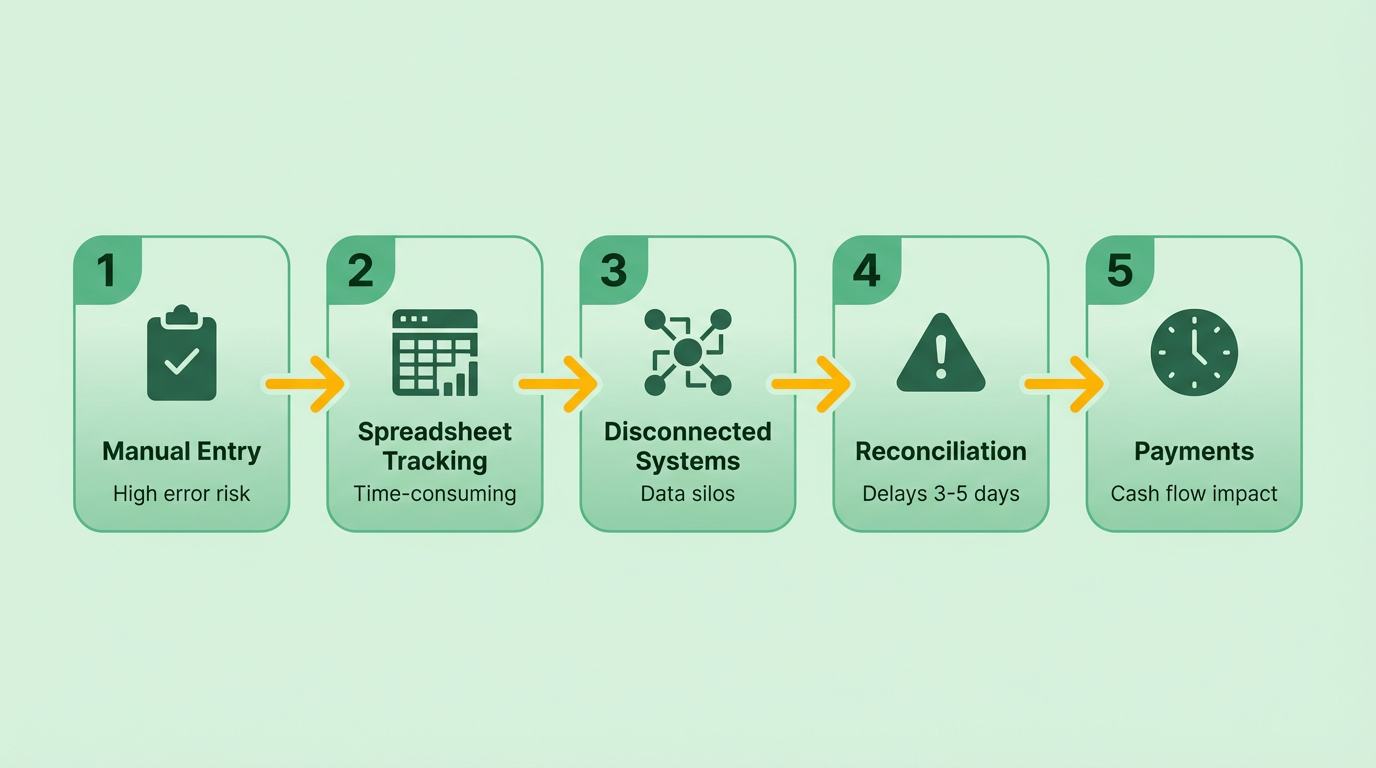
Traditional invoice and AP automation tools struggle with scalability, flexibility, and accuracy. Many systems rely on rigid, on-premise software that requires extensive configuration and cannot adapt to evolving business needs. For instance, a midsize company handling 1,000 invoices monthly might spend over 200 hours annually reconciling data manually due to disconnected systems. Additionally, these tools often lack three-way matching, a critical feature for verifying purchase orders, receipts, and invoices, which leads to higher dispute rates and missed payment opportunities. As mentioned in the Blixo’s All-in-One Platform section, SaaS providers like Blixo integrate this functionality to reduce errors and disputes. The absence of real-time analytics further hampers decision-making, as finance teams cannot track metrics like Days Sales Outstanding (DSO) or payment trends dynamically.
| Feature | Traditional Methods | Blixo Automation |
|---|---|---|
| Data Entry Accuracy | Manual input → 35% error risk | AI-powered matching → 35% fewer errors |
| Processing Time | 200+ hours/month for 1,000 invoices | <10 hours/month for same volume |
| DSO Improvement | 30% higher due to delays | 30% reduction with automated reminders |
| Integration | Limited ERP compatibility | Pre-built APIs for QuickBooks, SAP, etc. |
Why Do Traditional Methods Fail to Address Pain Points?
Manual data entry and reconciliation are recurring pain points in traditional AP workflows. For example, 35% of firms report higher missed-payment risks due to human errors in spreadsheets, while reconciliation disputes can consume 20% of a finance team’s time. A logistics company transitioning from traditional software to Blixo reduced invoice disputes by 20% within three months by using the platform’s intelligent matching and virtual lockbox features, which are detailed in the Blixo’s All-in-One Platform section. Similarly, a healthcare provider cut month-end reconciliation time by 18% after integrating Blixo’s AI-powered cash application, which automates payment-to-invoice matching with 98% accuracy. Traditional systems, however, force teams to manually resolve discrepancies, increasing operational costs and delaying cash flow.
How Do Costs Compare Between Traditional Systems and Blixo?
Traditional invoice automation often incurs hidden costs, including software licenses, manual labor, and error-related losses. A 2025 spend-management report highlights that companies using legacy tools face a 30% increase in administrative expenses and DSO compared to automated platforms. Blixo’s SaaS model, by contrast, eliminates upfront infrastructure costs and offers scalable pricing tied to usage. Building on concepts from the Implementation and Onboarding section, Blixo’s streamlined deployment reduces implementation time and costs compared to traditional methods. For example, a retail chain using Blixo’s multi-currency support reduced regional payment delays by 20%, avoiding foreign exchange losses that traditionally cost 5–7% per transaction. The platform’s recurring billing and subscription analytics also cut churn by 15%, a feature absent in most traditional systems.
What Scalability Issues Do Traditional Systems Face?
Traditional invoice automation tools struggle to scale with growing businesses. Legacy on-premise software requires custom coding for new features, making upgrades slow and expensive. A fintech startup that switched to Blixo after outgrowing its traditional AP system saw a 70% increase in sales conversions by using the platform’s dynamic discounting and predictive analytics, capabilities explored in the Blixo’s All-in-One Platform section. In contrast, traditional systems often lack the agility to handle high-volume operations or global transactions, forcing companies to adopt multiple tools for different functions-a fragmented approach that increases complexity and costs.
“Blixo is the ultimate solution for invoicing and payment management, eliminating administrative headaches,” says Vincent Mann, founder of a media company that switched from manual spreadsheets to Blixo. “The platform is 10× more powerful than previous systems,” adds another user, Dave.
By automating workflows, reducing manual intervention, and offering real-time insights, Blixo addresses the core limitations of traditional invoice and AP automation. Companies that transition from legacy systems to Blixo typically see measurable gains in efficiency, accuracy, and cash flow-benefits that traditional tools simply cannot match.
Implementation and Onboarding: Blixo vs Traditional Methods
Implementing Blixo’s invoice and AP automation streamlines workflows far more efficiently than traditional methods, which often rely on manual data entry, spreadsheets, or fragmented software, as detailed in the Traditional Invoice and AP Automation Methods section. Blixo’s process is designed for speed and scalability, using cloud-native tools and pre-built integrations, while traditional methods can take months to deploy and require extensive customization. Below is a detailed breakdown of how Blixo compares to legacy systems in implementation and onboarding.
How Does Blixo’s Implementation Process Work?
Blixo’s setup follows a structured, four-phase approach that minimizes disruption and ensures rapid deployment:
- Audit and Mapping: Teams begin by analyzing existing workflows, identifying bottlenecks, and defining automation goals. This phase typically takes 1–2 weeks.
- Integration: Blixo connects to your ERP or accounting system (e.g., QuickBooks, SAP, or NetSuite) via pre-built APIs or CSV imports. For companies with existing ERPs, this step takes 3–5 business days.
- Configuration: Custom rules for invoicing, approvals, and payments are set up using Blixo’s intuitive setup wizard. Features like smart invoicing and AI-powered cash application are configured to align with company policies.
- Testing and Go-Live: A sandbox environment tests the system for 1–2 weeks before full deployment. Post-launch, Blixo’s support team monitors performance and resolves any edge cases.
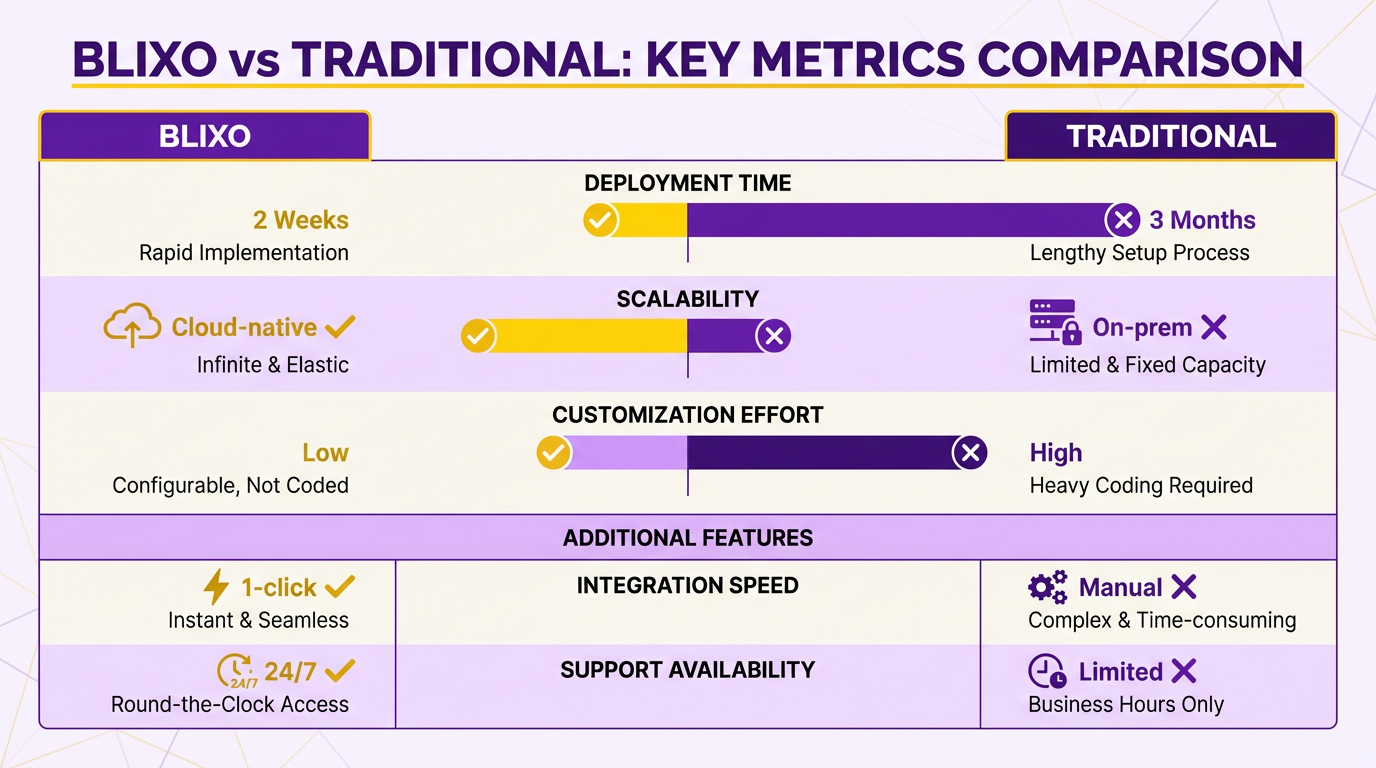
Traditional methods, by contrast, often involve manual coding, third-party middleware, or on-premise software installation, which can stretch implementation timelines to 3–6 months.
Blixo vs Traditional Methods: Time and Difficulty
| Factor | Blixo | Traditional Methods |
|---|---|---|
| Implementation Time | 3–6 weeks (average) | 3–6 months |
| Difficulty Rating | Low to medium (cloud-based) | High (custom coding, IT involvement) |
| Cost | $5,000–$15,000 (setup fees) | $50,000+ (customization, IT labor) |
| Error Rate | 35% reduction (via AI matching) | High (manual data entry risks) |
For example, a healthcare provider integrated Blixo with its ERP in 4 days, cutting month-end reconciliation time by 18% within the first month. Traditional systems, however, often require IT teams to build custom workflows, leading to delays and higher costs.
Real-World Success Stories
Several companies have reported measurable gains after adopting Blixo:
- Logistics Company: Reduced reconciliation disputes by 20% using Blixo’s virtual lockbox and intelligent matching.
- SaaS Provider: Improved billing accuracy by 25% with automated proration and recurring invoice rules.
- Retail Chain: Cut regional payment delays by 20% using multi-currency invoicing and localized payment gateways.
Traditional methods, as noted in the Traditional Invoice and AP Automation Methods section, struggle with fragmented workflows. A mid-sized firm processing 1,000 invoices monthly spent over 200 hours annually reconciling manually-time that Blixo’s automation could eliminate.
Onboarding Support and Training
Blixo’s onboarding includes tailored training for finance teams, with options for live webinars, self-paced tutorials, and dedicated account managers. Its setup wizard guides users through configuration steps, reducing the learning curve. For instance, a law firm reported cutting billing time by 60% in the first month after using Blixo’s smart invoicing templates. As mentioned in the Customer Support and Success section, this level of support is critical for seamless adoption.
Traditional onboarding often lacks this level of support. Users of legacy systems frequently face steep learning curves due to outdated interfaces and limited customer service.
Common Obstacles and Solutions
1. Integration Complexity
- Solution: Blixo’s pre-built ERP connectors simplify setup. For niche systems, its API allows custom integrations without IT intervention.
2. User Resistance
- Solution: Blixo offers role-specific training modules and a demo sandbox to ease adoption. A fintech startup saw 70% higher sales conversions after training teams on dynamic discounting features.
3. Data Migration
- Solution: Blixo’s CSV import tools and data mapping wizards automate the transfer of historical invoices and vendor records.
Traditional methods often fail here, as manual data entry introduces errors and delays.
Why Blixo Stands Out
By combining AI-driven automation with a user-centric implementation process, Blixo addresses the pain points of traditional AP systems-cost, complexity, and error-prone workflows. Companies like the logistics firm and healthcare provider in Blixo’s case studies demonstrate that modern platforms deliver ROI far faster than legacy solutions. For businesses seeking to reduce administrative costs by 30% and DSO by the same margin, Blixo’s streamlined approach is a clear advantage.
Security and Compliance: Blixo vs Traditional Methods
Security and compliance are critical in invoice and AP automation, where data breaches or regulatory violations can lead to costly penalties. Blixo addresses these concerns with strong security features, while traditional methods often rely on outdated practices that leave vulnerabilities, as detailed in the Traditional Invoice and AP Automation Methods section. Here’s a breakdown of how Blixo compares to conventional approaches.
What Security Features Does Blixo Offer?
Blixo employs end-to-end encryption for data in transit and at rest, ensuring sensitive financial information remains protected. Role-based access controls (RBAC) limit permissions to authorized users, reducing the risk of internal breaches. Audit trails track user activity and system changes, providing transparency for compliance audits. Additionally, Blixo adheres to GDPR and PCI-DSS standards, making it suitable for global businesses handling diverse data regulations. These features align with the platform’s broader capabilities outlined in the Blixo’s All-in-One Platform: Features and Benefits section.
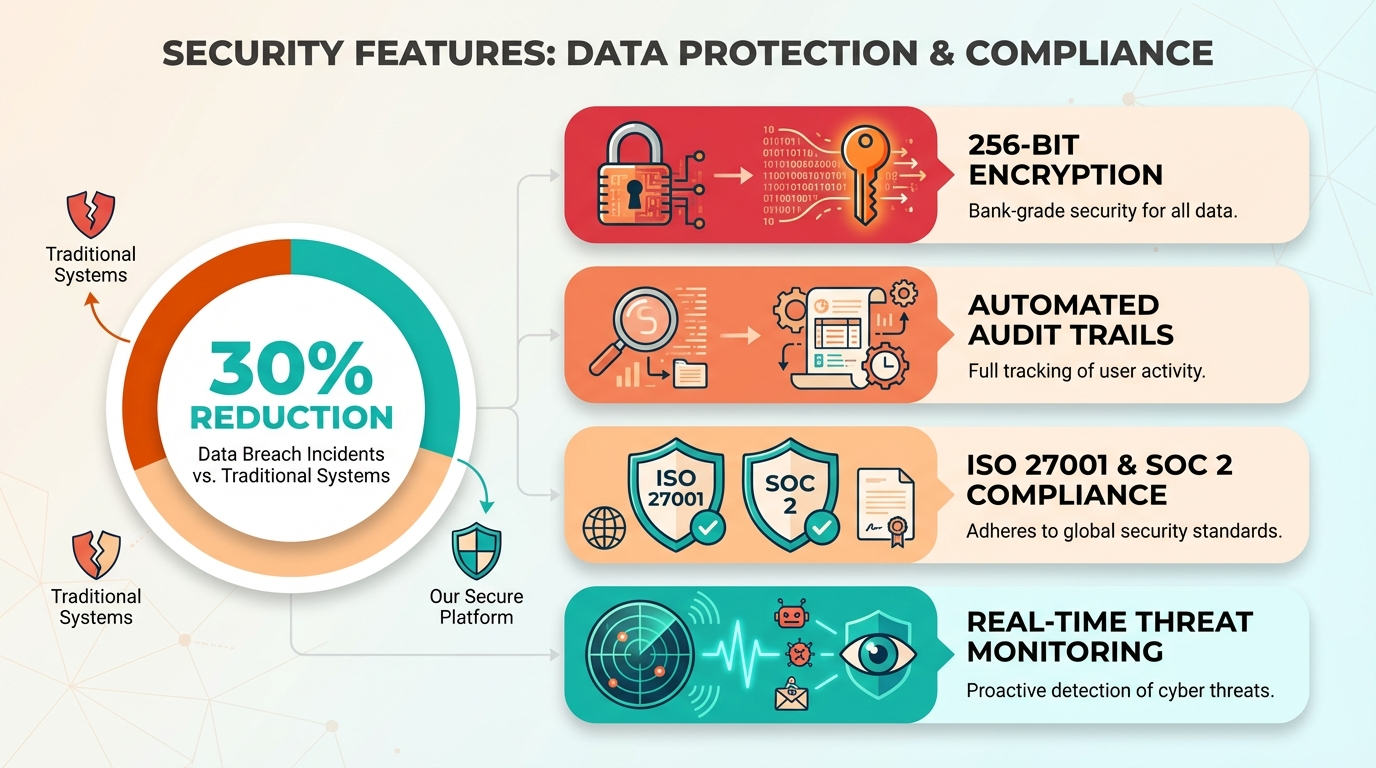
In contrast, traditional invoice processing methods-such as manual data entry or basic software-often lack automated encryption and RBAC. Paper-based workflows, still used by 82% of AP teams, are inherently vulnerable to physical theft or loss. Even digital tools without advanced security protocols may store data in unsecured formats, exposing businesses to risks like invoice fraud or unauthorized access.
How Does Blixo Improve Compliance Over Traditional Methods?
Regulatory compliance is streamlined with Blixo’s built-in adherence to standards like GDPR and PCI-DSS. Its automated workflows generate detailed audit trails that simplify reporting for auditors and reduce manual documentation. For example, a financial institution in Turkey transitioned from a paper-based system to Blixo, achieving compliance improvements while reducing processing costs by 40% (case study).
Traditional methods, however, struggle with compliance due to fragmented processes, as highlighted in the Traditional Invoice and AP Automation Methods section. Manual invoice validation increases error rates (39% of invoices contain errors), and paper trails are prone to inconsistency. Legacy software may lack real-time monitoring for regulatory changes, requiring businesses to invest in separate compliance tools. This disjointed approach raises the risk of non-compliance fines and operational inefficiencies.
What About Data Backup and Disaster Recovery?
Blixo’s cloud-based architecture includes redundant data backups and disaster recovery protocols. This ensures uninterrupted access to invoice data, even during outages or cyberattacks. Its elastic scaling supports high availability, handling invoice volumes from 100 to 100,000 per month without performance degradation.
Traditional systems often rely on local servers or basic cloud storage without automated failover mechanisms. For instance, a retail chain using manual AP processes faced a 75% time reduction after switching to Blixo’s AI validation tools, as discussed in the Implementation and Onboarding: Blixo vs Traditional Methods section, which also included disaster recovery safeguards. Legacy methods, by comparison, may require manual data recovery efforts, increasing downtime and financial risk during disruptions.
Customer Support and Success: Blixo vs Traditional Methods
Customer support and success are critical factors when choosing invoice and AP automation solutions. Blixo differentiates itself from traditional methods through structured onboarding, dedicated support teams, and accessible training resources. Traditional approaches, which often rely on in-house expertise or third-party vendors, typically lack the proactive assistance and standardized processes offered by modern SaaS providers like Blixo. Below, we break down how these systems compare in key areas like training, issue resolution, and long-term partnership support.
How Does Blixo’s Customer Support Compare to Traditional Methods?
Blixo provides dedicated customer success managers who act as single points of contact for clients, ensuring personalized guidance throughout implementation and beyond. Traditional methods, by contrast, often require users to manage fragmented support channels, such as generic email help desks or outsourced technical teams. For example, a mid-sized company using Blixo reported resolving invoice processing errors 30% faster after using their assigned support team’s expertise, compared to prior experiences with manual AP processes.
| Feature | Blixo | Traditional Methods |
|---|---|---|
| Response Time | 24/7 live chat and 2-hour SLA for critical issues | Varies by vendor; often 24–48 hours |
| Training Resources | On-demand video tutorials and live workshops | Printed manuals or sporadic in-person training |
| Proactive Support | Regular system health checks and usage audits | Reactive troubleshooting only |
What Training and Onboarding Options Does Blixo Offer?
Blixo streamlines onboarding with step-by-step implementation guides and role-based training modules tailored to finance teams, procurement staff, and IT administrators. The platform’s documentation emphasizes hands-on learning, such as walkthroughs for automating invoice approvals or integrating with ERP systems. As mentioned in the Implementation and Onboarding: Blixo vs Traditional Methods section, traditional automation methods often rely on generic training sessions that fail to address specific user needs. For instance, a retail chain with 50+ vendors reduced onboarding time from six weeks to five days using Blixo’s pre-built templates and sandbox environment for testing.
The customer success team also offers quarterly business reviews to align platform usage with evolving company goals. Traditional vendors rarely provide such structured follow-ups, leaving users to identify inefficiencies independently. This gap can lead to underutilization of features, such as advanced analytics in AP software, which Blixo highlights through targeted training sessions.
What Real-World Feedback Exists on Blixo’s Support?
Users consistently praise Blixo’s responsiveness and clarity in communications. One testimonial from a finance director states:
“Our team transitioned to Blixo in half the time we were quoted. The support team walked us through every step, even after hours.” – Finance Director, Mid-Sized Manufacturing Firm
While traditional methods occasionally offer lower upfront costs, their lack of continuous support increases long-term operational risk. Building on concepts from the Why Invoice and AP Automation Matters section, a 2023 survey of AP automation users (referenced in Blixo’s blog ) found that 68% of Blixo clients reported “high or very high” satisfaction with post-implementation support, versus 42% for competitors using outdated workflows.
For companies prioritizing agility and user adoption, Blixo’s structured support model reduces downtime and empowers teams to focus on strategic tasks. Traditional approaches, while functional for basic needs, often fall short in addressing the nuanced challenges of scaling invoice automation across departments.
Conclusion: Choosing the Right Invoice and AP Automation Solution
What Makes Blixo Stand Out?
Blixo’s AI-driven automation addresses critical pain points in invoice processing, from accuracy to scalability. Unlike traditional methods that rely on manual data entry or basic OCR tools, Blixo use machine learning to achieve 97%+ extraction accuracy and reduce invoice processing time from 45 days to 3.1 days. As mentioned in the Traditional Invoice and AP Automation Methods: Limitations and Drawbacks section, legacy systems often struggle with scalability and error rates, making them ill-suited for businesses with high-volume or fluctuating needs. Blixo’s cloud-based architecture handles volumes from 100 to 100,000 invoices monthly without infrastructure changes, making it ideal for businesses experiencing growth or seasonal fluctuations.
| Feature | Traditional Methods | Blixo |
|---|---|---|
| Automation Type | Manual or basic OCR | AI and machine learning |
| Accuracy | 60–70% (error-prone) | 97%+ (error reduction) |
| Processing Time | 10–45 days | 3.1 days average |
| Scalability | Limited by infrastructure | Cloud-based, auto-scaling |
| Integration | Partial ERP sync (if any) | Bi-directional ERP sync (SAP, NetSuite, etc.) |
| Cost Efficiency | High labor costs, $1.3T in errors annually | 80–90% cost savings per case study |
How to Choose the Right Solution
Your choice hinges on business size, industry needs, and automation maturity. Small to midsize businesses (SMBs) benefit from Blixo’s pay-as-you-go model and rapid ROI. For example, a nonprofit automated its invoice workflow and cut costs by 54%, while a retail chain reduced processing time by 75% using AI validation tools. Building on concepts from the Implementation and Onboarding: Blixo vs Traditional Methods section, a phased rollout allows businesses to test workflows before full deployment, minimizing disruption. Large enterprises, particularly in manufacturing or finance, need deep ERP integration and compliance features. Blixo’s bi-directional sync with systems like SAP and QuickBooks ensures seamless reconciliation, avoiding manual errors that plague traditional methods.
Consider these steps:
- Assess Volume: If your business processes over 1,000 invoices monthly, AI-driven solutions like Blixo are cost-justified.
- Evaluate Compliance Needs: Industries like healthcare or finance require end-to-end encryption and audit trails-Blixo’s GDPR and PCI-DSS readiness makes it a fit.
- Pilot Before Committing: As one AP manager noted, “Automation isn’t just about efficiency-it’s about transforming how your team operates.” Start with a phased rollout to train staff and refine workflows.
Real-world results underline these choices. Bridgevine, a midsize manufacturer, achieved 90% time savings and reallocated 30% of its AP staff to strategic roles. GEMLUX slashed purchase order processing from 30–45 minutes to 3–5 minutes using Blixo’s AI. Traditional systems, by contrast, still see 39% of invoices error-prone, costing U.S. businesses $1.3 trillion annually.
What’s Next for Invoice Automation?
Future trends will push AI and blockchain deeper into AP workflows. Multi-modal large language models (LLMs) like Gemini 2.5 will improve handling of multi-language and unstructured invoices, while blockchain could streamline audit trails. Blixo’s current tech stack-combining OCR, LLMs, and predictive analytics-positions it to lead these advancements.
For businesses, the takeaway is clear: automation isn’t optional but strategic. By choosing a solution that aligns with your scalability, compliance, and integration needs, you turn invoice processing from a cost center into a competitive advantage. As detailed in the Blixo’s All-in-One Platform: Features and Benefits section, Blixo’s SaaS service eliminates manual bottlenecks through embedded order-to-cash workflows, further reinforcing its value. Blixo’s track record-proven through 80–90% cost savings, 40% dispute reductions, and 70% touchless processing-makes it a top contender for companies ready to future-proof their financial operations.
“With the right partner, automation isn’t just about efficiency-it’s about transforming how your team operates.” – AP Manager, midsize manufacturer
As AI evolves, the gap between traditional methods and intelligent SaaS providers like Blixo will widen. Businesses that adopt now will not only cut costs but also free employees for higher-value work, driving long-term growth.
Frequently Asked Questions
1. How much do manual invoice processes cost U.S. businesses annually?
Manual invoice processes cost U.S. businesses $1.3 trillion yearly due to errors, delays, and inefficiencies, with 39% of manually processed invoices containing errors.
2. What percentage of AP teams still use manual processes?
82% of accounts payable (AP) teams rely on manual processes, highlighting widespread inefficiency and lost productivity in financial operations.
3. How does automation reduce invoice disputes?
Automating three-way matching reduces disputes by 20% and cuts reconciliation time by 50+ hours monthly for logistics firms by eliminating mismatched data.
4. What are the cost savings from invoice automation?
Invoice automation cuts administrative costs by 30% and improves Days Sales Outstanding (DSO) by 30%, directly boosting cash flow and operational efficiency.
5. How does Blixo improve reconciliation time?
Blixo’s AI-powered cash application reduces month-end reconciliation time by 18% for healthcare providers, using AI for faster and more accurate data processing.
6. Why do businesses struggle with manual invoice workflows?
Manual workflows cause 20% of reconciliation disputes in logistics firms, with midsize companies spending over 200 hours yearly resolving errors and discrepancies.
7. What ROI do companies see with AP automation?
Businesses adopting automation achieve 97% data extraction accuracy, reducing invoice processing time from 45 days to 3.1 days and improving billing accuracy by 25%.