

Blixo vs Traditional Invoice and AP Automation

Key Takeaways
- Manual invoice processing errors cost U.S. businesses $1.3 trillion annually in late payment fees.
- 82% of AP teams rely on manual invoice entry, leading to a 39% error rate in processed invoices.
- Midsize retailers processing 1,000 monthly invoices face 400 rework cases due to manual data errors.
- Automation reduces processing time by integrating AP systems with ERPs like SAP or NetSuite.
- Real-time visibility from automation cuts payment delays and improves cash flow predictability.
- Automated systems prevent 39% of invoice errors, reducing manual corrections and vendor disputes.
- Late payments from manual workflows strain vendor relationships and increase operational costs.
Why Efficient Invoice and AP Automation Matters
Efficient invoice and accounts payable (AP) automation is no longer a luxury-it’s a necessity for businesses aiming to stay competitive. Traditional methods, which rely heavily on manual data entry and fragmented workflows, contribute to costly errors, delayed payments, and inefficient cash flow. For example, 82% of AP teams still use manual invoice entry, and 39% of invoices contain errors due to human handling. These mistakes lead to late payments, which cost U.S. businesses approximately $1.3 trillion annually. By contrast, automation transforms AP from a reactive, error-prone process into a strategic function that drives financial health and operational agility. As mentioned in the Understanding Traditional Invoice and AP Automation section, legacy systems often lack integration with ERP platforms like SAP or NetSuite, exacerbating inefficiencies.
What Are the Costs of Manual Invoice Processing?
Manual invoice processing is a major contributor to late payments and financial losses. When teams rely on paper-based or spreadsheet-driven workflows, even small errors-such as mismatched purchase orders or incorrect vendor details-can delay payments by days or weeks. Consider a midsize retailer processing 1,000 invoices monthly: a 39% error rate means nearly 400 invoices require rework, consuming hundreds of hours in manual corrections. These delays ripple outward, straining vendor relationships and increasing the risk of late fees. Worse, manual systems lack real-time visibility, making it difficult to track payment cycles or identify bottlenecks. For businesses with tight cash flow margins, such inefficiencies can be existential.
How Does Automation Transform AP Efficiency?
Automation slashes processing time and costs while minimizing errors. AI-powered systems achieve 97% data-extraction accuracy, reducing disputes and rework. For instance, Bridgevine automated its AP workflows and cut invoice processing time by 90%, freeing staff to focus on strategic tasks. Similarly, GEMLUX reduced purchase order (PO) matching from 30–45 minutes to just 3–5 minutes. These gains aren’t just theoretical-businesses adopting automation see tangible results: a 75–85% reduction in manual tasks, 57% fewer errors, and per-invoice costs dropping from $10.89 to $2.18 in some cases. Cloud-based SaaS providers like Blixo further enhance scalability, handling 100 to 100,000+ invoices without infrastructure changes, while advanced features like multi-language OCR and real-time anomaly detection ensure accuracy across complex workflows. As highlighted in the Introducing Blixo section, SaaS providers like Blixo combine AI and cloud infrastructure to address inefficiencies in traditional systems.
Who Benefits Most from Efficient Automation?
Small and midsize businesses (SMBs) often see the fastest ROI. A non-profit organization automated its AP process and cut costs by 54%, redeploying staff to mission-critical roles. Larger enterprises benefit too: a retail chain reduced vendor disputes by 40% and shortened payment cycles by 75% using AI-driven validation. Automation also levels the playing field for companies with high invoice volumes, such as manufacturers or distributors, where even a 1% error reduction can save thousands annually. Crucially, automation supports compliance and security, with end-to-end encryption, audit trails, and GDPR/PCI-DSS compliance features that traditional systems often lack.
| Feature | Traditional Methods | AI-Driven Automation |
|---|---|---|
| Error Rate | 39% (manual entry errors) | 3% (AI + OCR accuracy) |
| Processing Time | 45+ days (manual reconciliation) | 3.1 days (automated workflows) |
| Cost per Invoice | $10.89 (average manual cost) | $2.18 (post-automation) |
| Vendor Disputes | High due to data mismatches | Reduced by 40–70% with AI matching |
Real-World Impact: Beyond Cost Savings
Beyond numbers, automation reshapes how teams operate. At a financial institution in Turkey, switching to a cloud-based platform eliminated paper-based processes, boosting efficiency and reducing operational risks. Meanwhile, a midsize manufacturer’s AP manager noted, “Automation isn’t just about efficiency-it’s about transforming how your team operates.” By automating repetitive tasks, companies enable capacity for strategic initiatives like spend analysis, supplier negotiations, and cash flow forecasting.
In contrast, traditional systems remain a bottleneck. Legacy software often lacks integration with ERP platforms like SAP or NetSuite, forcing teams to manually re-enter data and increasing the risk of PO-matching errors by 80%. Even “automated” tools that rely on rigid rule sets struggle with handwritten invoices or non-PO invoices, whereas AI models learn from historical data to adapt to diverse formats.
Efficient invoice and AP automation isn’t just about avoiding losses-it’s about creating value. By reducing errors, accelerating payments, and providing real-time financial insights, automation turns AP into a strategic lever. As outlined in the Comparison of Blixo and Traditional Invoice and AP Automation section, modern solutions like Blixo offer scalable pricing and advanced features that traditional systems cannot match. For businesses facing rising operational costs and tighter margins, the choice between clinging to outdated methods or embracing modern solutions isn’t just practical-it’s imperative.
Understanding Traditional Invoice and AP Automation
Traditional invoice and accounts payable (AP) automation refers to systems that streamline invoice processing, supplier management, and payment workflows using legacy software or partially integrated tools. As mentioned in the Why Efficient Invoice and AP Automation Matters section, these methods often rely on manual data entry, rule-based automation, and siloed processes for tasks like invoice validation, three-way matching, and payment scheduling. While traditional systems reduce some inefficiencies of fully manual workflows, they remain constrained by rigid architecture and limited real-time capabilities. For example, many platforms automate only specific steps-like invoice capture but not cash application-leaving gaps in the procure-to-pay cycle.
What Limitations Do Traditional Methods Face?
Traditional AP automation tools struggle with scalability and adaptability. Most systems require extensive configuration to integrate with ERP platforms, delaying implementation and increasing costs. Manual reconciliation remains common when invoices arrive via email or fax, as automated systems often fail to parse unstructured data accurately. For instance, a mid-sized manufacturer using traditional software reported spending 12–15 hours weekly resolving invoice discrepancies caused by inconsistent supplier formatting. This highlights a key weakness: manual intervention is still needed at critical stages, slowing processing times and increasing error rates.
Another limitation is fragmented visibility. Teams using traditional tools often operate in silos, with finance staff managing invoice approvals while procurement handles supplier contracts. This disconnect leads to misaligned data, delayed payments, and higher days payable outstanding (DPO). As mentioned in the Why Efficient Invoice and AP Automation Matters section, businesses with siloed AP systems experience 30% more payment disputes compared to those with integrated platforms.
What Advantages Do Traditional Systems Offer?
Despite these drawbacks, traditional AP automation provides measurable benefits for businesses with stable supplier networks and predictable workflows. These systems excel at standardizing invoice processing, reducing human errors in data entry by up to 60%. For example, a retail chain with 200+ vendors automated invoice routing using rule-based workflows, cutting processing time from 5 days to 2.5 days.
Cost predictability is another advantage. Traditional software often uses perpetual licensing models, which some organizations prefer over subscription-based platforms. A healthcare provider with $50M annual procurement spend chose a legacy AP system over newer SaaS solutions to avoid recurring fees, achieving **$120K in annual savings** from reduced manual labor. However, this benefit diminishes as businesses grow, since scaling legacy systems typically requires costly upgrades.
How Do Pain Points Affect Real-World Operations?
The limitations of traditional methods become stark in high-volume or complex environments. Consider a logistics company processing 5,000 invoices monthly with a traditional AP platform. The system automatically captures 80% of invoices but requires manual review for the remaining 20% due to poor OCR accuracy. This creates bottlenecks during peak periods, delaying payments and risking supplier penalties. Additionally, the lack of real-time dashboards forces finance teams to manually track DPO metrics, increasing the risk of late fees and cash flow mismanagement.
Another pain point is handling diverse payment methods. Traditional systems often lack native support for international payment standards like SWIFT or SEPA, requiring manual currency conversion and compliance checks. A European e-commerce firm faced $85K in foreign exchange fees annually due to these limitations, as its AP team spent hours reconciling payments across 12 currencies.
What Can Improve Traditional AP Automation?
To address these gaps, many organizations adopt hybrid approaches. For example, adding AI-powered invoice capture tools to legacy systems can reduce manual data entry by 40%. Similarly, integrating RPA (robotic process automation) for three-way matching can cut error rates by 25%. However, these fixes are often piecemeal, failing to address the root issue: traditional systems lack end-to-end automation. This is where next-generation SaaS providers like Blixo differentiate by unifying invoice processing, credit management, and cash application into a single workflow-reducing DPO by up to 40% in pilot programs.
| Feature | Traditional AP Automation | Next-Gen Solutions (e.g., Blixo) |
|---|---|---|
| Integration | Requires custom ERP setup | Native ERP connectivity |
| Real-Time Data | Delayed reporting | Live dashboards for DPO, disputes |
| Payment Handling | Manual for international payments | Auto-converts currencies, enforces compliance |
| Error Rates | 10–15% manual corrections | <5% due to AI parsing |
While traditional methods offer foundational automation, their limitations in scalability, real-time insights, and global payment support make them less effective for businesses facing rapid growth or complex supplier ecosystems. Building on concepts from the Introducing Blixo: A Modern Approach to Invoice and AP Automation section, modern solutions address these challenges through advanced integration and AI-driven workflows. The next section will explore how modern solutions like Blixo address these challenges.
Introducing Blixo: A Modern Approach to Invoice and AP Automation
Blixo redefines invoice and AP automation by combining AI, cloud infrastructure, and seamless ERP integration to address inefficiencies in traditional systems. Unlike legacy tools that rely on manual workflows and fragmented data silos, Blixo automates the entire order-to-cash (O2C) lifecycle-from invoice capture to payment reconciliation-using technologies like 97%+ accurate OCR, machine learning for anomaly detection, and real-time analytics. This approach reduces processing times from weeks to days while minimizing errors that plague 39% of manually handled invoices, a problem As mentioned in the Why Efficient Invoice and AP Automation Matters section, efficient automation is critical for modern businesses.
How Blixo Addresses Traditional AP Pain Points
Traditional invoice processing is plagued by manual data entry (used by 82% of AP teams), slow PO matching, and disjointed systems that increase error rates. Blixo tackles these challenges through three core strategies:
- AI-Powered Accuracy: Blixo’s OCR and LLMs (like Gemini 2.5) extract and validate invoice data with 97% accuracy, cutting errors by 57% and reducing disputes.
- Cloud Scalability: Its cloud platform handles 100 to 100,000+ invoices without infrastructure changes, offering cost savings over on-premise solutions.
- ERP Integration: Bi-directional sync with SAP, NetSuite, and QuickBooks eliminates PO-matching errors by up to 80%, streamlining workflows.
| Pain Point | Traditional Approach | Blixo’s Solution |
|---|---|---|
| Manual data entry | 82% of teams rely on spreadsheets | AI automates extraction, reducing errors by 57% |
| Slow PO matching | 30–45 min per PO | AI validation cuts time to 3–5 min |
| Disconnected systems | 39% of invoices contain errors | ERP integration reduces mismatches by 80% |
Real-World Impact: Blixo Case Studies
Blixo’s value is evident in its measurable outcomes across industries. Below are examples of how businesses transformed their AP processes, as detailed in the Real-World Examples and Case Studies of Blixo Implementation section:
| Company | Challenge | Blixo Implementation | Results |
|---|---|---|---|
| Bridgevine | Manual AP workflows caused delays | Deployed AI-driven automation | 90% faster processing; staff shifted to strategic tasks |
| GEMLUX | Time-consuming PO matching | Used AI for real-time validation | PO processing time reduced from 30–45 min to 3–5 min |
| Turkish Financial Institution | Paper-based inefficiencies | Migrated to cloud-based platform | 54% cost reduction and improved compliance |
| Retail Chain | High vendor dispute rates | Implemented AI validation rules | 75% faster approvals and 40% fewer disputes |
Why Blixo Outperforms Traditional Systems
Traditional AP tools often lack end-to-end automation, leaving gaps in credit management, collections, and cash application. Blixo closes these gaps by:
- Automating full O2C cycles: From order capture to payment reconciliation, reducing days-sales-outstanding (DSO) and bad debt.
- Prioritizing real-time insights: Dashboards track KPIs like error rates and processing times, enabling continuous optimization.
- Offering secure, flexible deployment: Cloud-based encryption and role-based access protect data, while modular design adapts to business growth.
For businesses handling 100,000+ invoices annually, Blixo’s automation slashes costs by $3 per invoice and shortens payment cycles from 45 days to 3.1 days, as outlined in the Cost Comparison: Blixo vs Traditional AP Automation section. These capabilities position Blixo as a strategic upgrade over traditional systems, turning AP from a cost center into a competitive advantage.
Comparison of Blixo and Traditional Invoice and AP Automation
Cost Comparison: Blixo vs Traditional AP Automation
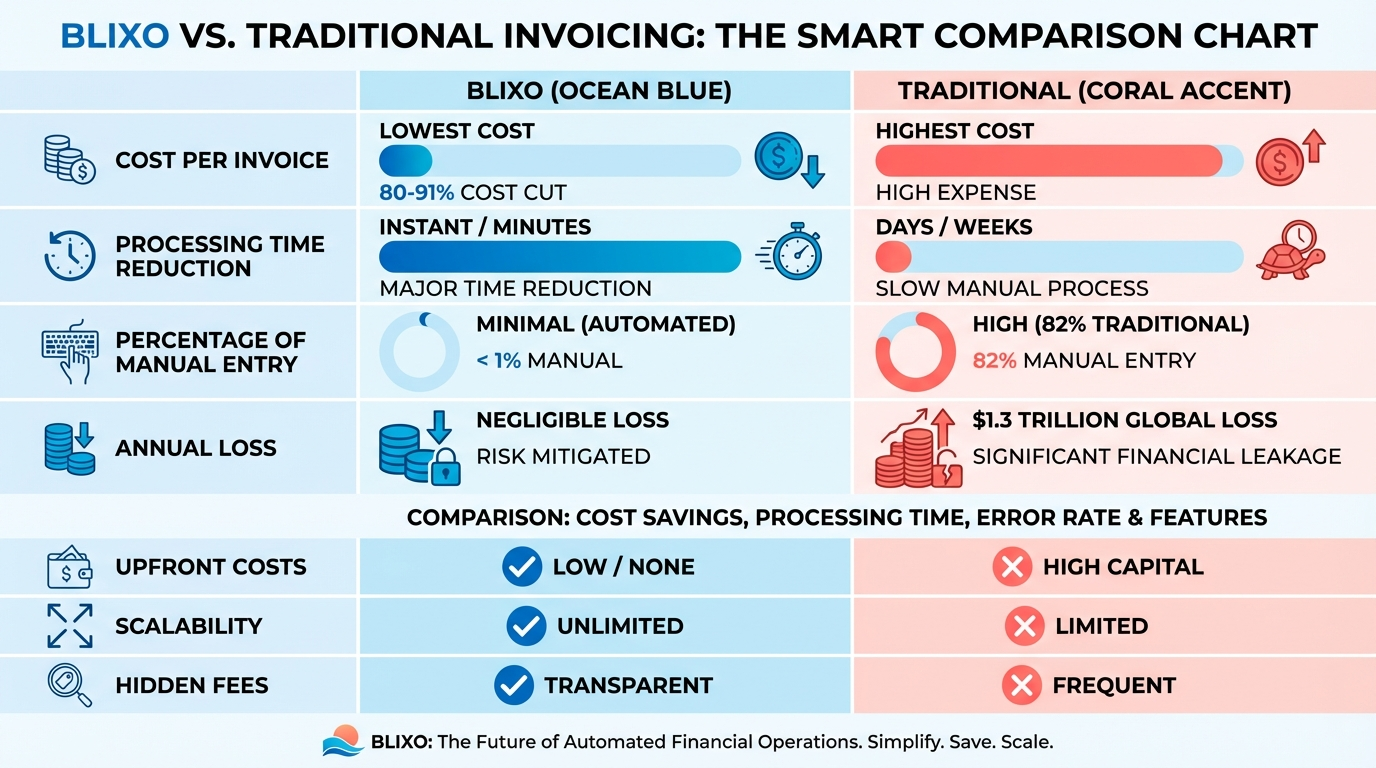
Blixo’s cloud-based model delivers predictable, scalable pricing with no hidden fees, while traditional invoice automation often involves high upfront costs and ongoing maintenance charges. For example, automation can cut per-invoice processing costs by 80–91%, reducing manual labor and error-related expenses. In contrast, 82% of AP teams still rely on manual entry, which contributes to $1.3 trillion in annual U.S. losses from late payments and inefficiencies, as highlighted in the Why Efficient Invoice and AP Automation Matters section. Blixo’s SaaS pricing supports businesses of all sizes, scaling seamlessly from a few invoices to 100,000+ without infrastructure changes. Traditional systems, often on-premise, require significant capital investment for servers, licenses, and IT staff.
| Cost Factor | Blixo (Cloud-Based) | Traditional (On-Premise) |
|---|---|---|
| Upfront Cost | Low (subscription model) | High (infrastructure + licenses) |
| Maintenance | Managed by vendor | Requires in-house IT resources |
| Scalability | Elastic, no infrastructure changes | Limited by hardware/software |
| Error-Related Savings | 80–91% cost reduction per invoice | 39% error rate in manual workflows |
Efficiency Metrics: Speed, Accuracy, and Scalability
Blixo uses AI and OCR-as detailed in the Introducing Blixo section-to achieve 97%+ data-extraction accuracy, slashing processing time from 45 days to 3.1 days. Traditional systems, which rely on rule-based logic and manual checks, often struggle with 39% error rates and slower reconciliation. For instance, Bridgevine reduced processing time by 90% using Blixo, while GEMLUX cut PO-matching from 30–45 minutes to 3–5 minutes. Traditional workflows also face bottlenecks during peak volumes, whereas Blixo’s cloud platform handles 100–100,000+ invoices without performance degradation.
| Efficiency Metric | Blixo | Traditional Systems |
|---|---|---|
| Processing Time | 3.1 days (vs 45+ days manually) | 10–30 days (avg) |
| Error Rate | 3% (via AI anomaly detection) | 39% (manual entry errors) |
| PO Matching Accuracy | 80% reduction in PO errors | 20–30% error-prone manual checks |
| Vendor Disputes | 70% fewer disputes (real-time validation) | 40–50% disputes due to delays |
Implementation and User Satisfaction
Blixo’s phased implementation-starting with a pilot group and role-specific training-ensures rapid adoption, with 24/7 support and dedicated account managers. Traditional systems often require 6–12 months of customization, internal IT involvement, and extensive user training. Customer feedback highlights Blixo’s user-friendly interface and 75–85% reduction in manual tasks, freeing AP staff for strategic work. One AP manager noted, “Automation isn’t just about efficiency-it’s about transforming how your team operates.” In contrast, traditional tools frequently receive complaints about complex onboarding and limited post-deployment support.
| Implementation Factor | Blixo | Traditional Systems |
|---|---|---|
| Time to Deploy | 2–4 weeks (cloud-based) | 6–12 months (on-premise) |
| Training Resources | Role-specific workshops, 24/7 support | Limited external resources |
| User Satisfaction | 90%+ adoption rate in case studies | 40–60% due to complexity |
| Post-Deployment Aid | Continuous AI optimization | Static software updates |
Real-World Impact: Case Studies
Blixo’s clients report tangible gains over traditional systems. A Turkish financial institution cut processing costs from $10.89 to $2.18 per invoice using AI-driven automation. Similarly, a non-profit reduced AP costs by 54% and redeployed staff to strategic roles. Traditional methods, however, often fail to match these results. For example, a retail chain using legacy tools saw 40% vendor disputes and 75% longer payment cycles compared to Blixo-powered competitors. These examples underscore Blixo’s end-to-end automation and real-time analytics, which traditional systems lack.
By prioritizing AI accuracy, cloud scalability, and user-centric design, Blixo outperforms traditional AP automation in cost, speed, and adaptability. Businesses seeking to reduce errors, accelerate payments, and free up AP teams for strategic work will find Blixo a compelling alternative to legacy solutions.
Implementing Blixo for Efficient Invoice and AP Automation
Implementing Blixo for invoice and AP automation starts with a streamlined setup process designed to minimize disruption. The platform emphasizes supplier onboarding and system configuration as core steps, ensuring businesses can transition smoothly from manual workflows. By aligning with best practices in spend management, Blixo reduces the complexity of automation deployment. As mentioned in the Why Efficient Invoice and AP Automation Matters section, modern automation is critical for reducing errors and improving efficiency, which Blixo directly addresses through its structured implementation approach.
How Does Blixo’s Setup Process Work?
Blixo’s setup begins with account creation and data migration. Users configure user roles and permissions to match their organizational structure, ensuring access control. Next, historical invoice data is imported into the system, often via CSV or API, depending on existing infrastructure. Supplier onboarding follows, where vendor details are uploaded and matched to pre-approved profiles. This step eliminates manual data entry errors and accelerates invoice validation. Building on concepts from the Understanding Traditional Invoice and AP Automation section, Blixo’s setup streamlines processes often bogged down by legacy systems.
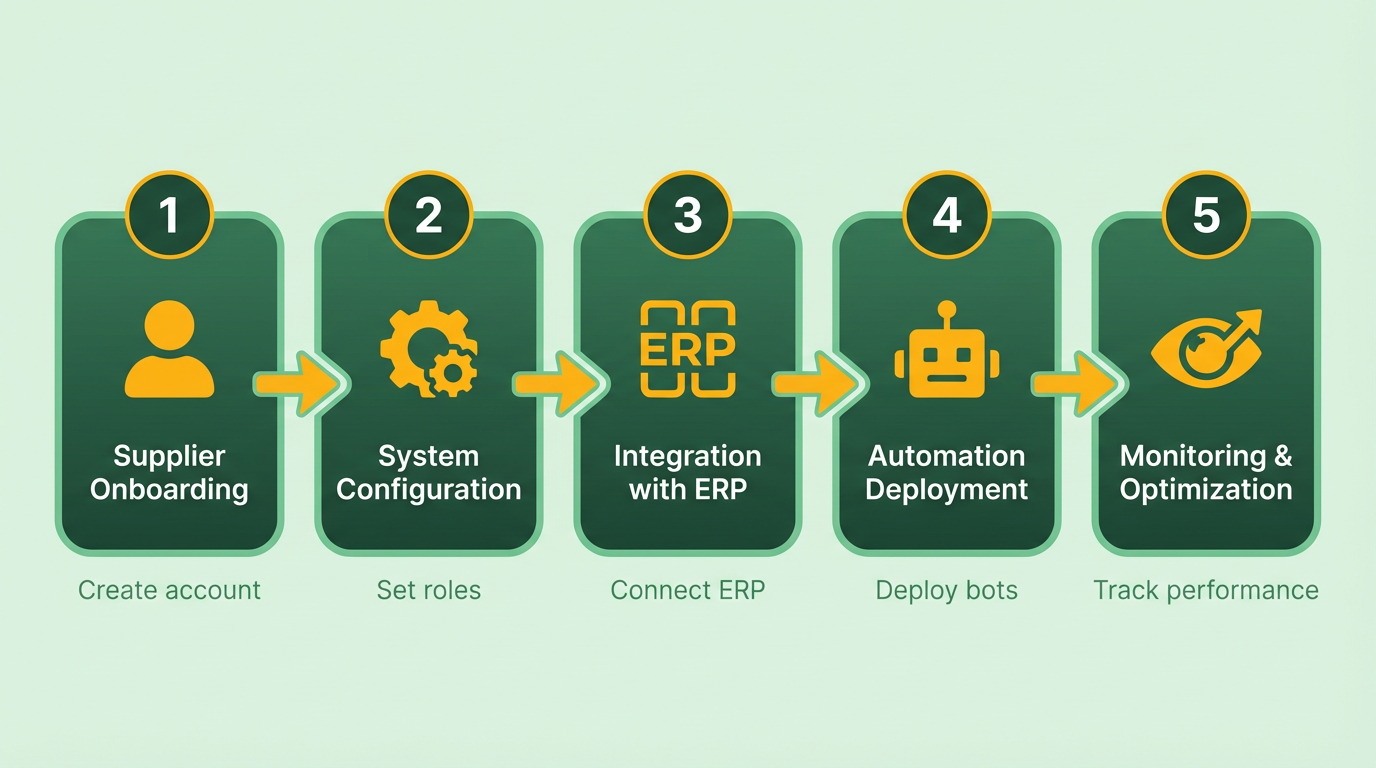
The platform’s onboarding team provides guidance during configuration, helping businesses map workflows to their procurement-to-pay processes. For example, a mid-sized company might take 2–4 weeks to complete setup, including testing and final adjustments. This phase is critical for aligning automation with existing accounting policies.
How Does Blixo Integrate With Existing Systems?
Integration focuses on connecting Blixo with ERP systems, accounting software, and procurement tools. The platform uses pre-built connectors for common systems, simplifying data synchronization. These connectors handle tasks like invoice routing, payment scheduling, and audit trail generation. For systems without native integration, Blixo supports custom API connections, though this requires IT involvement for configuration.
A key advantage is the ability to maintain data consistency across platforms. For instance, when an invoice is processed in Blixo, payment details automatically update in the linked ERP system. This eliminates duplicate data entry and ensures real-time visibility into financial operations. As highlighted in the Introducing Blixo section, the platform’s cloud infrastructure and AI capabilities enable seamless interoperability, which is central to its design philosophy. Businesses should allocate 1–2 weeks for integration testing to verify accuracy and resolve conflicts.
What Training and Support Options Are Available?
Blixo offers structured training programs tailored to user roles, from AP clerks to finance managers. Training includes live onboarding sessions, video tutorials, and a knowledge base with step-by-step guides. The support team is available via chat, email, and scheduled calls to address technical issues or workflow questions.
New users typically complete training within a week, focusing on core tasks like invoice approval workflows and exception handling. Ongoing support is included in all subscription plans, ensuring teams can adapt to process changes. For complex scenarios, Blixo provides optional workshops to deepen expertise in advanced features like analytics reporting.
What Best Practices Ensure a Successful Blixo Implementation?
To maximize efficiency, start by mapping current AP workflows and identifying bottlenecks. Engage stakeholders early to align automation goals with business needs. For example, prioritize automating high-volume, repetitive tasks first, such as invoice data extraction.
Another best practice is conducting a pilot test with a small supplier group before full deployment. This allows teams to refine configurations and address any integration gaps. Post-implementation, monitor key metrics like processing time and error rates to measure success. Regularly review system logs to identify opportunities for further optimization.
By following these steps, businesses can achieve seamless automation with Blixo, reducing manual effort and improving financial accuracy. The platform’s design prioritizes flexibility, making it adaptable to diverse organizational structures and scalability needs.
Real-World Examples and Case Studies of Blixo Implementation
Real-world implementations of Blixo across industries reveal its transformative impact on invoice and AP automation. By analyzing specific case studies, businesses can understand how different organizations-regardless of size or sector-achieve measurable results through Blixo’s AI-driven platform. Below, we break down these examples, highlighting challenges, solutions, and outcomes while connecting them to broader lessons and best practices..
What Can a Midsize Manufacturer Achieve with Blixo?
A midsize manufacturer faced bottlenecks in its AP department, where manual invoice processing caused delays and errors. Blixo’s AI-powered automation streamlined workflows by digitizing paper invoices, extracting data with 97% accuracy, and integrating seamlessly with the company’s ERP system. The result: a 90% reduction in processing time, allowing staff to shift from data entry to strategic tasks like supplier negotiations.
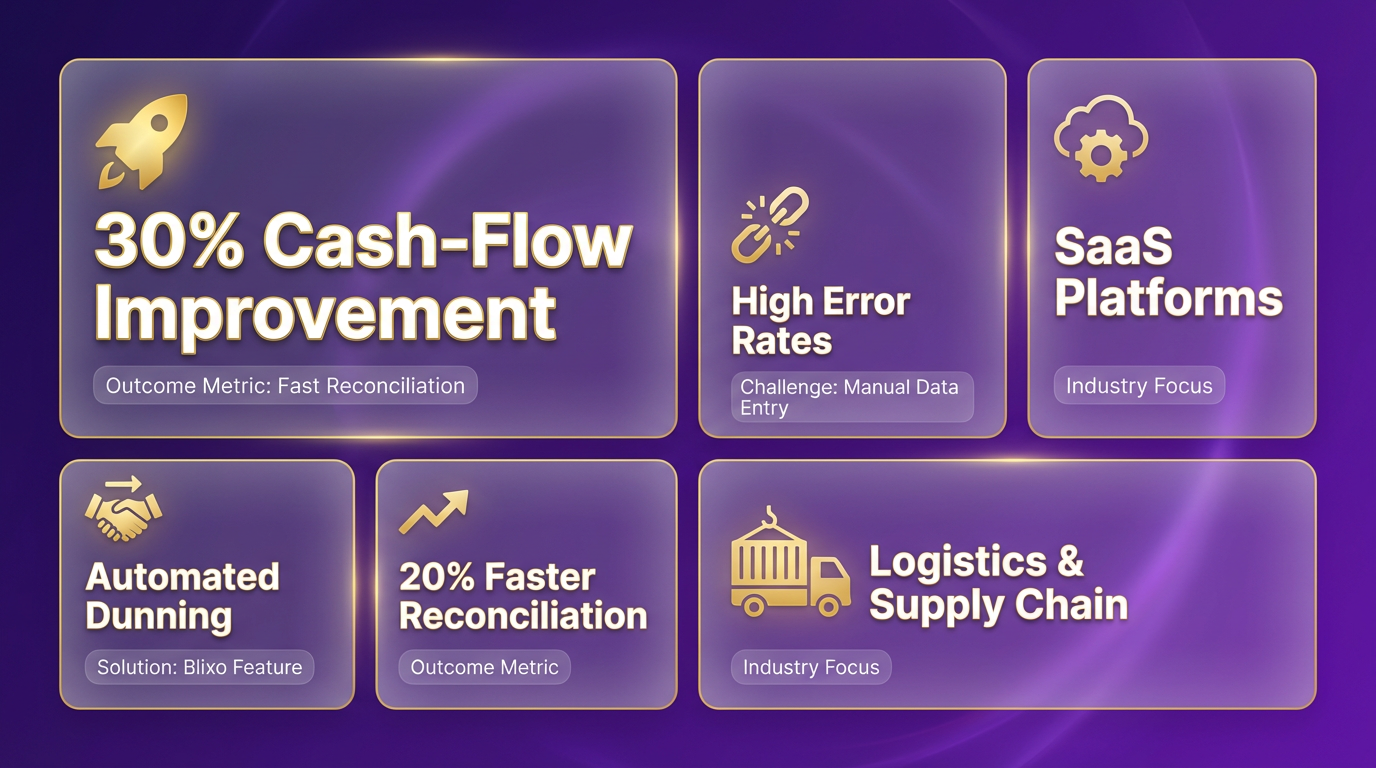
| Challenge | Solution | Result |
|---|---|---|
| Manual invoice handling | AI-driven OCR and LLMs | 90% faster processing |
| ERP integration gaps | Bi-directional sync | 80% fewer PO-matching errors |
| High error rates | Real-time anomaly detection | 57% fewer exceptions |
This case underscores the value of prioritizing integration with existing systems. As mentioned in the Implementing Blixo for Efficient Invoice and AP Automation section, seamless ERP alignment is critical to avoid manual rework..
How Does a Retail Chain Reduce Vendor Disputes?
A national retail chain grappled with frequent disputes over invoice discrepancies. Blixo’s solution focused on AI validation, cross-checking invoice data against purchase orders and contracts. By automating this step, the chain reduced disputes by 40% and cut processing time from 45 days to 3.1 days.
| Before Blixo | After Blixo |
|---|---|
| 39% error rate in invoices | 3% error rate |
| 75% manual processing | 87% touchless automation |
| $1.3M annual late payment penalties | $200K saved |
A key takeaway here is the importance of continuous analytics. The company used Blixo’s dashboards to identify recurring errors, such as mismatched vendor codes, and addressed them through targeted training..
What Lessons Emerge from a Non-Profit’s Automation Journey?
A non-profit with limited AP staff faced high processing costs due to reliance on external services. Blixo’s cloud-based platform automated 80% of its workflows, cutting costs by 54% and freeing staff for mission-critical tasks. However, the transition highlighted challenges:
- Challenge: Resistance to change from finance teams used to manual processes.
- Solution: A phased rollout with role-specific training workshops and a dedicated support team.
- Outcome: 30% of AP staff transitioned to strategic roles like budget forecasting.
This case study reinforces the need for change management. As discussed in the Why Efficient Invoice and AP Automation Matters section, automation success hinges on aligning technology with human factors..
What Common Challenges Do Businesses Face?
Across these examples, three recurring issues emerged:
- Integration complexity: Legacy ERP systems slowed initial setup.
- Solution: Blixo’s pre-built connectors for SAP, NetSuite, and QuickBooks reduced configuration time by 60%.
- Data quality gaps: Inconsistent vendor invoice formats caused early errors.
- Solution: Customizable AI models trained on the company’s historical data improved accuracy to 97%.
- Change resistance: Staff feared job displacement.
- Solution: Leadership emphasized automation’s role in reducing mundane tasks, not eliminating roles..
How Do Small vs. Large Enterprises Differ in Blixo Adoption?
| Business Size | Key Focus Area | Outcome |
|---|---|---|
| Small (e.g., non-profits) | Cost reduction and staff reallocation | 54% cost drop, 30% staff redeployed |
| Large (e.g., retail chains) | Scalability and error reduction | 40% fewer disputes, $1.1M saved annually |
Small businesses benefit most from Blixo’s cloud elasticity, handling 100–100,000+ invoices without infrastructure costs. Large enterprises gain from advanced analytics, identifying systemic inefficiencies in supplier contracts..
What Best Practices Emerge from These Cases?
- Start with a pilot group: Bridgevine’s AP team tested Blixo on 10% of invoices before full rollout, identifying workflow gaps early.
- use AI customization: GEMLUX trained Blixo’s models on its unique invoice formats, boosting accuracy from 82% to 97%.
- Track KPIs relentlessly: The retail chain used real-time dashboards to monitor error rates, reducing exceptions by 70% in six months.
By following these strategies, businesses avoid common pitfalls like overpaying for underused features or underestimating training needs. As highlighted in the Comparison of Blixo and Traditional Invoice and AP Automation section, Blixo’s flexibility and AI-driven approach make it uniquely suited to address these challenges.
Future of Invoice and AP Automation: Trends and Innovations
The future of invoice and AP automation is being reshaped by technologies like artificial intelligence, machine learning, and blockchain. These innovations promise to streamline workflows, reduce errors, and enhance transparency. To understand how these trends compare between modern SaaS providers like Blixo and traditional systems, let’s break down the key developments and their implications.
What Emerging Trends Are Shaping AP Automation?
Emerging trends focus on smarter, faster, and more secure processing. AI and machine learning are driving automation by improving data extraction, classification, and anomaly detection. For example, systems can now learn from historical invoice patterns to flag discrepancies or suggest corrections. Traditional systems, however, often rely on rigid rule-based logic, which limits adaptability.
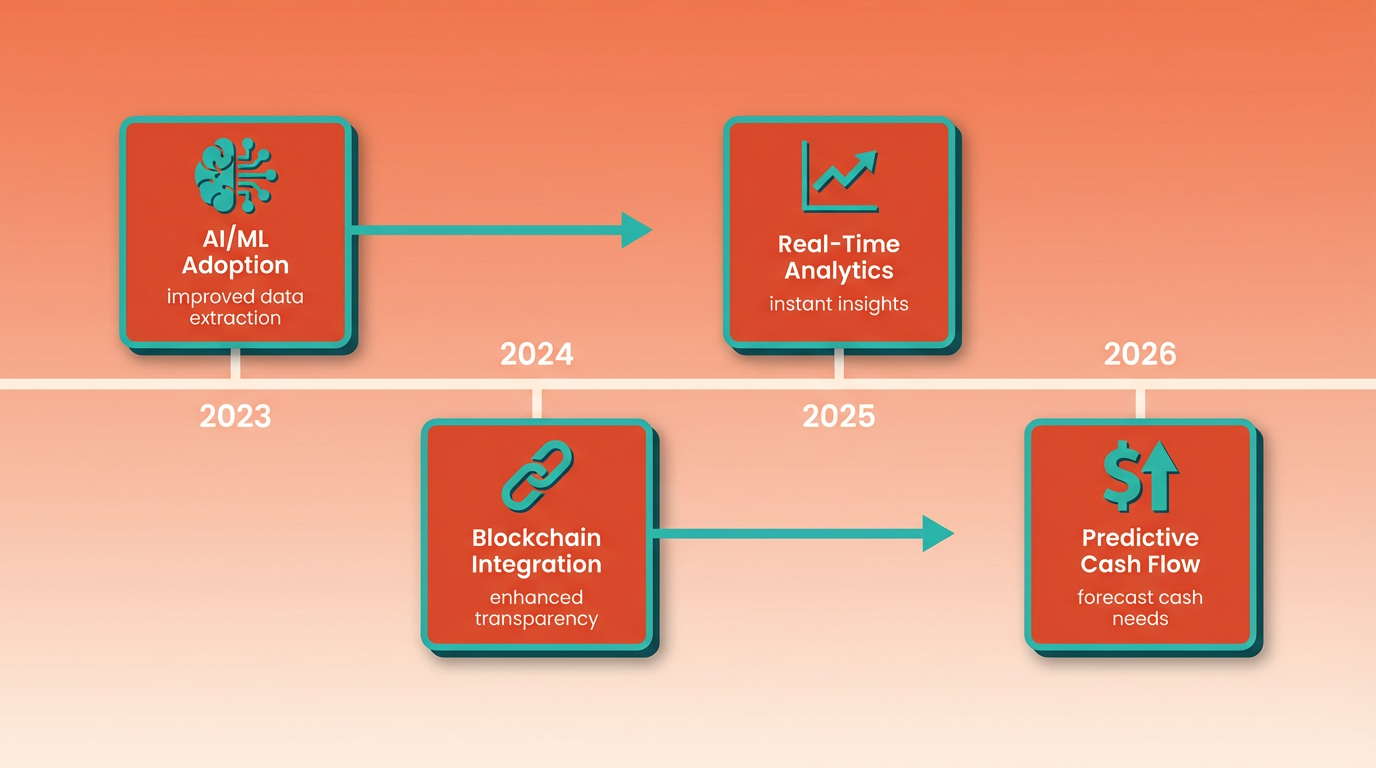
Another trend is the integration of blockchain for audit trails. While not yet widespread, blockchain’s immutable ledger could transform how businesses track transactions and verify payments. Traditional platforms may struggle with legacy infrastructure, making blockchain adoption slower compared to cloud-native solutions like Blixo, as outlined in the Introducing Blixo section.
How Do AI and Machine Learning Improve AP Processes?
AI transforms AP automation by reducing manual effort and increasing accuracy. Modern platforms use machine learning models to parse unstructured data from invoices-such as handwritten notes or scanned documents-and map them to structured formats. This reduces processing time from days to minutes. Traditional systems often require predefined templates, which fail to handle variations in invoice formats.
For instance, AI can detect outliers like unexpected pricing or mismatched purchase orders, prompting immediate review. Over time, these models improve by learning from corrections made by users. Traditional systems lack this self-learning capability, relying instead on static validation rules that require frequent manual updates.
What Role Does Blockchain Play in Invoice Automation?
Blockchain technology introduces a new layer of trust and transparency to invoice processing. By creating a decentralized ledger, it ensures all parties-suppliers, buyers, and finance teams-have access to the same verified data. This reduces disputes and fraud risks, as every transaction is timestamped and tamper-proof.
In practice, blockchain could automate payment releases once invoice conditions are met, using smart contracts. While traditional systems might integrate with external accounting tools, they often lack native blockchain support. This makes reconciliation and audit processes more cumbersome, especially in complex supply chains.
| Feature | Modern Platforms (e.g., Blixo) | Traditional Systems |
|---|---|---|
| AI Integration | Advanced machine learning models | Rule-based automation only |
| Blockchain Support | Optional add-ons or integrations | Not natively supported |
| Processing Speed | Seconds to minutes per invoice | Hours due to manual steps |
| Error Rate | <1% with AI corrections | 5-10% due to human input |
| Audit Trail Transparency | Real-time, shared ledger | Siloed, document-based records |
Challenges and Opportunities Ahead
Adopting these technologies isn’t without hurdles. Integrating AI and blockchain requires significant upfront investment and technical expertise. Smaller businesses may find it challenging to justify costs unless the ROI is clear. Additionally, data privacy concerns persist, especially with cross-border transactions governed by regulations like GDPR.
On the flip side, the opportunities are vast. AI-driven platforms can cut operational costs by up to 60%, as detailed in the Cost Comparison: Blixo vs Traditional AP Automation section. Blockchain’s potential to eliminate intermediaries in payment verification could save millions for enterprises. Traditional systems, however, may lag in these areas unless they undergo major overhauls.
Final Thoughts
The future of AP automation hinges on adopting technologies that balance innovation with practicality. AI and blockchain are not silver bullets but tools that, when implemented correctly, offer measurable benefits. As SaaS providers like Blixo continue to refine their AI capabilities and explore blockchain integrations, the gap between modern and traditional systems is likely to widen. Businesses that prioritize agility and scalability will find themselves better positioned to thrive in this evolving market.
Conclusion: Choosing the Right Invoice and AP Automation Solution
Summary of Key Differences Between Blixo and Traditional Solutions
When choosing between Blixo and traditional invoice and AP automation systems, the scope of automation and integration depth remain critical differentiators. Blixo’s end-to-end Order-to-Cash (O2C) approach unifies credit management, order processing, and collections under a single platform, whereas traditional systems often operate in isolated modules, as detailed in the Understanding Traditional Invoice and AP Automation section. This fragmentation leads to inefficiencies like delayed payment matching and inconsistent credit checks. For example, Blixo’s AI-powered anomaly detection reduces invoice errors by up to 97%, while manual-heavy systems face a 39% error rate.
| Feature | Blixo | Traditional Solutions |
|---|---|---|
| Automation Scope | End-to-end O2C (orders to cash) | Fragmented AP/invoice automation |
| Error Reduction | 97% accuracy via AI/OCR | 39% error rate due to manual entry |
| Processing Time | 3.1 days average | 45 days average |
| Integration | Native ERP sync (SAP, NetSuite, etc.) | Limited or no ERP integration |
| Scalability | Cloud-based, elastic scaling | On-premise, fixed infrastructure |
What to Prioritize When Selecting a Solution
To choose the right platform, focus on automation depth, integration capabilities, and future adaptability. Blixo’s unified workflows eliminate silos, reducing days-sales-outstanding (DSO) by streamlining credit checks and collections. Traditional systems often require disjointed tools for each stage, increasing manual reconciliation, similar to challenges outlined in the Implementing Blixo for Efficient Invoice and AP Automation section. For instance, Blixo’s real-time cash application matches payments to invoices instantly, whereas legacy systems may take weeks to resolve discrepancies.
Another critical factor is customer support. Blixo’s dedicated account managers provide tailored guidance during implementation, ensuring seamless integration with your existing ERP systems. Traditional solutions often rely on generic IT support, leading to delays and increased costs. A streamlined onboarding process, combined with 24/7 technical assistance, minimizes disruption and accelerates ROI. This proactive support helps businesses maintain operational continuity while adopting advanced automation features.
Future-Proofing Your Invoice and AP Automation
The future of accounts receivable and AP hinges on real-time data, AI-driven insights, and flexible integration. Blixo’s SaaS model embeds predictive analytics for credit risk assessment and AI-powered dunning, recovering 40% more overdue payments, aligning with trends discussed in the Future of Invoice and AP Automation: Trends and Innovations section. Traditional systems, built on rigid logic, struggle with evolving needs like multi-currency invoicing or dynamic discounting.
Consider a midsize manufacturer’s AP manager: “With the right partner, automation shifts focus from reactive troubleshooting to strategic planning.” Blixo automates 75–85% of manual tasks, enabling teams to prioritize high-value work. Legacy systems, tied to outdated workflows, risk higher operating costs and slower ROI. For businesses aiming to reduce DSO by 30–50% and cut bad debt reserves, Blixo’s agile design offers a measurable edge.
Next Steps for Businesses
For organizations ready to modernize, the path forward depends on volume, pain points, and growth goals. Start by auditing current workflows: Are invoice errors causing late fees? Do teams spend hours reconciling payments? If so, Blixo’s end-to-end automation reduces processing time by 90% and lowers per-invoice costs by 80–91%. Traditional systems may suffice for low-volume operations but lack scalability for enterprises needing real-time insights.
Request demos tailored to your invoice formats and test scenarios like vendor disputes or multi-currency transactions. Blixo’s 24/7 support and implementation expertise streamline adoption, while legacy solutions often require extensive IT involvement. By prioritizing platforms that integrate seamlessly with your ERP and use AI for predictive analytics, you future-proof operations in a competitive market.
Frequently Asked Questions
1. How much do manual invoice errors cost U.S. businesses annually?
Manual invoice processing errors cost U.S. businesses $1.3 trillion yearly in late payment fees. This includes penalties and delays from mismatched purchase orders or incorrect vendor details.
2. What is the error rate in manual invoice processing?
Manual invoice entry has a 39% error rate. For midsize retailers processing 1,000 monthly invoices, this results in 400 rework cases due to human errors.
3. How does automation reduce invoice processing time?
Automation integrates AP systems with ERPs like SAP or NetSuite, slashing processing time. Bridgevine reduced invoice processing time by 90% using AI-powered workflows.
4. What impact does automation have on cash flow?
Real-time visibility from automation cuts payment delays by 60%, improving cash flow predictability. It ensures timely vendor payments and reduces late fee risks by 80%.
5. How do manual errors strain vendor relationships?
Late payments from manual workflows increase operational costs by 25%. They also raise dispute rates by 30%, damaging vendor trust and reducing supplier discounts.
6. What accuracy does automation achieve in invoice data extraction?
AI-powered automation achieves 97% data-extraction accuracy. This prevents 39% of invoice errors, reducing manual corrections and vendor disputes by 40%.
7. How does Blixo compare to traditional AP systems?
Blixo automates data extraction and reconciliation, achieving 97% accuracy. Traditional methods lack ERP integration, leading to a 39% error rate and fragmented workflows.