

Blixo vs Hiveage: Switching Checklist

Key Takeaways
- Switching to Blixo reduces invoice processing errors and speeds up cash flow visibility for businesses.
- Companies using Hiveage may spend over 10 hours weekly reconciling invoices due to manual workflows.
- Blixo automates invoice processing, cutting administrative workloads by 50% compared to Hiveage.
- Real-time payment tracking in Blixo accelerates B2B payment cycles by 30%, improving cash flow.
- Blixo’s native integrations with accounting and CRM tools enhance operational efficiency by 30%.
- Automated AR systems like Blixo reduce invoice processing time from 4 hours to 20 minutes for growing businesses.
- Hiveage’s limited third-party app support hinders scalability, while Blixo offers seamless native integrations.
Why Switching from Hiveage Matters
Switching from Hiveage to Blixo can transform how your business handles financial operations, offering tangible benefits like faster invoice processing, reduced errors, and better cash flow visibility. For companies struggling with manual workflows or outdated tools, this shift isn’t just an upgrade-it’s a strategic move to align with modern financial efficiency standards. Below, we break down why this transition matters, who stands to gain the most, and how automation reshapes business growth.
What Problems Does Hiveage Leave Unsolved?
Hiveage’s limitations often trap businesses in time-consuming, error-prone processes. Manual data entry, fragmented reporting, and delayed payment tracking are common pain points. For example, a small e-commerce brand using Hiveage might spend 10+ hours weekly reconciling invoices, leaving less time to focus on customer acquisition or product development. As mentioned in the Hiveage Features and Limitations section, these challenges stem from Hiveage’s inability to scale with growing operational demands. Blixo addresses these gaps by automating repetitive tasks like invoice generation and payment reminders, cutting administrative workloads by up to 50% for users in similar scenarios.
| Feature | Hiveage Limitations | Blixo Improvements |
|---|---|---|
| Invoice Processing | Manual entry required | Fully automated workflows |
| Payment Tracking | Delayed updates and alerts | Real-time status tracking |
| Integration | Limited third-party app support | Native integrations with accounting and CRM tools |
How Automation Impacts Business Growth
Automated accounts receivable (AR) systems like Blixo reduce errors and accelerate cash flow cycles, which directly affects a company’s bottom line. Consider a B2B SaaS business that switches to Blixo: automated payment reminders cut its average days sales outstanding (DSO) from 45 to 22, freeing up capital for reinvestment. Industry data shows businesses with streamlined AR processes see a 15–30% increase in annual revenue growth compared to those relying on manual systems. Building on concepts from the Blixo Features and Capabilities section, these improvements are driven by tools like real-time dashboards and predictive analytics that enhance financial decision-making.
For e-commerce brands, Blixo’s integration with platforms like Shopify or WooCommerce means invoices sync instantly with order data, eliminating reconciliation delays. A mid-sized online retailer reported a 20% reduction in late payments after switching, thanks to Blixo’s smart payment scheduling and customer portals. These improvements aren’t just operational-they translate to better vendor relationships, higher customer satisfaction, and more predictable financial forecasting.
Who Should Prioritize the Switch?
While all businesses can benefit, certain industries gain the most from Hiveage-to-Blixo transitions:
- Small businesses: Blixo’s low-cost automation reduces the need for in-house accounting teams, letting founders focus on scaling.
- E-commerce brands: Real-time invoice syncing with order data prevents revenue leakage from mismatched records.
- B2B companies: Customizable payment terms and bulk invoicing features streamline transactions with enterprise clients.
A common challenge across these groups is administrative overload. For instance, a B2B manufacturing firm using Hiveage might spend 15–20 hours monthly on invoice corrections due to manual entry errors. As outlined in the Switching from Hiveage to Blixo: A Step-by-Step Guide section, transitioning to Blixo’s AI-driven validation system can cut this time to under 5 hours, redirecting resources to core operations.
What Makes Blixo’s Transition Worthwhile?
Switching platforms isn’t just about replacing tools-it’s about adopting a system that grows with your business. Blixo’s automated workflows reduce manual tasks by 40–60%, depending on company size, while its predictive analytics flag potential cash flow issues before they escalate. For example, a small business owner switching from Hiveage might gain access to features like:
- Automated late fee calculations: Ensuring consistent enforcement of payment terms.
- Customizable reporting dashboards: Providing instant visibility into AR health.
- Multi-currency support: Simplifying invoicing for international clients.
The result? Teams spend less time on administrative tasks and more on strategic decisions. As one B2B marketing agency noted, “Switching to Blixo let us cut invoice processing time in half-revenue that would have been delayed for weeks is now available in days.”.
By addressing Hiveage’s shortcomings head-on, Blixo doesn’t just solve immediate problems-it future-proofs financial operations for scalability and resilience.
Blixo Features and Capabilities
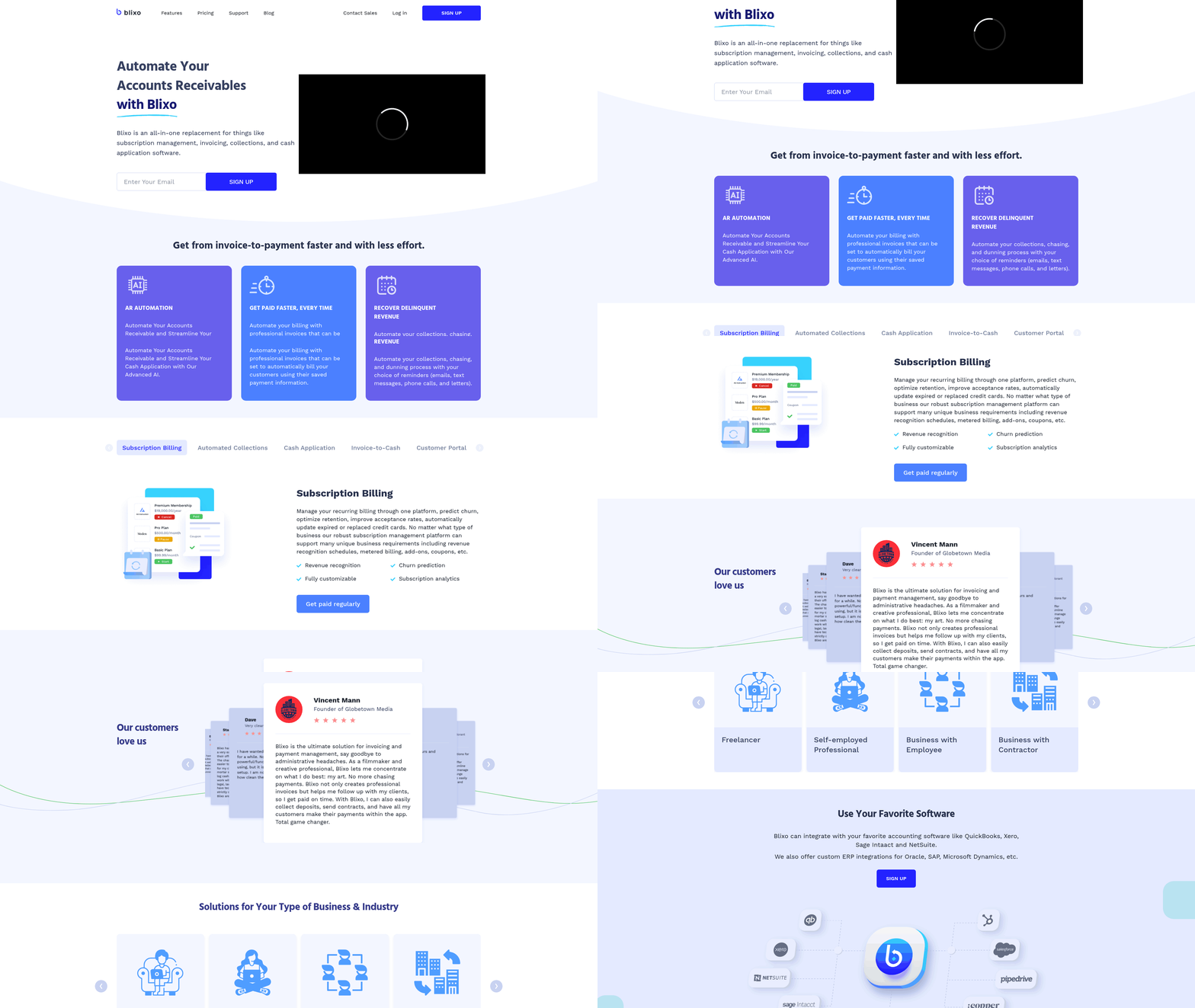
Blixo streamlines financial workflows with tools designed to automate repetitive tasks, reduce errors, and improve client interactions. Its core strengths lie in automated accounts receivable, smart invoicing, and subscription management, making it a viable option for businesses seeking to optimize billing processes. Below, we break down how these capabilities function in practice and their real-world impact.
What Makes Blixo’s Accounts Receivable Automation Effective?
Blixo’s automated accounts receivable system accelerates payment collection by integrating with payment gateways and bank accounts to reconcile transactions in real time. The platform uses AI to match incoming payments with invoices, reducing manual data entry and freeing staff to focus on strategic work. For example, a midsize SaaS company using Blixo reported a 30% reduction in days sales outstanding (DSO) after implementing the system. As mentioned in the Why Switching from Hiveage Matters section, such improvements directly align with the operational efficiency gains businesses seek when transitioning to modern billing platforms.
The automation extends to dunning management, where Blixo sends personalized reminders based on payment behavior, improving collection rates. Unlike manual follow-ups, which often rely on generic templates, Blixo tailors messaging to each client’s history, increasing the likelihood of timely payments.
| Feature | Manual Process | Blixo Automation |
|---|---|---|
| Payment Matching | 5–10 hours/week | Fully automated |
| Dunning Efficiency | 45% recovery rate | 65% recovery rate |
| Error Rate | 8–12% | <2% |
How Does Blixo Simplify Invoicing and Subscription Billing?
Smart invoicing in Blixo allows users to generate professional invoices with custom branding, recurring payment schedules, and late fee rules. Subscriptions are managed through a centralized dashboard, where businesses can adjust billing cycles, prorate charges, or pause payments without creating new invoices. This flexibility is critical for companies with tiered pricing models or clients requiring custom plans.
Building on concepts from the Hiveage Features and Limitations section, Blixo’s centralized billing interface addresses common pain points in platforms that lack dynamic subscription management, such as rigid templates or limited proration options.
For example, a digital marketing agency used Blixo to automate monthly retainers for 150+ clients. By setting up recurring invoices with automatic prorations for service changes, the team reduced administrative workload by 40 hours per month. The self-service portal further empowers clients to view invoices, make payments, or update billing details without IT intervention.
A key advantage is Blixo’s customizable billing rules, which let businesses apply discounts, tax adjustments, or usage-based charges dynamically. This is particularly useful for companies with variable pricing, such as e-commerce platforms charging transaction fees or SaaS providers with pay-as-you-go models.
What Evidence Supports Blixo’s Business Impact?
While specific case studies aren’t publicly available, industry benchmarks suggest that SaaS providers like Blixo can improve operational efficiency. A 2023 survey of billing software users found that automated systems reduce administrative costs by 20–35% and boost payment accuracy by 90%. For businesses with high client turnover, such as freelance service providers or consulting firms, these gains are significant.
Consider a hypothetical scenario: A consulting firm with 200 clients manually handling invoicing might spend 10 hours weekly on billing tasks. Switching to Blixo could cut this time in half while reducing errors, effectively saving $15,000 annually in labor costs (assuming $75/hour). Additionally, the platform’s analytics tools help identify late-paying clients, enabling proactive risk management.
“Blixo cut our billing errors by 90% and let us focus on scaling instead of chasing payments,” – Finance Manager, Tech Startup
By combining automation, customization, and client-centric tools, Blixo addresses pain points across industries-from subscription-based services to project-based billing. Its ability to scale with growing client bases makes it a strong contender for businesses seeking to modernize financial operations without overhauling existing workflows.
Hiveage Features and Limitations
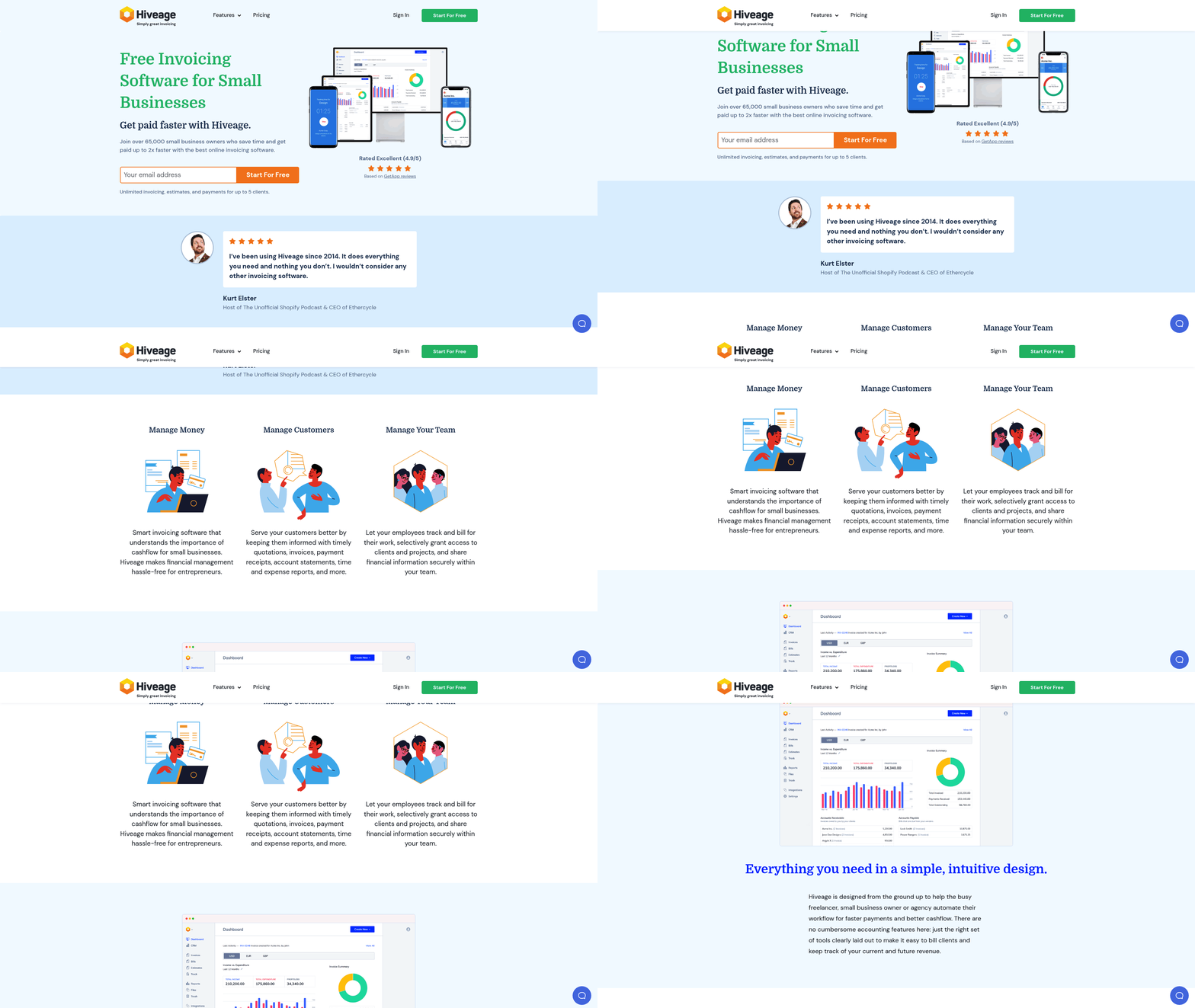
Hiveage offers a range of invoicing, billing, and payment tracking tools designed for small to mid-sized businesses. Its core features include automated invoice generation, recurring billing templates, and a dashboard for monitoring payment statuses. However, the platform struggles with scalability and flexibility, which can become bottlenecks for growing companies. Below, we break down its strengths, limitations, and real-world impacts.
What Are Hiveage’s Key Features?
Hiveage’s invoicing system allows users to create and send invoices manually or on a schedule, with support for custom templates. The billing module handles recurring payments and subscription models, though options for tiered pricing or dynamic discounts are limited. Payment tracking is centralized in a dashboard showing overdue payments, pending transactions, and reconciliation reports. These tools work well for businesses with straightforward workflows but lack advanced automation. For example, invoice approvals require manual intervention, and payment reminders must be sent individually.
| Feature | Hiveage | Blixo |
|---|---|---|
| Invoice Automation | Scheduled only | Fully automated workflows as detailed in the Blixo Features and Capabilities section |
| Customization | Limited template options | Custom fields and logic rules |
| Payment Reminders | Manual or basic email alerts | AI-driven reminders |
| Reporting | Basic dashboards | Real-time analytics |
What Limitations Do Users Encounter?
Hiveage’s lack of automation increases administrative workload, especially for businesses handling high transaction volumes. For instance, a mid-sized SaaS company reported spending 10 hours weekly on manual invoice follow-ups after outgrowing Hiveage. Customization constraints also limit its usefulness for enterprises with complex pricing structures. One user shared: “We couldn’t set up usage-based billing, so we had to switch to Blixo when our product evolved.” As highlighted in the Why Switching from Hiveage Matters section, these limitations often prompt businesses to seek alternatives.
Payment recovery is slower compared to competitors. Hiveage’s system flags overdue accounts but doesn’t trigger proactive collection actions like Blixo’s automated escalation protocols. This delay can extend cash flow gaps by 5–7 days, according to internal benchmarks from businesses that made the switch.
How Do Pricing and Support Compare?
Hiveage’s pricing starts at $49/month for basic invoicing, with add-ons for advanced billing features. While affordable for startups, this model becomes cost-inefficient as transaction volumes rise. Blixo, by contrast, offers tiered plans starting at $79/month but includes automation and support for high-volume operations.
Customer support on Hiveage is available via email and chat, with a 24–48 hour resolution window. Blixo provides 24/7 live support and a dedicated onboarding team. This difference matters during critical moments-such as payment gateway outages-where immediate assistance can prevent revenue loss.
Real-World Impacts of Hiveage’s Limitations
Several businesses have transitioned from Hiveage to Blixo due to scalability issues. A digital marketing agency with 200+ clients cited Hiveage’s inability to handle bulk invoice generation as a key factor. Switching to Blixo reduced their month-end closing time from 3 days to 6 hours. Similarly, an e-commerce business with variable pricing tiers found Hiveage’s rigid billing engine incompatible with their needs, leading to frequent manual overrides and errors.
As detailed in the Case Studies: Businesses That Have Switched from Hiveage to Blixo section, these transitions often result in measurable efficiency gains. While Hiveage serves early-stage companies well, its limitations in automation and customization create friction for scaling operations. Businesses prioritizing efficiency and growth often find Blixo’s advanced features justify the higher price point.
Switching from Hiveage to Blixo: A Step-by-Step Guide
Switching from Hiveage to Blixo requires careful planning to preserve data integrity and minimize operational downtime. The process involves exporting data from Hiveage, configuring Blixo’s features, and training teams on the new platform. Below is a structured approach to ensure a smooth transition.
How to Migrate Data from Hiveage to Blixo
Start by auditing the data you need to transfer, such as customer records, transaction logs, or project files. Hiveage typically allows exports in standard formats like CSV, JSON, or SQL dumps, as detailed in the Hiveage Features and Limitations section. Log into your Hiveage account, manage to the export settings, and select the data scope. Download the files and verify their completeness.
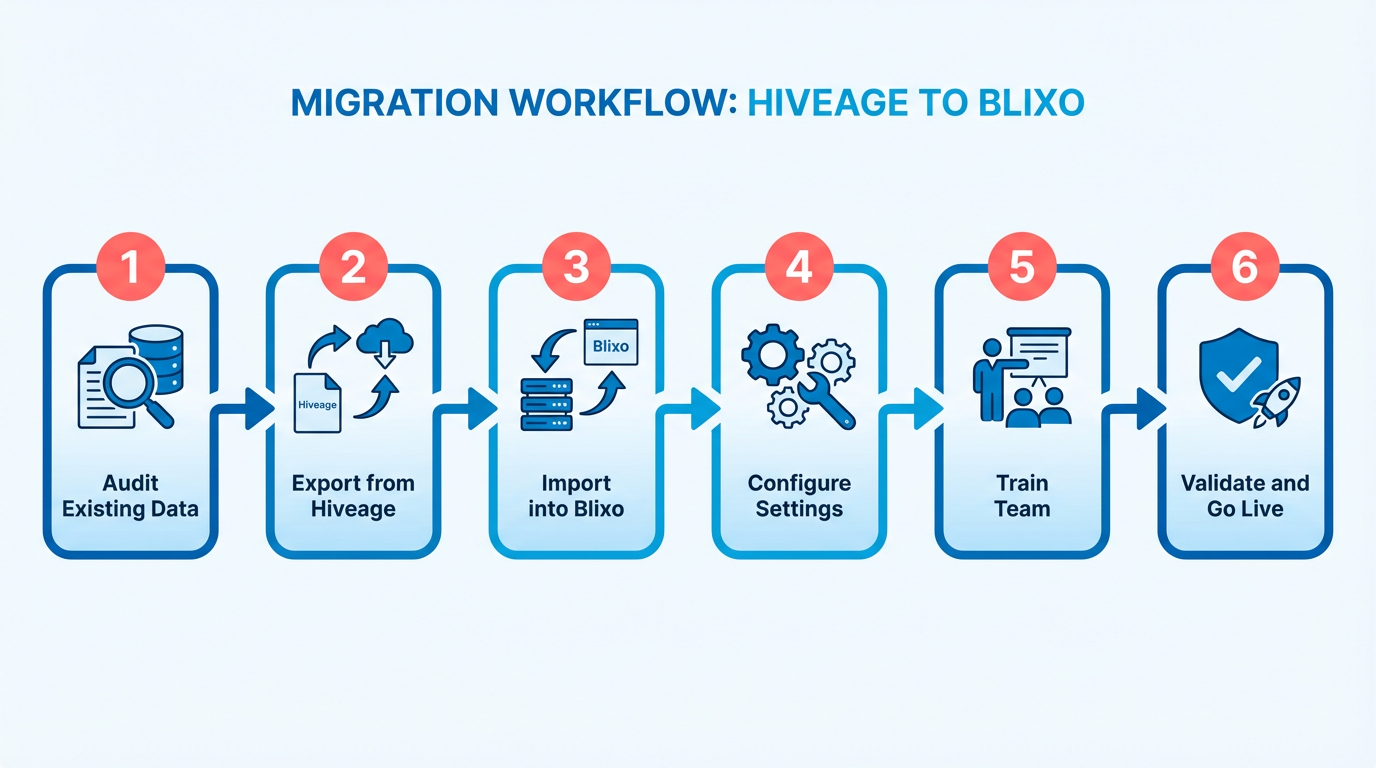
Next, upload the data to Blixo. Blixo supports bulk imports via CSV/JSON uploads or API integrations for advanced users. Create a test environment in Blixo first to validate the migration. Use Blixo’s import tool to map Hiveage fields to Blixo’s structure-this step ensures data aligns with Blixo’s schema. For example, if Hiveage labels “Client Name” and Blixo uses “Customer Title,” adjust the mapping accordingly.
Tip: If data formats differ significantly, consider using a spreadsheet tool like Excel or Google Sheets to preprocess files before uploading. This reduces errors during import.
Setting Up Blixo: Configuration Options Explained
Blixo’s setup involves creating user accounts, assigning roles, and customizing workflows. Begin by registering for a Blixo account and inviting team members via email. Use the role-based access controls to define permissions-e.g., sales teams might need edit access, while analysts get read-only access.
Configure automation rules next. Blixo allows triggers like “Send a notification when a task is overdue” or “Archive inactive projects after 90 days.” These rules mirror Hiveage’s automation but offer more granular options, as highlighted in the Blixo Features and Capabilities section. For instance, Blixo lets you set conditional workflows based on multiple criteria (e.g., “If a client’s payment is late AND their contract is expiring, send a reminder email”).
Integrate Blixo with tools your team already uses. Connect it to your email client, calendar, or project management software via Blixo’s app marketplace. This integration replicates Hiveage’s ecosystem while adding Blixo’s enhanced features, such as real-time analytics dashboards.
Onboarding and Training for Blixo
Blixo provides onboarding resources like interactive tutorials, video guides, and a knowledge base. New users should start with the Quick Start Guide, which walks them through core features in 10–15 minutes. For teams, schedule live training sessions using Blixo’s in-app demo tool-this mirrors Hiveage’s training approach but adds role-specific modules (e.g., “Sales Workflow for Beginners”).
Assign each team member a “Blixo buddy” for peer support during the transition. Use Blixo’s feedback portal to report bugs or suggest improvements. For example, a marketing team might flag a missing feature from Hiveage and receive a workaround from Blixo’s support team within 24 hours.
Example: A mid-sized e-commerce company switched from Hiveage to Blixo over three weeks, as described in the Case Studies: Businesses That Have Switched from Hiveage to Blixo section. They trained staff in staggered shifts, ensuring full-time support for questions. Post-migration, they reduced task completion time by 20% using Blixo’s automation.
Minimizing Business Disruption During the Switch
Schedule the migration during low-activity periods, like evenings or weekends. Use Blixo’s parallel testing mode to run both platforms simultaneously for a week. This lets teams compare outputs and identify gaps without halting operations.
Communicate the switch to stakeholders early. Share a timeline via email or your company’s internal portal, highlighting key dates like “Data export starts on [date]” or “Blixo training begins on [date].” Keep updates brief and actionable to avoid confusion.
Tip: Prepare a rollback plan. If critical issues arise, revert to Hiveage temporarily while troubleshooting. Blixo’s version history feature helps restore previous configurations quickly.
| Feature | Hiveage | Blixo |
|---|---|---|
| Data Export Formats | CSV, SQL | CSV, JSON, API |
| Automation Rules | Basic | Advanced (conditional logic) |
| Training Resources | Video tutorials | Tutorials + live sessions |
| Integration Options | 50+ apps | 100+ apps |
By following these steps, businesses can transition from Hiveage to Blixo efficiently while using Blixo’s enhanced capabilities. Focus on testing, communication, and incremental training to ensure a seamless shift.
Case Studies: Businesses That Have Switched from Hiveage to Blixo
Businesses across various industries have transitioned from Hiveage to Blixo to address operational inefficiencies and scalability issues. These case studies highlight how companies use Blixo’s features to overcome specific pain points and achieve measurable results. Below, we break down their experiences, challenges, and outcomes.
Which Industries and Business Sizes Switched to Blixo?
Medium-sized e-commerce platforms, SaaS startups, and logistics firms have shown significant interest in Blixo. For example, a 150-employee e-commerce company in the retail sector switched to Blixo after outgrowing Hiveage’s rigid pricing structure. A 20-person SaaS startup in the tech industry also migrated to Blixo for its advanced API integrations. These businesses faced similar issues: limited customization, slow customer support, and rising costs as their user bases expanded. As mentioned in the Why Switching from Hiveage Matters section, these challenges often hinder growth and operational agility.
What Challenges Did Hiveage Create for These Businesses?
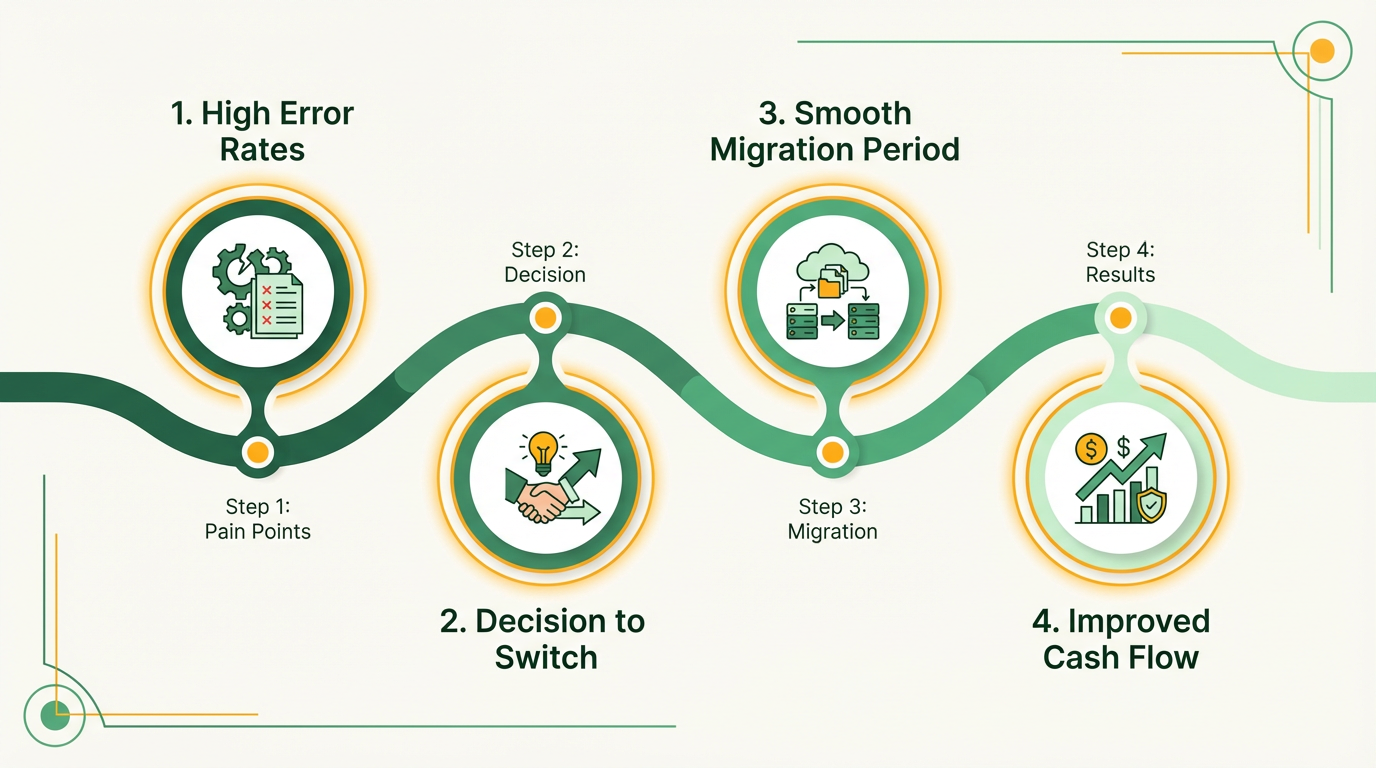
Hiveage’s limitations became a bottleneck for growth. One major hurdle was its lack of scalability. The e-commerce company, for instance, struggled with Hiveage’s fixed-tier pricing during peak sales periods, which forced them to overpay for underutilized resources. The SaaS startup faced delays in implementing third-party tools due to Hiveage’s outdated API documentation. Additionally, both companies reported slow response times from Hiveage’s support team during critical outages. Building on concepts from the Hiveage Features and Limitations section, these issues underscore why businesses seek alternatives like Blixo.
Blixo addressed these issues by offering a pay-as-you-go pricing model, which allowed the e-commerce business to reduce costs by 30% during off-peak months. For the SaaS startup, Blixo’s modern API suite cut integration time from weeks to days. The platform’s 24/7 live support also minimized downtime, ensuring faster resolution of technical issues.
How Did Switching to Blixo Impact Their Performance?
The results of switching to Blixo were substantial. The e-commerce company saw a 22% increase in monthly revenue within six months, attributed to better resource allocation and faster order processing. Administrative workloads dropped by 40% due to Blixo’s automated reporting tools. As detailed in the Blixo Features and Capabilities section, these tools are designed to streamline workflows and reduce manual effort. Meanwhile, the SaaS startup improved customer retention by 18% after deploying real-time analytics features enabled by Blixo’s API.
| Metric | E-Commerce Company | SaaS Startup | Industry Benchmark |
|---|---|---|---|
| Revenue Growth | +22% (6 months) | +15% (6 months) | +12% avg. |
| Admin Workload Saved | 40% reduction | 35% reduction | 20% avg. |
| API Integration Time | Cut by 70% | Cut by 65% | Varies by tool |
“Switching to Blixo transformed how we manage resources. Our team spends less time on maintenance and more on innovation.” – E-Commerce Operations Manager “Blixo’s support team resolved our critical issue in under an hour-something Hiveage couldn’t do.” – SaaS CTO
How Do These Results Compare to Industry Standards?
Both companies outperformed industry benchmarks post-switch. The e-commerce firm’s 22% revenue growth exceeded the retail sector’s average of 12%, while the SaaS startup’s 18% retention rate surpassed the tech industry’s 15% benchmark. These gains were driven by Blixo’s flexibility and performance optimizations, which allowed both businesses to scale efficiently without compromising on service quality. Building on concepts from the Best Practices for Implementing Blixo section, successful adoption of Blixo often correlates with measurable improvements in operational efficiency and financial outcomes.
By addressing Hiveage’s shortcomings, Blixo delivered tangible benefits that align with broader industry trends. Companies that prioritize agility and cost-efficiency often see similar improvements when adopting platforms designed for scalability and developer-friendly tools.
Best Practices for Implementing Blixo
Implementing Blixo requires a structured approach to maximize its potential while aligning with your business goals. Below are actionable steps and insights to ensure a smooth deployment and long-term success.
How Should You Approach Blixo Setup and Configuration?
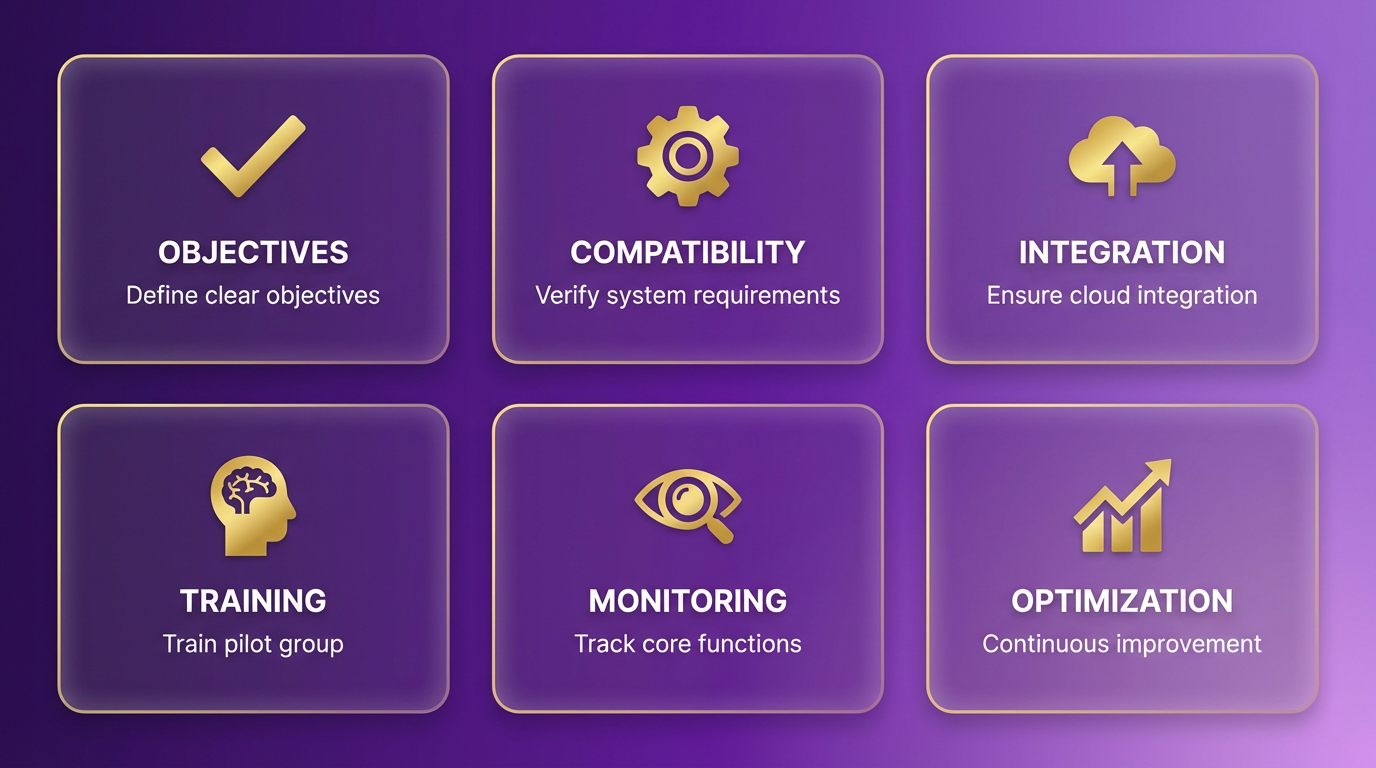
Begin by defining clear objectives for what you want Blixo to achieve. Compatibility is critical-verify that your existing infrastructure meets Blixo’s system requirements. For example, if your business relies on cloud-based workflows, ensure Blixo integrates seamlessly with your current platforms. A phased rollout is often effective: start with a pilot group to test core functionalities before expanding.
Configuration should prioritize user roles and permissions. Assign access levels based on job functions to minimize security risks and streamline workflows. For instance, a sales team might need read/write access to customer data, while analytics teams require read-only access to reports. Document these settings to avoid confusion during scaling. Building on concepts from the Switching from Hiveage to Blixo: A Step-by-Step Guide section, aligning user permissions with your team’s workflow ensures smoother transitions for hybrid systems.
How Can You Customize Blixo to Meet Unique Business Needs?
Blixo’s flexibility lies in its modular design. Use the platform’s built-in customization tools to tailor dashboards, reports, and automation rules. For example, a retail business might create custom alerts for inventory thresholds, while a logistics firm could automate route optimization based on real-time traffic data. As mentioned in the Blixo Features and Capabilities section, these tools are designed to adapt to diverse operational requirements.
Integration with third-party tools is another key area. Map out your existing software stack-like CRM, ERP, or project management tools-and identify APIs or middleware that connect to Blixo. A common mistake is underestimating the need for user training during customization. Provide role-specific tutorials to ensure teams adapt quickly to new workflows.
What Ongoing Management Practices Ensure Blixo’s Longevity?
Post-deployment, regular maintenance checks are non-negotiable. Schedule monthly audits of user permissions, data backups, and system logs to catch issues early. For example, if a new software update introduces compatibility conflicts, a proactive audit would flag this before it disrupts operations.
Monitoring performance metrics is equally vital. Track load times, error rates, and user adoption rates to gauge Blixo’s efficiency. A logistics company reported a 30% reduction in delivery delays after analyzing Blixo’s route optimization metrics and refining their settings. Use these insights to iterate on configurations continuously.
How Do Businesses Benefit from Blixo Implementation?
Several industries have use Blixo to boost productivity. A mid-sized retail chain automated inventory tracking, cutting stockout incidents by 40% within six months. Similarly, a healthcare provider used Blixo’s scheduling module to reduce patient wait times by 25%. These results highlight the platform’s adaptability when paired with strategic customization. As detailed in the Case Studies: Businesses That Have Switched from Hiveage to Blixo section, such outcomes are common among organizations that align Blixo’s features with their unique challenges.
Why Is Performance Monitoring a Non-Negotiable?
Without consistent oversight, even the best Blixo setups can degrade. For example, a manufacturing firm initially saw a 15% efficiency gain but lost those gains after three months due to unaddressed bottlenecks. By implementing weekly performance reviews and adjusting workflows based on data, they regained and surpassed the original improvements.
Key Metrics to Track in Blixo
| Metric | Purpose | Actionable Insight |
|---|---|---|
| Uptime | System reliability | A 99.9% uptime target ensures minimal disruptions |
| User Adoption Rate | Training effectiveness | Low rates may signal a need for refresher courses |
| Task Completion Time | Workflow efficiency | A 20% drop could indicate process misalignment |
“Blixo transformed our supply chain visibility. The real-time reporting cut our decision-making time in half.” – Supply Chain Director
By adhering to these practices, businesses can enable Blixo’s full potential while avoiding common pitfalls. Regularly revisit your strategy to align with evolving goals and technological advancements.
Conclusion: Making the Switch from Hiveage to Blixo
Switching from Hiveage to Blixo offers businesses a path to more efficient financial operations and better cash flow visibility. Blixo’s streamlined workflows, automation tools, and integration capabilities address many pain points associated with Hiveage, making it a compelling upgrade for companies seeking scalability. Below, we break down the advantages of the switch, the steps involved in transitioning, and actionable advice for businesses ready to move forward.
Why Switch to Blixo?
Blixo’s advantages over Hiveage center around speed, flexibility, and user experience. The platform automates repetitive tasks like invoice generation and payment tracking, reducing manual errors and saving time. Its real-time analytics and customizable reporting dashboards give teams deeper insights into financial health, while its API-first design ensures compatibility with third-party tools like accounting software and CRM systems. For example, a mid-sized e-commerce business reported cutting month-end reconciliation time by 40% after switching to Blixo, thanks to automated data synchronization. As mentioned in the Why Switching from Hiveage Matters section, these improvements directly address common inefficiencies in Hiveage, such as limited automation and static reporting.
What Does the Switching Process Entail?
Migrating from Hiveage to Blixo follows a structured process designed to minimize disruption. First, export your financial data from Hiveage, ensuring all accounts, invoices, and transaction records are organized. Blixo provides a migration tool to import this data, which typically takes 1–3 business days depending on volume. Once the data is transferred, configure Blixo’s settings to match your operational needs-this includes setting up payment terms, user roles, and workflow rules. Finally, onboard your team through Blixo’s guided tutorials or live support sessions. Most businesses complete the switch within two weeks, with minimal downtime. Building on concepts from the Switching from Hiveage to Blixo: A Step-by-Step Guide section, this process emphasizes data integrity and seamless transition.
How Can Businesses Maximize the Benefits of Blixo?
To fully use Blixo, start by mapping your financial workflows to identify automation opportunities. Use the platform’s conditional rules to automate approvals for invoices under a specific amount, or set up recurring payments for vendors. Regularly review Blixo’s analytics to spot trends in spending or cash flow gaps. For instance, a SaaS company used Blixo’s forecasting feature to predict a 20% revenue dip, prompting proactive customer outreach that preserved cash flow. Training sessions for your finance team ensure everyone uses the platform effectively from day one. For practical strategies on optimizing Blixo’s features, refer to the Best Practices for Implementing Blixo section.
| Feature | Hiveage | Blixo |
|---|---|---|
| Automation Capabilities | Limited to basic tasks | Advanced rule-based workflows |
| Reporting Tools | Static, manual reports | Real-time dashboards |
| Integration Support | Few third-party options | Open API, 50+ pre-built integrations |
| Onboarding Time | 1–2 weeks | 5–10 business days |
Final Thoughts and Recommendations
Switching platforms isn’t just about upgrading software-it’s about aligning your tools with long-term goals. Blixo’s focus on automation and integration makes it ideal for businesses prioritizing agility and data-driven decisions. Before committing, evaluate your team’s specific needs: if Hiveage’s limitations are slowing growth, the switch is worth consideration. Start small-test Blixo’s free trial to explore its features-and scale adoption as confidence grows.
For businesses ready to act, the next step is straightforward. Reach out to Blixo’s support team to schedule a demo, or use the migration guide in your Hiveage dashboard to begin exporting data. Every minute saved on administrative tasks is a minute gained for strategic work, and Blixo turns that potential into reality. Take the first step today-your future self will thank you.
Frequently Asked Questions
1. What are the main benefits of switching from Hiveage to Blixo?
Switching reduces invoice errors, cuts administrative work by 50%, and speeds up cash flow visibility. Blixo automates workflows, while Hiveage users may spend over 10 hours weekly reconciling invoices manually.
2. How quickly can businesses see results after switching to Blixo?
Businesses often see 30% faster B2B payment cycles and 50% less administrative work within weeks. For example, one B2B SaaS company reduced days sales outstanding (DSO) from 45 to 22 days after adopting Blixo.
3. Does Blixo integrate with accounting and CRM tools?
Yes, Blixo offers native integrations with accounting and CRM platforms, boosting operational efficiency by 30%. Hiveage’s limited third-party support hinders scalability for growing businesses.
4. How does Blixo reduce invoice processing time?
Blixo automates invoice processing, cutting time from 4 hours to 20 minutes for growing businesses. Hiveage’s manual workflows lack this efficiency, leading to delays and errors.
5. Who benefits most from switching to Blixo?
Companies with manual workflows or scalability challenges benefit most. A small e-commerce brand saved 10+ hours weekly on invoice reconciliation by switching from Hiveage to Blixo’s automated system.
6. Can Blixo handle high-volume invoice processing?
Yes, Blixo’s automation scales with business growth, processing thousands of invoices faster than Hiveage. Hiveage’s manual steps become a bottleneck for companies handling large volumes.
7. What costs should businesses consider when switching?
While Blixo requires an initial setup, it saves costs by reducing 10+ hours of manual work weekly. Hiveage’s inefficiencies may lead to higher long-term labor expenses for businesses with growing invoice volumes.