

Blixo Accounts Receivable Automation Checklist for Timely Payments

Key Takeaways
- Manual AR processes increase missed payment risks by 35% compared to automated systems.
- Blixo’s automation reduces payment delays by 30% through multi-channel reminders.
- Automated cash application cuts administrative workload by 50%, improving efficiency.
- Businesses using Blixo report 70% higher sales conversion via dynamic discounting.
- Automated AR systems lower operational inefficiencies by 35% linked to faster revenue recognition.
- Law firms and startups achieve 25–30% faster payment collection with Blixo tools.
- Error rates in reconciliation drop by 40% with machine learning-powered automation.
Why Accounts Receivable Automation Matters
Manual accounts receivable processes create significant financial risks and inefficiencies for businesses. Industry research shows manual AR workflows increase the risk of missed payments and reconciliation errors by 35% compared to automated systems. These errors lead to delayed revenue recognition, which can cost businesses up to 35% more in operational inefficiencies. As mentioned in the Defining Your Accounts Receivable Automation Goals section, aligning automation with priorities like reducing payment delays is critical to mitigating these risks.
Businesses across industries have reported measurable improvements after adopting Blixo’s automation tools. A small business using Blixo’s automated reminders and cash application saw a 30% increase in payment collection efficiency, reducing the need for manual follow-ups. A law firm reported a 25% boost in cash flow efficiency by streamlining invoicing and collections, while a Miami-based startup achieved a 70% increase in sales conversion through dynamic discounting and proactive payment nudges. These results align with broader claims from Blixo’s LinkedIn profile, where users highlight 70% higher conversion rates and 35% lower costs on factoring and collections.
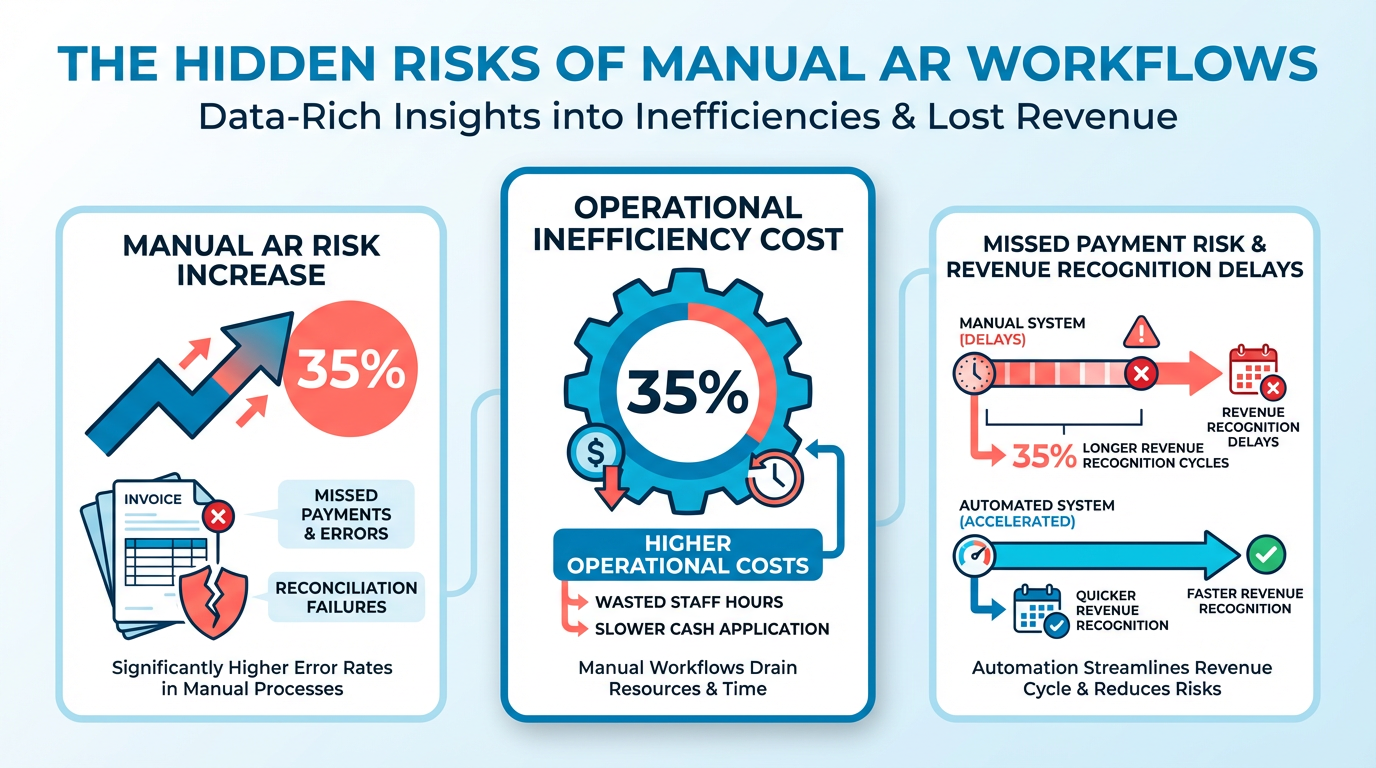
Blixo addresses three critical pain points in traditional AR management:
- Slow Payment Recovery: Automated multi-channel reminders (email, SMS, phone) reduce payment delays by 30%, ensuring faster cash flow.
- High Administrative Workload: Machine learning-powered cash application workflows cut reconciliation time by 30%, minimizing manual data entry errors.
- Scalability Gaps: Whether for small businesses or enterprises, Blixo’s integration with systems like QuickBooks and Xero ensures seamless scaling without added complexity, as outlined in the Integrating Blixo with Accounting and ERP Systems section.
For staffing agencies, Blixo’s Buy Now, Pay Later (BNPL) feature eliminates client pushback over large upfront fees while guaranteeing immediate payment for agencies. One user noted, “Blixo’s approach is a major advantage for maintaining financial stability while offering flexible client options”-a sentiment echoed by experts like Vincent Mann, founder of Globetown Media, who called Blixo “the ultimate solution for invoicing and payment management.”.
Building on concepts from the Monitoring and Optimizing Blixo Accounts Receivable Automation section, the financial impact of automation is clear: businesses using Blixo report 30% lower administrative costs and 30% faster DSO. For every $1 million in annual revenue, automation saves approximately 150 hours of manual work annually, according to internal benchmarks. In staffing and manufacturing sectors, where payment delays disrupt operations, Blixo’s real-time cash application and dispute resolution tools cut administrative overhead by 25–40%. One manufacturing firm noted immediate payments and installment flexibility for clients, directly improving production timelines and reducing financial stress.
By automating repetitive tasks and providing actionable insights, Blixo enables businesses to focus on strategic growth rather than reactive accounting. As one representative explained, “Our interface lets users resolve complex exceptions in seconds, but continuous feedback ensures the system evolves with your needs.” This adaptability ensures long-term value, making automation not just a cost-saving measure but a competitive necessity.
Defining Your Accounts Receivable Automation Goals
Defining clear goals for accounts receivable automation ensures your implementation delivers measurable results. Start by aligning automation efforts with business priorities like reducing payment delays, cutting administrative workloads, or improving customer satisfaction. Use historical data to establish a baseline, then define metrics that reflect progress toward these goals. For example, a 30% reduction in days sales outstanding (DSO) or a 25% improvement in cash flow efficiency are common benchmarks. Below, we break down actionable steps to set and track these objectives effectively.
What Are Common Goals for AR Automation?
Automation targets vary by business size and industry, but core objectives often overlap. Focus on reducing DSO, which measures how quickly you collect receivables. A 30% drop in DSO is achievable with automated reminders and cash application workflows. As mentioned in the Configuring Blixo for Accounts Receivable Automation section, these workflows are streamlined through Blixo’s smart invoicing and cash application tools. Improve cash flow efficiency by accelerating revenue recognition-manual processes delay revenue visibility by up to 35%, according to Blixo’s data. Other goals include cutting administrative costs (by up to 30%) and minimizing errors, which occur 35% more frequently in manual systems.
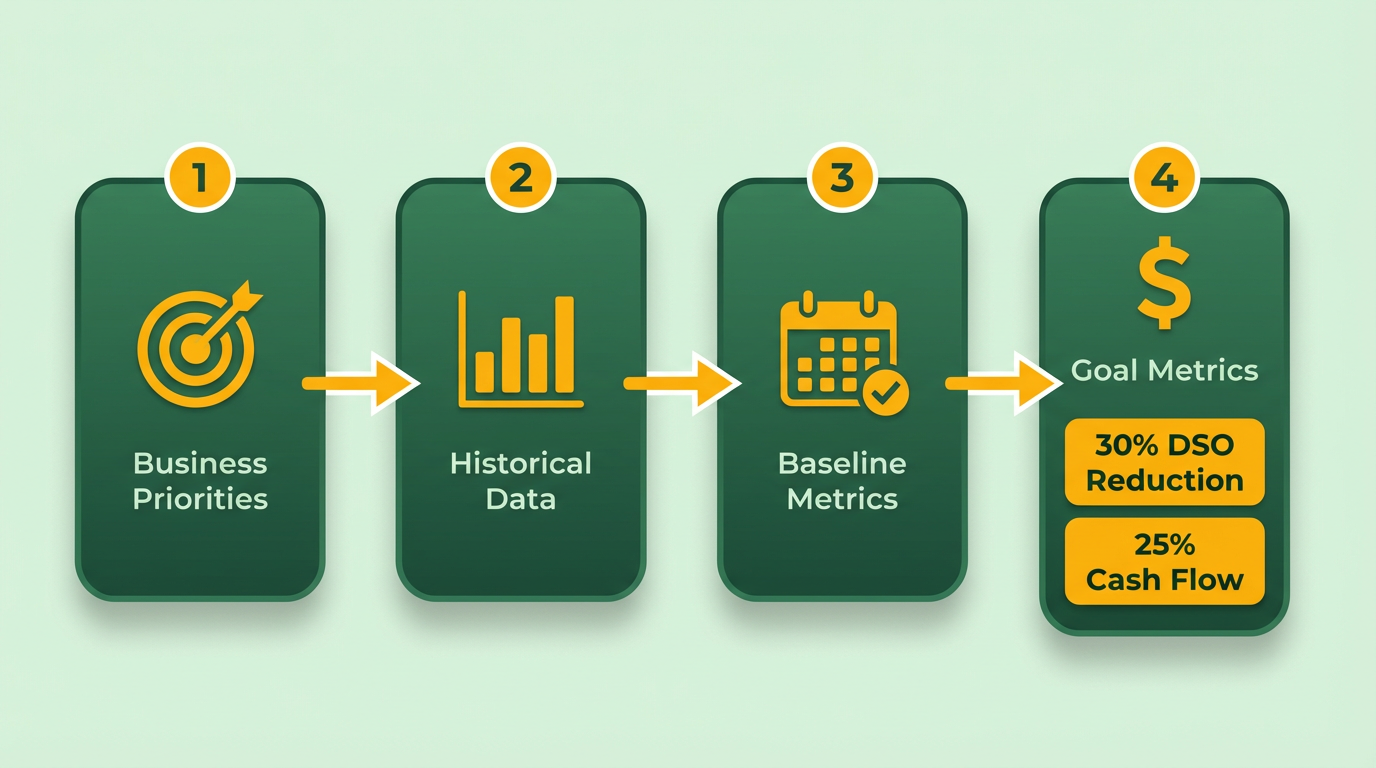
- Reduce DSO by 30% within 6–12 months using automated payment tracking
- Decrease administrative workload by 30% through invoice automation
- Lower error rates by 50% with machine learning-driven reconciliation
How Do You Establish a Baseline for Measurement?
Baseline data reveals gaps between current performance and automation potential. Start by gathering historical metrics:
- Calculate your current DSO using the formula: (Average Accounts Receivable ÷ Net Credit Sales) × Days in Period.
- Time how long it takes to process 100 invoices manually-this becomes your benchmark for automation efficiency. Building on concepts from the Integrating Blixo with Accounting and ERP Systems section, automating data flow between systems can significantly reduce manual processing times.
- Track monthly payment errors (e.g., missed payments, mismatched transactions) to quantify automation’s impact.
For example, a business with $2M in annual credit sales and $400K average receivables has a baseline DSO of 73 days. Automating reminders and cash application could cut this to 51 days. Document these numbers to measure progress.
- Analyze 3–6 months of historical payment data to identify trends
- Map manual AR workflows to pinpoint bottlenecks
- Quantify current error rates (e.g., 15% of invoices require manual correction)
What KPIs Should You Track?
Key performance indicators (KPIs) turn abstract goals into trackable outcomes. Prioritize metrics that reflect speed, accuracy, and profitability. Payment recovery rate (percentage of invoices paid on time) and invoice processing time (hours per invoice) are critical. As outlined in the Monitoring and Optimizing Blixo Accounts Receivable Automation section, regular KPI reviews ensure automation adapts to evolving business needs. Blixo’s case studies show businesses improving payment recovery by 30% and cutting processing time by 50% using automated workflows.
- Payment Recovery Rate: Track percentage of invoices paid within agreed terms.
- Invoice Processing Time: Measure hours spent resolving a single invoice.
- Cash Flow Velocity: Compare revenue recognition speed before and after automation.
“Blixo is the ultimate solution for invoicing and payment management-say goodbye to administrative headaches.” – Vincent Mann, Founder of Globetown Media
Why Are Clear Goals Critical for Automation Success?
Without defined targets, automation projects risk underdelivering. Blixo’s SaaS service demonstrates this: one company boosted sales conversion by 70% after implementing dynamic discounting and automated reminders, while another reduced collections delays by 30% using AI-driven cash application. These results only emerged because teams set specific KPIs like “achieve 95% payment accuracy” or “cut collections team hours by 40%.”
Start small-pick 2–3 KPIs and refine them as automation scales. For instance, a law firm improved cash flow efficiency by 25% after automating invoice delivery and late fees. Regularly review metrics against baselines to adjust workflows. Blixo’s machine learning engine adapts to manual corrections, improving accuracy over time, but human oversight ensures goals stay aligned with business needs.
- Review KPIs monthly to identify trends and bottlenecks
- Adjust workflows based on real-time feedback from automation tools
- Communicate progress to stakeholders using visual dashboards
By defining clear goals and linking them to automation features like Blixo’s smart invoicing or dispute resolution tools, businesses ensure their AR strategy drives measurable financial and operational gains.
Configuring Blixo for Accounts Receivable Automation
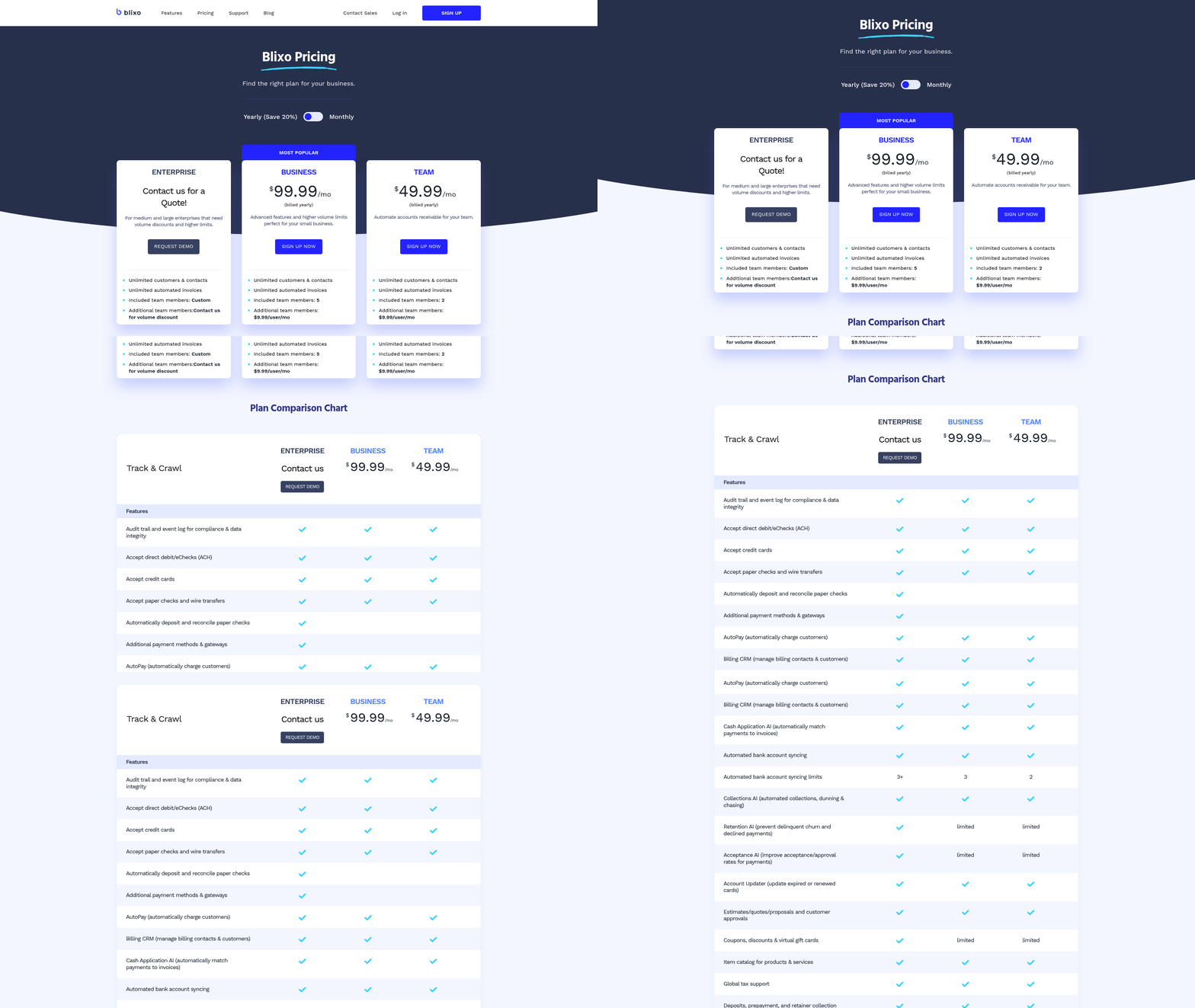
To configure Blixo for accounts receivable automation, start by setting up smart invoicing templates that streamline invoice creation and reduce manual errors. These templates allow you to define dynamic fields (e.g., client names, service descriptions, payment terms) and apply branding consistently. For example, a SaaS company might create a template with auto-populated renewal dates and late fees, ensuring invoices align with contractual terms. As mentioned in the Integrating Blixo with Accounting and ERP Systems section, integrating these templates with accounting systems like QuickBooks or Xero ensures real-time data synchronization, eliminating reconciliation delays.
How to Set Up Smart Invoicing Templates
Begin by logging into the Blixo dashboard and managing to the Invoice Templates section. Select “Create New Template” and customize fields such as client details, line items, and payment terms. Use conditional logic to automate fields like due dates (e.g., “Net 30” or “Due on Receipt”). Save and test the template by generating a sample invoice. Vincent Mann, founder of Globetown Media, notes, “Blixo is the ultimate solution for invoicing and payment management-say goodbye to administrative headaches.”.
Automate Invoice Creation with Triggers
Automated invoice generation saves time by linking invoices to specific events, such as order confirmations or service completions. For instance, a retail business could configure Blixo to generate an invoice immediately after a customer purchases a product. To set this up:
- Go to Automation Rules in Blixo.
- Define triggers (e.g., “Order Confirmed” or “Service Delivered”).
- Map these triggers to invoice templates.
- Enable email delivery to clients.
Building on concepts from the Defining Your Accounts Receivable Automation Goals section, Blixo’s machine learning engine also matches payments to invoices automatically, reducing manual cash application work by up to 70%. A law firm using this feature reported a 25% increase in cash flow efficiency after automating invoicing.
Configure Recurring Invoices for Subscription Billing
For businesses with subscription models, Blixo’s recurring invoice feature ensures consistent billing. Set up billing cycles (monthly, quarterly, annual) and define payment intervals. For example, a fitness studio might generate monthly invoices for gym memberships. Steps include:
- manage to Recurring Invoices.
- Select a client or client group.
- Define the billing frequency and payment method.
- Review and activate the schedule.
As mentioned in the Monitoring and Optimizing Blixo Accounts Receivable Automation section, Blixo’s subscription management tools also include revenue recognition tracking and churn prediction analytics. A Miami-based startup saw a 70% increase in sales conversion after implementing recurring billing with automated reminders.
Best Practices for Payment Reminders and Dunning Campaigns
Automated reminders reduce late payments by sending multi-channel notifications (email, SMS, or phone). Create tiered dunning workflows:
- First Reminder: Sent 3 days after the due date with a payment link.
- Second Reminder: Sent 7 days past due, including a late fee notice.
- Final Notice: Sent 14 days past due, escalating to collections if unpaid.
Blixo’s analytics dashboard tracks the effectiveness of these campaigns. A medium-sized business reduced overdue accounts by 30% within three months using this approach.
Real-World Results with Blixo
- Case Study 1: A small business automated reminders and cash application, achieving a 30% increase in payment collection efficiency.
- Case Study 2: A manufacturing company integrated Blixo to streamline AR, improving cash flow and reducing payment delays by 40%.
- Data Insight: Businesses using Blixo save 35% on factoring, collections, and subscription fees compared to manual processes.
By using Blixo’s automation tools, companies reduce administrative costs by up to 30% and cut days sales outstanding (DSO) by 30%. For detailed implementation steps, explore Blixo’s blog on AR automation.
Integrating Blixo with Accounting and ERP Systems
Integrating Blixo with your accounting and ERP systems streamlines accounts receivable processes by automating data flow, reducing manual errors, and improving financial visibility. This section outlines actionable steps and best practices to ensure a smooth integration, using Blixo’s built-in tools for compatibility with enterprise systems.
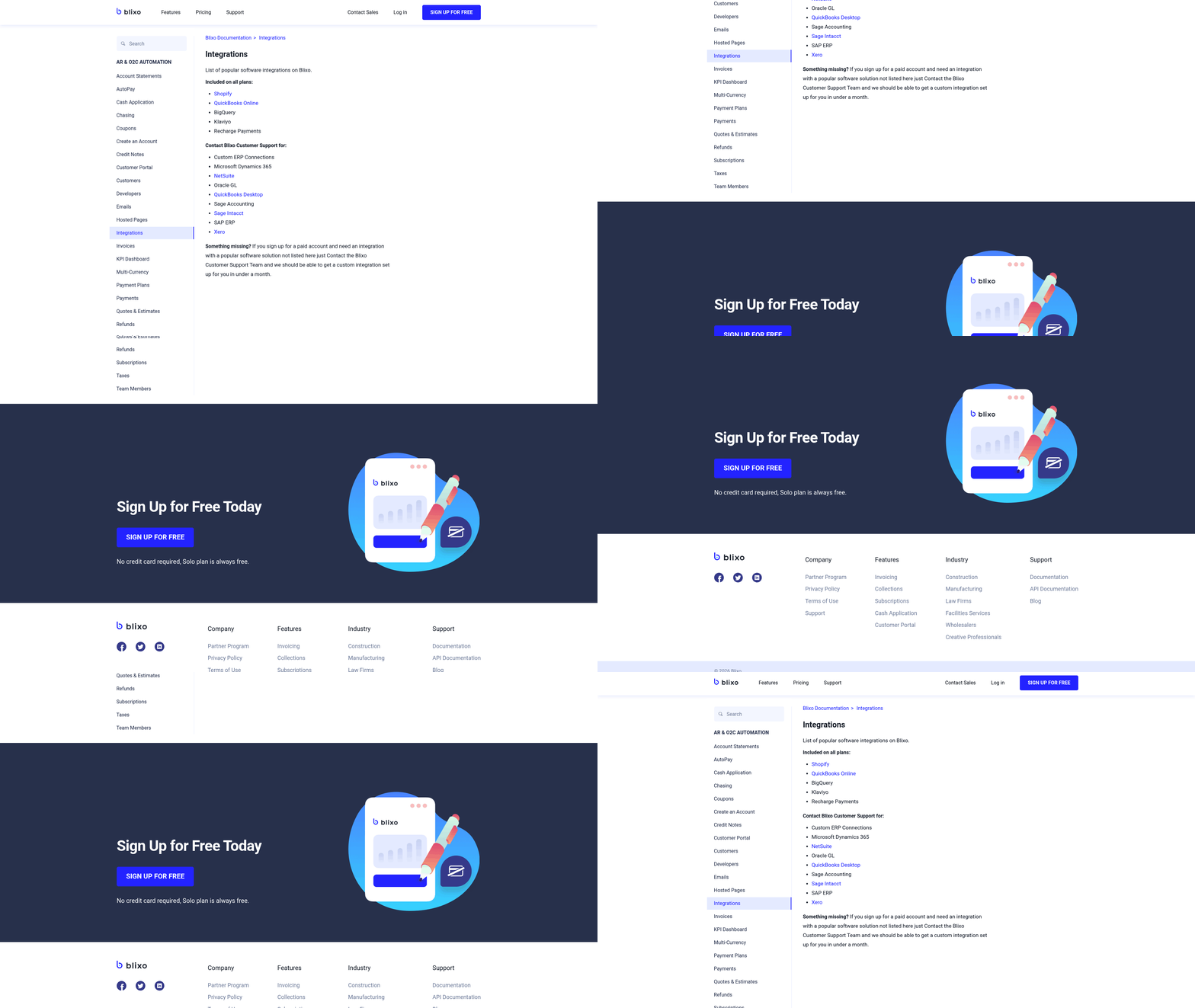
What Accounting and ERP Systems Can Blixo Integrate With?
Blixo connects with a wide range of accounting platforms and ERP systems, including popular solutions used by businesses of all sizes. These systems typically handle invoice generation, payment tracking, and financial reporting. Blixo’s integration capabilities are designed to align with standard data structures, ensuring compatibility without requiring major overhauls to your existing workflows.
For example, Blixo can sync with ERP platforms that manage inventory, procurement, and sales pipelines, as well as accounting software that tracks revenue and expenses. The integration process is simplified through APIs or pre-built connectors, depending on the system’s architecture. A field mapping step ensures that data like customer names, invoice numbers, and payment terms transfer correctly between systems.
What Steps Are Required to Set Up Integration?
Begin by identifying the key data points that need to flow between Blixo and your accounting/ERP system. This includes customer details, invoice statuses, and payment histories. Next, configure the integration using Blixo’s setup wizard, which guides you through connecting your systems and defining data synchronization rules. As mentioned in the Configuring Blixo for Accounts Receivable Automation section, setting up smart invoicing templates is a crucial step in this process.
- Map fields accurately: Match Blixo’s data fields (e.g., customer ID, invoice number) to corresponding fields in your system. Misaligned fields can lead to errors like duplicated invoices or missing payments.
- Test workflows: Run sample transactions to verify that invoices, payments, and updates sync correctly. Adjust configurations if discrepancies arise.
- Enable real-time updates: Configure settings to ensure data reflects changes instantly across both platforms, preventing delays in collections.
Blixo’s documentation and support team provide step-by-step guidance for these tasks, ensuring minimal disruption to your operations.
How Can You Ensure Data Consistency and Minimize Errors?
Maintaining data integrity requires proactive monitoring and validation. Start by setting up automated checks to flag inconsistencies, such as mismatched payment amounts or duplicate entries. Schedule regular audits to compare data between Blixo and your accounting system, especially after system updates or process changes.
- Use validation rules: Define rules to reject transactions with missing or invalid data (e.g., incomplete customer information). Building on concepts from the Defining Your Accounts Receivable Automation Goals section, these validation rules help align automation with business priorities like reducing payment delays.
- Assign a point of contact: Designate a team member to oversee integration performance and resolve issues promptly.
- use audit logs: Review logs to trace errors back to their source and refine integration workflows.
One company reduced manual reconciliation efforts by 60% after implementing these practices, according to internal reports.
What Real-World Benefits Can Integration Deliver?
Businesses that integrate Blixo with their accounting systems often see measurable improvements in efficiency and cash flow. For instance, a mid-sized manufacturer automated its AR process by linking Blixo to its ERP system, cutting the time spent on invoicing and collections by 40%. Another organization reported a 25% reduction in late payments by synchronizing payment reminders between platforms.
The benefits extend beyond speed. Automated integrations reduce the risk of human error, ensuring that financial reports remain accurate and compliant. Blixo’s integration capabilities also enable businesses to scale more effectively, as new customers and transactions are processed seamlessly without manual intervention.com/blog/en/post/implement-automated-accounts-receivable-solutions-with-blixo-2676/). By following these steps and best practices, you’ll position your business to reap the full value of Blixo’s automation tools.
Monitoring and Optimizing Blixo Accounts Receivable Automation
To ensure Blixo’s accounts receivable automation performs optimally, start by tracking key performance indicators (KPIs) that directly impact payment efficiency and cash flow. As mentioned in the Defining Your Accounts Receivable Automation Goals section, aligning KPIs with business priorities like reducing payment delays ensures measurable outcomes. Focus on metrics like payment recovery rate, invoice processing time, days sales outstanding (DSO), and payment error rate. These KPIs reveal how effectively automation reduces delays, minimizes errors, and accelerates collections.
- Track invoice processing time to identify bottlenecks. Building on concepts from the Configuring Blixo for Accounts Receivable Automation section, smart invoicing templates streamline initial data entry, which directly impacts processing speed. Blixo’s AI-driven workflows aim to cut this time by 30% compared to manual processes.
- Review payment error rate to ensure Blixo’s machine learning engine improves accuracy over time, minimizing manual reconciliation. Seamless data flow, as outlined in the Integrating Blixo with Accounting and ERP Systems section, ensures training data reflects real-world scenarios, further reducing errors.
By combining KPI tracking, real-time monitoring, and iterative rule adjustments, businesses using Blixo can sustain long-term efficiency gains. Continuous optimization ensures automation remains aligned with strategic priorities, turning accounts receivable from a reactive task into a proactive growth driver.
Frequently Asked Questions
1. How does Blixo reduce payment delays?
Blixo reduces payment delays by 30% through automated multi-channel reminders (email, SMS, phone), ensuring timely payments without manual follow-ups. This proactive system minimizes late payments by 35% compared to manual processes.
2. What are the main benefits of AR automation?
AR automation reduces missed payments by 35%, cuts administrative work by 50%, and lowers operational inefficiencies by 35%. It also improves sales conversion by 70% via dynamic discounting and faster revenue recognition.
3. How does Blixo integrate with accounting systems?
Blixo seamlessly integrates with QuickBooks, Xero, and ERPs, enabling scalable automation. This ensures real-time data synchronization and reduces reconciliation errors by 40% through machine learning.
4. What error reduction does Blixo’s automation provide?
Blixo’s automation reduces reconciliation errors by 40% using machine learning. Automated cash application minimizes manual data entry mistakes, improving financial reporting accuracy and compliance.
5. How quickly do businesses see results with Blixo?
Businesses often see 25–30% faster payment collections within weeks. Small businesses report 30% higher efficiency in payment collection, while staffing agencies achieve measurable cash flow improvements in 4–6 weeks.
6. Which industries benefit most from Blixo?
Law firms, startups, and staffing agencies see 25–70% improvements. Blixo’s tools address slow payment recovery, high administrative workloads, and scalability gaps across industries.
7. How does dynamic discounting boost sales conversion?
Dynamic discounting increases sales conversion by 70% by offering customers early payment incentives. This strategy improves cash flow efficiency while aligning payment terms with buyer preferences.