

Automated Accounts Receivable Solutions Checklist for Blixo Users

Key Takeaways
- Automating AR reduces revenue losses by up to 5% annually caused by manual process inefficiencies.
- Blixo users report a 30% time reduction in accounts receivable tasks after automation.
- Machine learning in AR tools achieves near-perfect payment-to-invoice matching accuracy.
- Automated cash application cuts days sales outstanding (DSO) and accelerates cash flow.
- Blixo integrates seamlessly with existing systems to streamline invoicing and collections.
- Automation resolves payment exceptions in seconds, reducing manual reconciliation delays.
- Automated AR solutions ensure compliance while minimizing errors in financial data handling.
Related Video
Watch: Blixo Lifetime Deal $79 - Subscription Billing & Accounts Receivable Automation | Blixo Review by The SaaS Deals
Why Automated Accounts Receivable Solutions Matter
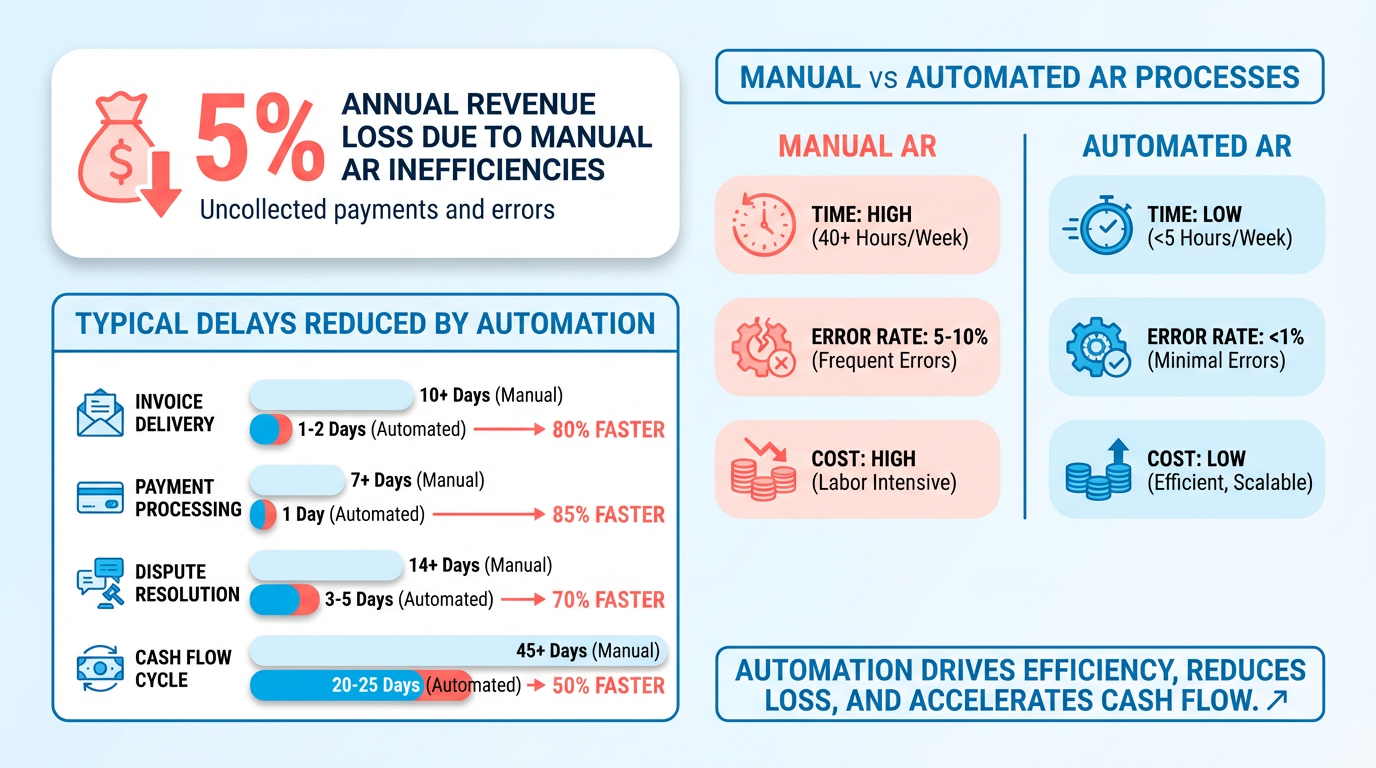
Automated accounts receivable (AR) solutions are no longer a luxury-they’re a necessity for businesses aiming to stay competitive. Manual AR processes are error-prone, time-consuming, and costly, with studies showing companies lose up to 5% of revenue annually due to inefficiencies in collections and invoicing. By automating these workflows, businesses reduce delays, minimize manual errors, and enable cash flow faster. As mentioned in the Configuring Blixo for Automated Accounts Receivable Solutions section, Blixo’s tools integrate seamlessly with existing systems to streamline invoicing, payments, and collections.
Automation eliminates the guesswork and repetitive tasks tied to manual AR management. For example, businesses using Blixo report a 30% reduction in time spent on accounts receivable after implementing automated cash application and reconciliation tools. Machine learning algorithms match payments to invoices with near-perfect accuracy, resolving exceptions in seconds rather than hours. This means fewer late payments, lower DSO (days sales outstanding), and a significant boost in operational efficiency. Building on concepts from the Ensuring Data Security and Compliance with Blixo section, these tools also protect sensitive financial data while improving accuracy.
Businesses with high invoice volumes or complex billing needs see the most dramatic improvements. Subscription-based models, professional services, and enterprises managing global payments often struggle with manual tracking. As mentioned in the Evaluating Existing Accounts Receivable Workflows section, companies in industries like construction and legal services benefit from Blixo’s support for recurring invoices and multi-currency transactions. Smaller teams also benefit-Blixo’s Business plan supports up to five users, making it scalable for growing businesses without requiring a dedicated finance department.
The rise of AI and predictive analytics is redefining AR management. Building on concepts from the Monitoring and Optimizing Automated Accounts Receivable Solutions with Blixo section, automation extends to customer self-service portals and real-time revenue visibility. This reduces back-and-forth communication and empowers customers. Additionally, SaaS providers like Blixo are integrating with banking systems and ERPs to create unified financial ecosystems-eliminating silos and providing real-time revenue visibility. As remote work grows, cloud-based solutions that require no software installation are becoming the standard, ensuring teams can manage AR from anywhere.
By automating accounts receivable, businesses gain more than just efficiency-they gain strategic advantages. Reduced DSO, lower operational costs, and improved customer satisfaction are just the beginning. With Blixo’s tools, companies can reinvest saved time and resources into growth initiatives, confident their financial operations are secure, scalable, and future-ready.
Evaluating Existing Accounts Receivable Workflows
When documenting roles and responsibilities for automation, consider the security guidelines outlined in the What Security Items Should You Check section to ensure user access and data handling meet baseline protections. For example, enabling two-factor authentication for AR team members can prevent unauthorized changes to automated workflows.
As mentioned in the Why Automated Accounts Receivable Solutions Matter section, manual processes like chasing payments or reconciling invoices are prime automation targets. By automating these tasks with Blixo, businesses avoid delays that lead to late fees and reduced cash flow efficiency.
When refining workflows, the Monitoring and Optimizing Automated Accounts Receivable Solutions with Blixo section provides guidance on tracking KPIs and adjusting automation settings to sustain efficiency gains over time. Regular reviews should include security checks from the What Security Items Should You Check section to maintain compliance as workflows evolve.
Configuring Blixo for Automated Accounts Receivable Solutions
Building on concepts from the Evaluating Existing Accounts Receivable Workflows section, configuring Blixo for automated accounts receivable solutions requires a structured approach to ensure seamless invoicing, collections, and integration with existing systems. By using Blixo’s tools for smart invoicing, recurring payments, and automated dunning, businesses can reduce manual errors and improve cash flow efficiency. Below is a step-by-step checklist to guide the setup process..
What Should You Do to Set Up Smart Invoicing?
Smart invoicing automates the creation and delivery of invoices, ensuring consistency and reducing delays. Start by defining templates with dynamic fields for client names, service details, and payment terms. Blixo allows you to embed recurring invoice schedules directly into these templates, so businesses with regular billing cycles (e.g., monthly subscriptions or retainer fees) can save time.
- Create invoice templates with dynamic fields for client data, payment terms, and service descriptions.
- Enable automated sending to schedule invoices for specific dates or trigger them based on project milestones.
- Integrate payment gateways (e.g., credit cards, ACH) to allow clients to pay directly from the invoice.
For example, a law firm using Blixo can set up retainer invoices to auto-generate and send on the first day of each month, with embedded links for clients to pay instantly. This minimizes follow-up and speeds up cash collection..
How Can You Configure Recurring Invoices?
Recurring invoices are ideal for subscription-based or retainer models. Blixo lets you define billing intervals (daily, weekly, monthly) and specify proration rules for partial periods. Use the platform’s subscription management tools to adjust plans or pause billing without manual intervention.
- Define billing cycles (e.g., monthly, quarterly) and set proration rules for early cancellations or plan changes.
- Link recurring invoices to customer accounts to ensure accurate tracking of payments and outstanding balances.
- Set up alerts for failed payments, allowing quick resolution of issues like expired credit cards.
A construction company, for instance, might use recurring invoices to bill clients weekly for ongoing projects. Blixo’s automated reminders ensure clients receive timely notices, reducing the risk of late payments..
What Steps Are Required for Automated Collections and Dunning?
Automated collections and dunning workflows prevent overdue payments from becoming delinquent. Blixo’s collections AI identifies high-risk accounts and triggers follow-up actions like email reminders or SMS notifications. Pair this with customizable dunning policies to escalate late fees or suspend services if needed.
- Configure dunning rules (e.g., number of retry attempts, late fee percentages) based on industry standards.
- Enable multi-channel reminders (email, SMS) to notify clients of upcoming or missed payments.
- Review collections reports weekly to identify trends in late payments and adjust strategies.
One user noted that Blixo’s automated follow-ups reduced their average days sales outstanding (DSO) by 40% compared to manual tracking. For example, a SaaS business could automatically send a late fee notice after 15 days of a missed payment, then pause access to the service after 30 days..
How Do You Integrate Blixo with ERP or Accounting Systems?
As mentioned in the Ensuring Data Security and Compliance with Blixo section, seamless integration with ERP systems like QuickBooks or accounting platforms ensures financial data stays synchronized. Blixo supports CSV bulk imports for customers, invoices, and payments, reducing setup time. For deeper integration, use APIs to sync data in real time, ensuring consistency across systems.
- Map Blixo fields to your ERP’s data structure (e.g., align customer IDs, product codes).
- Schedule automated syncs to update financial records daily or hourly, depending on transaction volume.
- Test reconciliation workflows to verify that payments and invoices match between systems.
A manufacturing firm might integrate Blixo with their ERP to auto-generate invoices from purchase orders, eliminating double data entry and reducing errors..
What Best Practices Should You Follow for Testing?
Before going live, validate all configurations to avoid disruptions. Use Blixo’s sandbox environment to simulate invoice generation, payment processing, and dunning workflows. Check that custom customer portals display the correct information and that clients can update their payment methods without errors.
- Run test transactions for recurring invoices and verify that amounts and schedules align with expectations.
- Validate dunning workflows by triggering late payment scenarios and confirming follow-up actions.
- Invite a small group of clients to test the customer portal and provide feedback on usability.
Building on concepts from the Monitoring and Optimizing Automated Accounts Receivable Solutions with Blixo section, after validating all configurations, regularly review performance metrics like DSO and payment success rates to refine workflows and maximize cash flow.. By following this checklist, businesses can configure Blixo to automate accounts receivable processes efficiently. Regularly review performance metrics like DSO and payment success rates to refine workflows and maximize cash flow.
Ensuring Data Security and Compliance with Blixo
Ensuring data security and compliance is critical when automating accounts receivable processes, as sensitive financial and customer information flows through the system. Blixo addresses these concerns by integrating encryption, access controls, and compliance frameworks into its SaaS service. Below is a structured checklist to help users align their workflows with security best practices and regulatory requirements like PCI DSS and GDPR.
What Security Measures Should You Prioritize?
Your security checklist must include encryption, access restrictions, and audit trails to protect data at all stages. Start by verifying that Blixo encrypts data both in transit and at rest using industry-standard protocols.
- Enable AES-256 encryption for stored customer payment details and financial records. This prevents unauthorized access to sensitive data even if it’s intercepted. As mentioned in the Evaluating Existing Accounts Receivable Workflows section, encryption is a minimum baseline for secure data handling.
- Implement role-based access controls (RBAC) to limit user permissions. For example, restrict invoice editing to finance team members only. Building on concepts from the Configuring Blixo for Automated Accounts Receivable Solutions section, RBAC ensures proper access governance during implementation.
- Activate multi-factor authentication (MFA) for all admin accounts to reduce the risk of credential theft.
How Can You Maintain Compliance with Blixo?
PCI DSS and GDPR compliance require specific safeguards for payment data and personal information. Blixo supports these standards through built-in tools, but users must configure them correctly.
- Tokenize payment data to replace credit card numbers with non-sensitive tokens. This reduces PCI scope by keeping actual card details off your servers.
- Anonymize customer data in test environments to comply with GDPR’s data minimization principle. Avoid using real names or addresses for training purposes.
- Schedule quarterly vulnerability scans using Blixo’s integration with third-party security tools. This helps identify weaknesses before attackers exploit them.
What Certifications Should You Verify?
Blixo holds several compliance certifications that simplify regulatory adherence for users. Confirm these credentials during your implementation process.
- SOC 2 Type II certification ensures Blixo meets rigorous standards for data security, availability, and processing integrity.
- PCI DSS Level 1 compliance guarantees the platform adheres to the highest payment card industry security requirements.
- ISO 27001 certification validates Blixo’s information security management system (ISMS), demonstrating a structured approach to risk mitigation.
How Can You Monitor Compliance Over Time?
Regulations evolve, so continuous monitoring is essential. Use Blixo’s audit logs and reporting features to track changes and generate compliance documentation.
- Review access logs monthly to detect unauthorized login attempts or unusual activity. Export these logs for internal audits.
- Update user permissions quarterly to reflect role changes. For example, revoke access for employees who transition to non-financial roles. Refer to the Monitoring and Optimizing Automated Accounts Receivable Solutions with Blixo section for strategies on refining permissions over time.
- Participate in annual compliance training for your team to reinforce data protection policies and Blixo’s security features.
What Are Common Compliance Pitfalls to Avoid?
Misconfigurations and overlooked workflows can create vulnerabilities. Address these areas to maintain a secure environment:
- Unsecured API integrations: Ensure all third-party connections to Blixo use HTTPS and validate API keys regularly.
- Inadequate data retention policies: Delete obsolete customer records promptly to reduce exposure under GDPR’s “right to be forgotten.”
- Lack of incident response plans: Define steps for reporting breaches, such as notifying affected customers and regulators within 72 hours under GDPR.
By following this checklist, Blixo users can automate accounts receivable processes while maintaining compliance and protecting sensitive data. The platform’s design prioritizes security without sacrificing usability, allowing teams to focus on financial operations confidently.
Monitoring and Optimizing Automated Accounts Receivable Solutions with Blixo
To ensure your automated accounts receivable (AR) workflows with Blixo remain efficient and scalable, focus on tracking key performance indicators (KPIs), using built-in analytics tools, and refining processes based on data. Here’s how to monitor and optimize your Blixo implementation effectively.
What KPIs Should You Track for Automated AR?
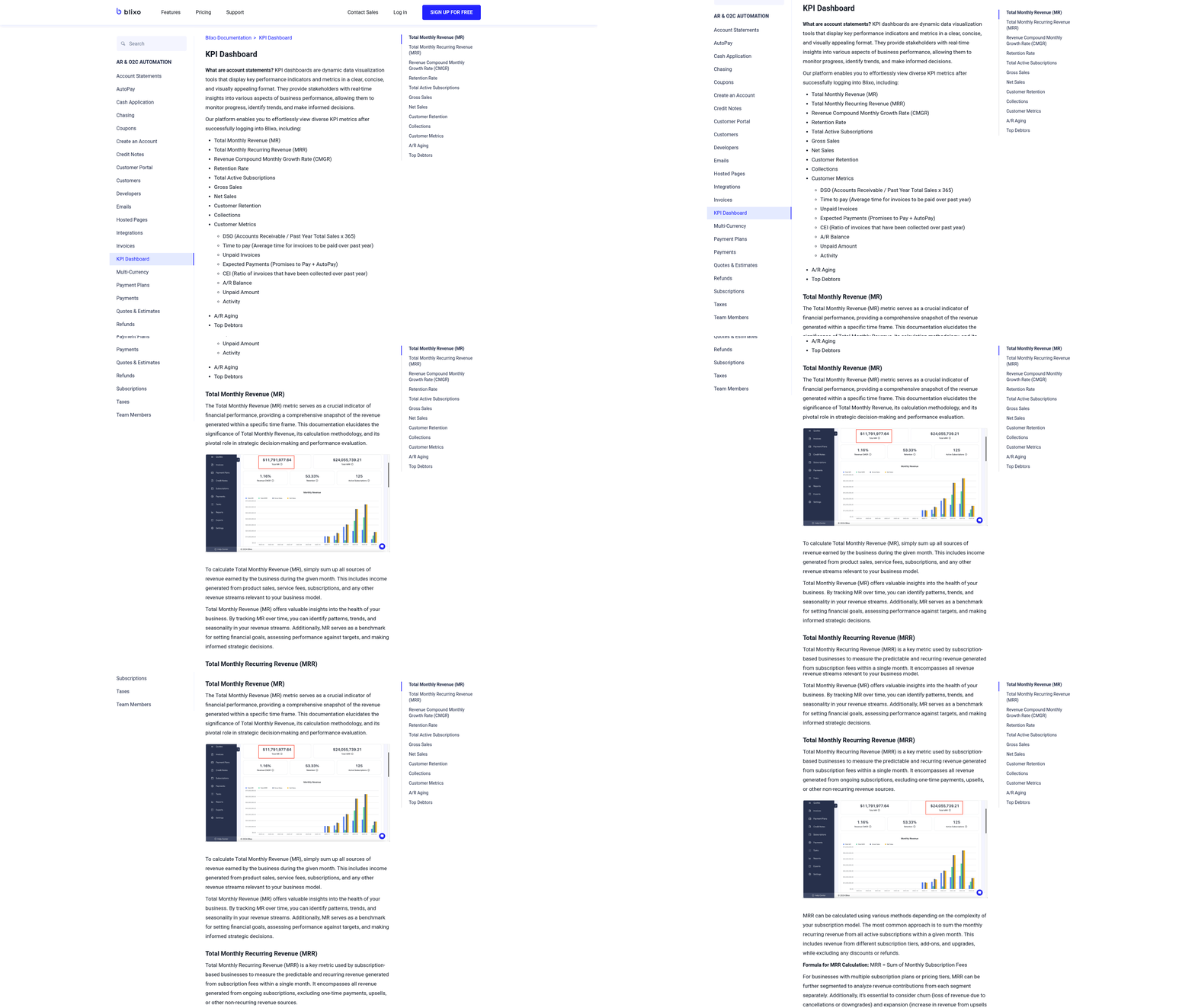
Start by measuring metrics that directly impact cash flow and operational efficiency. Days Sales Outstanding (DSO) is critical-it shows the average number of days it takes to collect payments. A lower DSO means faster cash availability, which fuels business growth. Cash flow forecasting is another key metric, allowing you to anticipate revenue gaps and allocate resources strategically. As mentioned in the Why Automated Accounts Receivable Solutions Matter section, manual AR processes are error-prone and costly, making automated KPI tracking essential for maintaining accuracy and efficiency. Blixo’s advanced analytics dashboard tracks these KPIs in real time, using automated data from bank syncs and payment histories. For example, if DSO spikes due to delayed payments, Blixo’s collections AI flags the issue and triggers automated follow-ups. Monitoring these metrics ensures you stay ahead of bottlenecks.
How Can Blixo Help You Analyze KPIs?
Blixo simplifies KPI analysis with tools like automated invoice status tracking and cash flow visualizations. The platform’s collections AI proactively identifies late invoices and suggests recovery strategies, such as sending payment reminders or adjusting payment terms for high-risk customers. For instance, if a client consistently pays late, Blixo’s system can recommend switching to a partial upfront payment model. Regularly review these insights in the customizable AR dashboard, which aggregates data on payment success rates, dispute resolution times, and team performance. This transparency lets you pinpoint inefficiencies, like manual reconciliation errors, and address them swiftly.
How Do You Identify Areas for Improvement?
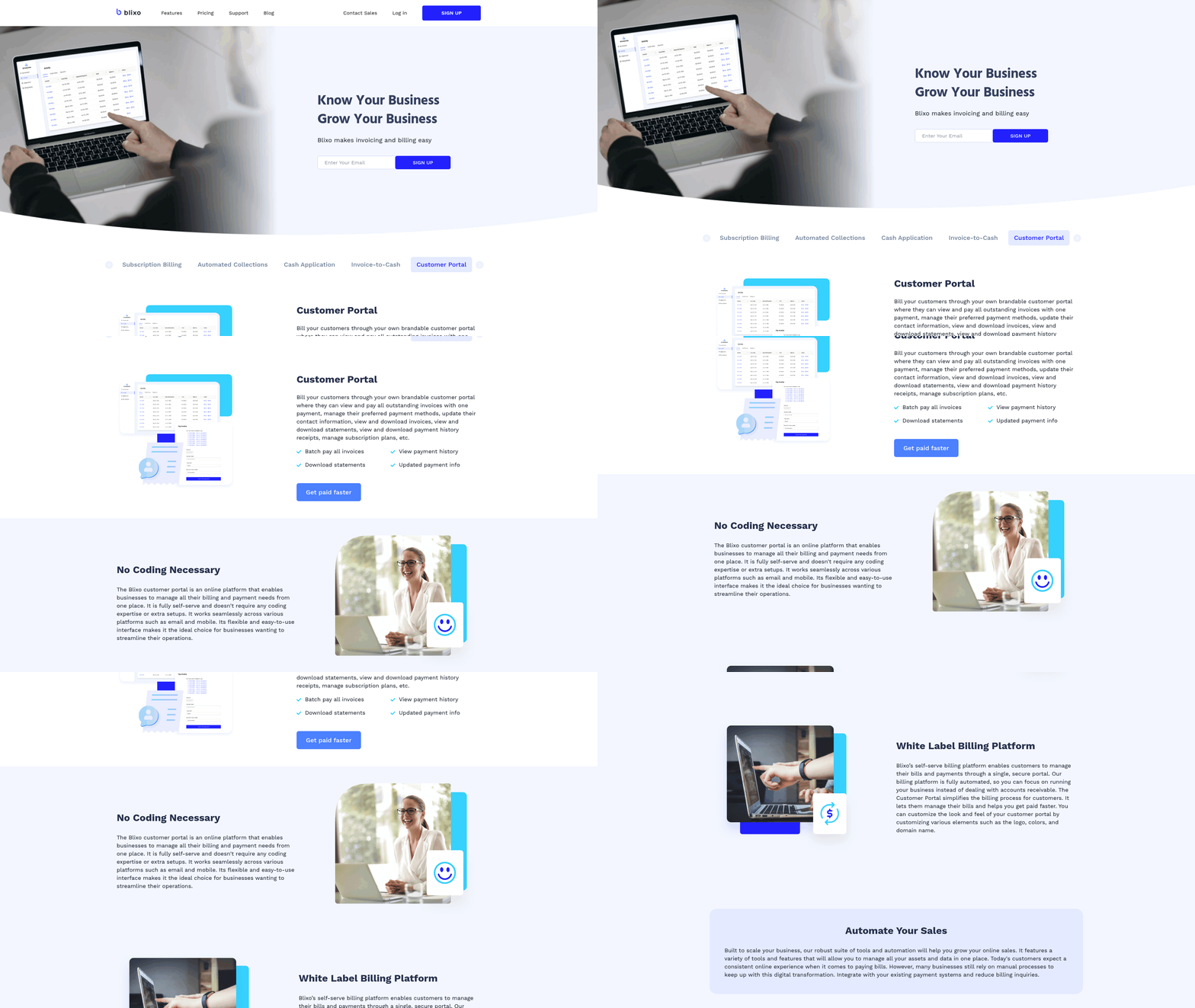
Look for gaps in automation and customer experience. A common issue is manual intervention in reconciliation, which Blixo’s automatic cash application feature reduces by matching payments to invoices without human input. If disputes still arise, use Blixo’s customer portal to let clients view invoices, dispute charges, and update payment methods directly-cutting resolution time by up to 50%. Also, audit your team’s workflows using Blixo’s role-based access controls. For example, if junior staff spend hours on data entry, enable bulk invoice imports via CSV to save time. Regularly test these optimizations by comparing DSO and staff productivity metrics before and after changes.
What Best Practices Support Continuous Optimization?
Adopt habits that align with Blixo’s design. Set monthly KPI reviews to assess trends in DSO, late payment rates, and automation accuracy. Use Blixo’s customizable templates to standardize invoices and payment terms, reducing client confusion. For scalability, use the Team or Business plan features-like unlimited customer support and automated invoicing-to handle growth without adding staff. One business reported saving 35% on factoring costs by integrating Blixo’s subscription billing tools, which automate recurring payments and reduce manual errors. Finally, train your team to use Blixo’s QuickBooks and Stripe integrations for seamless accounting, ensuring data consistency across platforms.
How Does Blixo Enable Scalable AR Operations?
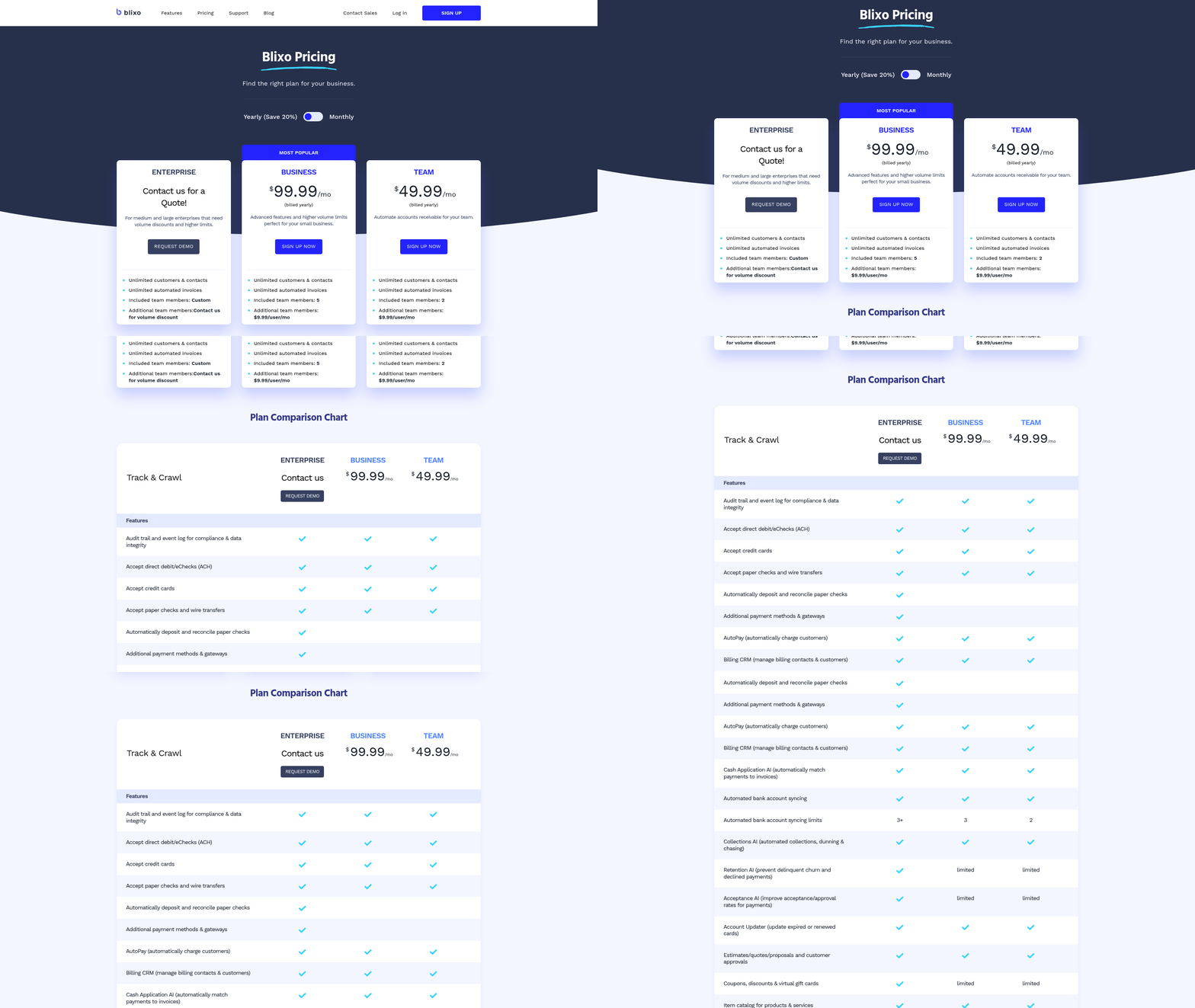
Blixo’s tiered pricing and flexible features support businesses at every stage. The Enterprise plan offers volume discounts and custom workflows, ideal for companies with high invoice volumes. Building on concepts from the Ensuring Data Security and Compliance with Blixo section, Blixo’s PSD2 and PCI DSS compliance ensures data security remains uncompromised as operations expand. For example, a mid-sized firm with 500+ monthly invoices uses Blixo’s AI-driven collections to reduce DSO from 45 to 28 days, accelerating reinvestment. Meanwhile, small businesses benefit from Blixo’s $49.99/month Team plan, which includes automated ACH and credit card payments-cutting time spent on collections by 60%. As your needs grow, Blixo’s compliance framework adapts, maintaining trust and regulatory adherence.
By consistently monitoring KPIs, refining workflows, and using Blixo’s automation tools, you’ll maintain a streamlined AR process that adapts to your business’s growth. The platform’s focus on reducing manual tasks-like reconciliation and collections-means you can redirect resources to strategic initiatives while ensuring steady cash flow. For implementation details, refer to the Configuring Blixo for Automated Accounts Receivable Solutions section to align your setup with optimization goals.
Frequently Asked Questions
1. How much time can businesses save by automating accounts receivable tasks?
Businesses can save up to 30% of the time spent on accounts receivable tasks after automation, as reported by Blixo users. This efficiency gain stems from streamlined invoicing, cash application, and payment reconciliation processes.
2. What revenue losses can manual AR processes cause annually?
Manual accounts receivable processes can lead to up to 5% annual revenue losses due to inefficiencies like delayed collections, errors in invoicing, and poor cash flow management. Automation helps mitigate these losses effectively.
3. How does machine learning improve payment accuracy in AR automation?
Machine learning in AR tools achieves near-perfect payment-to-invoice matching accuracy by analyzing patterns and resolving exceptions in seconds. This reduces manual reconciliation delays and ensures precise financial data handling.
4. Can automated AR solutions integrate with existing financial systems?
Yes, Blixo’s automated AR solutions integrate seamlessly with existing financial systems, enabling real-time invoicing, payments, and collections without disrupting current workflows or requiring extensive customization.
5. How does automation impact days sales outstanding (DSO)?
Automated cash application reduces days sales outstanding (DSO) by accelerating payment processing and reconciliation. This improves cash flow and lowers the average time it takes to collect receivables.
6. What compliance benefits do automated AR tools provide?
Automated AR solutions ensure compliance with financial regulations while minimizing human errors in data handling. They maintain accurate records and reduce risks of non-compliance through standardized, auditable workflows.
7. How quickly do automated systems resolve payment exceptions?
Automated AR systems resolve payment exceptions in seconds by using advanced algorithms to match payments to invoices. This eliminates hours of manual work and reduces delays in cash application and reconciliation.