

Automate Your Invoice Workflow with Blixo
Key Takeaways
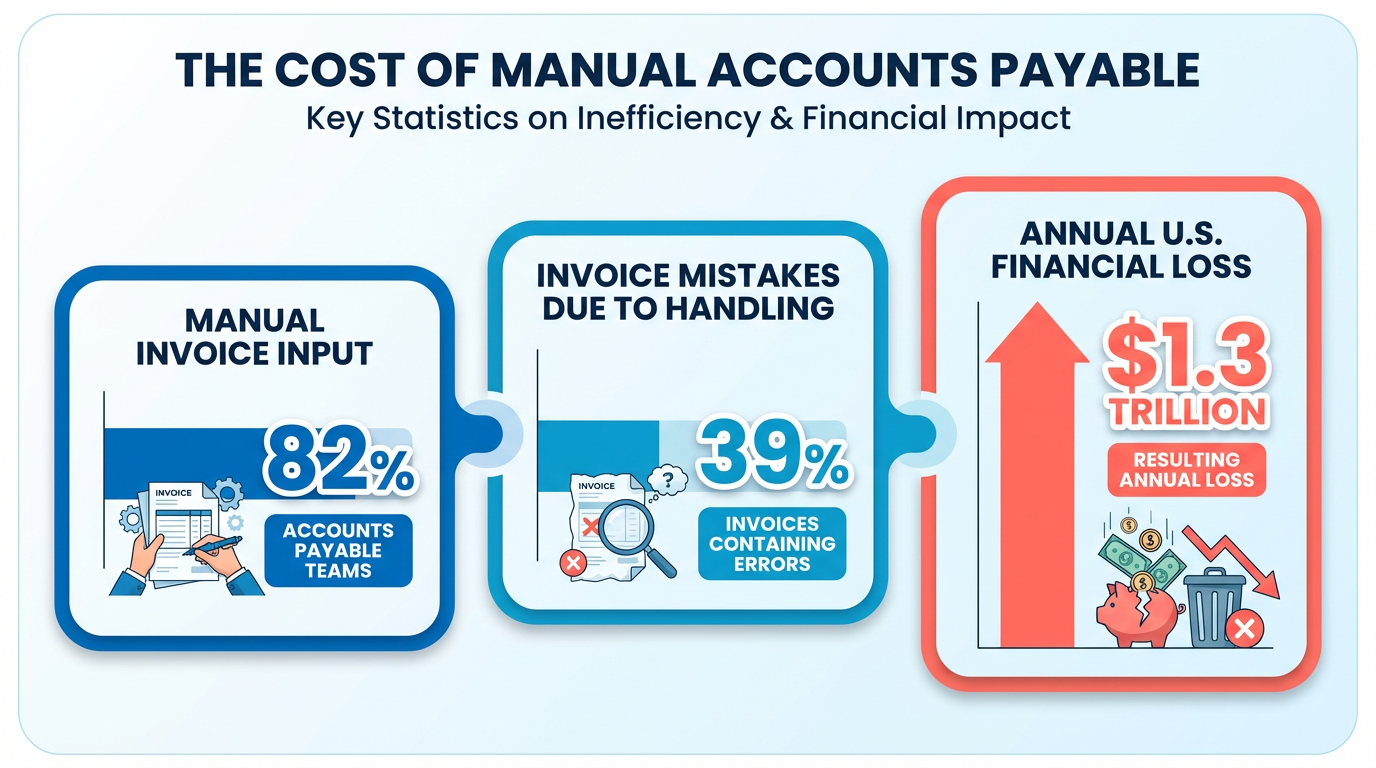
- Manual invoicing causes 39% of errors, costing U.S. businesses $1.3 trillion annually due to mistakes and delays.
- Automation reduces invoice processing time from 45 days to 3.1 days, accelerating cash flow and payments.
- 82% of accounts payable teams manually input invoices, creating inefficiencies and a 35% higher risk of missed payments.
- Blixo cuts invoice errors by 57%, minimizing disputes and saving 200+ hours yearly on reconciliation for 1,000 invoices.
- A law firm improved cash flow efficiency by 50% using Blixo’s automated cash application features.
- Manual processes waste 200+ hours annually reconciling invoices for just 1,000 documents.
- Automating invoicing prevents 35% of payment delays, ensuring operational continuity and growth opportunities.
Related Video
Watch: Red Cat Motion | Explainer Animation | Blixo by Red Cat Motion Studio
Why Automate Your Invoice Workflow Matters
Automation isn’t just about saving time-it’s about transforming how your business manages cash flow, reduces errors, and scales efficiently. Manual invoicing processes are riddled with inefficiencies: 82% of accounts payable teams still manually input invoices, leading to errors, delays, and lost productivity. With 39% of invoices containing mistakes due to manual handling, businesses collectively lose an estimated $1.3 trillion annually in the U.S. alone. Automation cuts through this chaos, slashing processing times from 45 days to just 3.1 days and reducing errors by up to 57%. As discussed in the Cost Savings and ROI of Automating Invoicing with Blixo section, these improvements lead to faster payments, fewer disputes, and a revenue cycle that keeps pace with growth.
Delayed payments directly impact cash flow, creating ripple effects across operations. Manual processes increase the risk of missed payments by 35%, forcing businesses to spend 200+ hours annually on reconciliation for just 1,000 invoices. When payments stall, teams waste hours chasing down missing documents or correcting errors. For example, a law firm using Blixo’s automation saw a 50% increase in cash flow efficiency by eliminating manual cash application tasks. Without automation, late payments become a bottleneck, limiting a business’s ability to invest in growth opportunities or meet supplier obligations.
Blixo addresses these challenges with AI-driven tools designed for accuracy and speed. Building on the concepts from the Core Features of Blixo for Invoice Management section, its intelligent matching engine automates payment reconciliation, achieving 97% accuracy and reducing manual effort by 75–85%. For a medium-sized business, this translated to a 70% reduction in invoice reconciliation time. The platform also handles complex workflows-like retrying failed payments at optimal times or sending multi-channel reminders-cutting payment delays by 30%. Unlike generic solutions, Blixo integrates seamlessly with banks and ERPs, ensuring scalability whether you process 100 invoices monthly or 100,000. Machine learning further refines results over time, adapting to unique invoice formats, including handwritten or non-English documents.
While all businesses gain from automation, certain organizations see transformative results:
- Small businesses reduce invoicing and collections time by 30%, as seen in Blixo case studies, allowing teams to focus on core operations.
- Enterprises handle high-volume workloads without compromising accuracy, with one company cutting purchase order processing from 30–45 minutes to 3–5 minutes.
- Professional services firms (e.g., law firms, consultancies) accelerate revenue recognition by reducing days sales outstanding (DSO) by 30%, ensuring faster cash access.
Blixo’s SaaS service is especially valuable for businesses struggling with paper-based systems or fragmented tools. A Turkish financial institution, for instance, slashed costs and boosted performance by switching from manual processes to Blixo’s cloud-based solution. By unifying invoicing, collections, and reconciliation in a single platform, Blixo turns invoice management from a cost center into a strategic advantage-boosting conversion rates by 70% and retention by 30% for users.
In today’s fast-paced economy, manual workflows are a liability. Automation isn’t optional-it’s a necessity for businesses aiming to stay agile, accurate, and profitable. With Blixo, the ROI is clear: fewer errors, faster payments, and teams freed to focus on growth.
Core Features of Blixo for Invoice Management
Blixo streamlines invoice management through automation, AI-driven tools, and seamless integrations, addressing pain points like delayed payments, manual errors, and fragmented workflows. Below is a breakdown of its core features, structured to highlight practical benefits and real-world impact.
How Does Blixo Automate Accounts Receivable?
Automated accounts receivable (AR) reduces administrative costs by up to 30% while cutting days sales outstanding (DSO) by 30%, according to Blixo’s research. As mentioned in the Why Automate Your Invoice Workflow Matters section, manual invoicing processes are error-prone and inefficient, whereas automation ensures faster cash flow and fewer payment delays. The platform automates invoice generation, payment reminders, and collections, reducing payment delays by 30% for small businesses. For example, a law firm reported a 25% increase in cash flow efficiency after automating invoicing and collections. By replacing manual processes-such as spreadsheet tracking or email follow-ups-Blixo minimizes missed payments and reconciliation errors, which are 35% more common in manual workflows.
A key differentiator is Blixo’s multi-channel reminders, which send automated notifications via email, SMS, or in-platform alerts. This ensures customers receive timely prompts, accelerating payment cycles. For businesses processing 1,000 monthly invoices, this automation saves over 200 hours annually on manual reconciliation. Vincent Mann, Founder of Globetown Media, calls Blixo “the ultimate solution for invoicing and payment management,” emphasizing its role in eliminating administrative headaches..
What Makes Blixo’s AI-Powered Cash Application Stand Out?
Blixo’s AI-driven cash application matches payments to invoices with high accuracy, reducing manual effort and reconciliation risks. Building on concepts from the Integrating Blixo with Accounting, CRM, and Payment Systems section, the system handles diverse payment types, including wire transfers, direct deposits, and checks, and integrates with banks and ERP systems for real-time data sync. Its machine learning engine improves over time, identifying unapplied payments and resolving exceptions in seconds. For instance, a medium-sized business using Blixo reduced invoice reconciliation time by 70%, while a law firm saw a 50% boost in cash flow efficiency.
The system handles diverse payment types, including wire transfers, direct deposits, and checks, and integrates with banks and ERP systems for real-time data sync. If a payment is disputed or partial, Blixo’s AI flags the issue and routes it to the appropriate team for resolution. This minimizes delays and ensures accurate revenue reporting. One company saved 30% on payment collection costs by using Blixo’s automated cash application, avoiding errors that cost businesses $1.3 trillion annually in the U.S..
How Does Blixo Manage Subscriptions and Recurring Billing?
Subscription management is a core feature, enabling businesses to automate recurring invoices, manage customer portals, and handle prorated charges or cancellations. Blixo supports customizable payment terms and dynamic discounting, which helped a Miami-based startup increase sales conversion by 70%. The platform also includes tools for tracking subscription health, such as churn rates and lifetime value metrics, allowing businesses to retain customers proactively.
A notable example is Elemental Deodorant, an online retailer that streamlined subscription billing and accounting with Blixo. Founder Matthew Schwartz highlighted how the platform reduced manual tasks, enabling his team to focus on growth. Users can also create self-service portals, letting customers update payment methods or view invoices independently. This reduces support requests and improves customer satisfaction..
What Integrations and Security Features Does Blixo Offer?
Blixo connects seamlessly with accounting and CRM systems like QuickBooks, Xero, and Sage Intaact, eliminating data silos and ensuring consistent records. This integration is critical for businesses that rely on real-time financial visibility to make informed decisions. For example, a medium-sized enterprise improved on-time payments by 25% after linking Blixo to its CRM, automating follow-ups based on customer payment history.
Security is prioritized with 256-bit encryption, safeguarding sensitive data without requiring on-premise software. The platform complies with industry standards for data protection, ensuring peace of mind for businesses handling high-volume transactions. Additionally, Blixo’s cloud infrastructure scales automatically, handling workloads from 100 to 100,000 invoices monthly without performance degradation..
Real-World Impact of Blixo’s Features
Businesses using Blixo report measurable improvements:
- 30% faster payment collection for small businesses using automated reminders.
- 70% reduction in reconciliation time for mid-sized firms.
- 35% cost savings on factoring, collections, and subscription fees, as detailed in the Cost Savings and ROI of Automating Invoicing with Blixo section.
By unifying invoicing, AR automation, and subscription management, Blixo transforms financial workflows from reactive tasks into strategic advantages. As Danilo, Blixo’s CEO, notes, the platform aims to “automate time-intensive manual processes,” giving teams more time to focus on growth.
Comparing Blixo to Other Invoice Automation Platforms
Blixo distinguishes itself through a combination of AI-driven automation, unified revenue management, and cost transparency. Unlike alternative solutions that fragment invoicing, collections, and subscription management into separate tools or charge extra fees for core features, Blixo integrates these functions into a single SaaS solution. As mentioned in the Core Features of Blixo for Invoice Management section, its intelligent matching engine achieves 97% accuracy in payment-to-invoice reconciliation, reducing manual corrections and disputes. This level of precision is often missing in generic providers that rely on basic rule-based systems.
Additionally, Blixo’s SaaS service handles collections, subscription billing, and cash application without additional fees. Many alternative solutions bundle these as premium modules or charge transaction-based costs, which can complicate budgeting. Building on concepts from the Cost Savings and ROI of Automating Invoicing with Blixo section, Blixo’s transparent pricing model eliminates hidden fees, offering businesses predictable expenses while saving 35% on factoring, collections, and subscription costs compared to traditional methods.
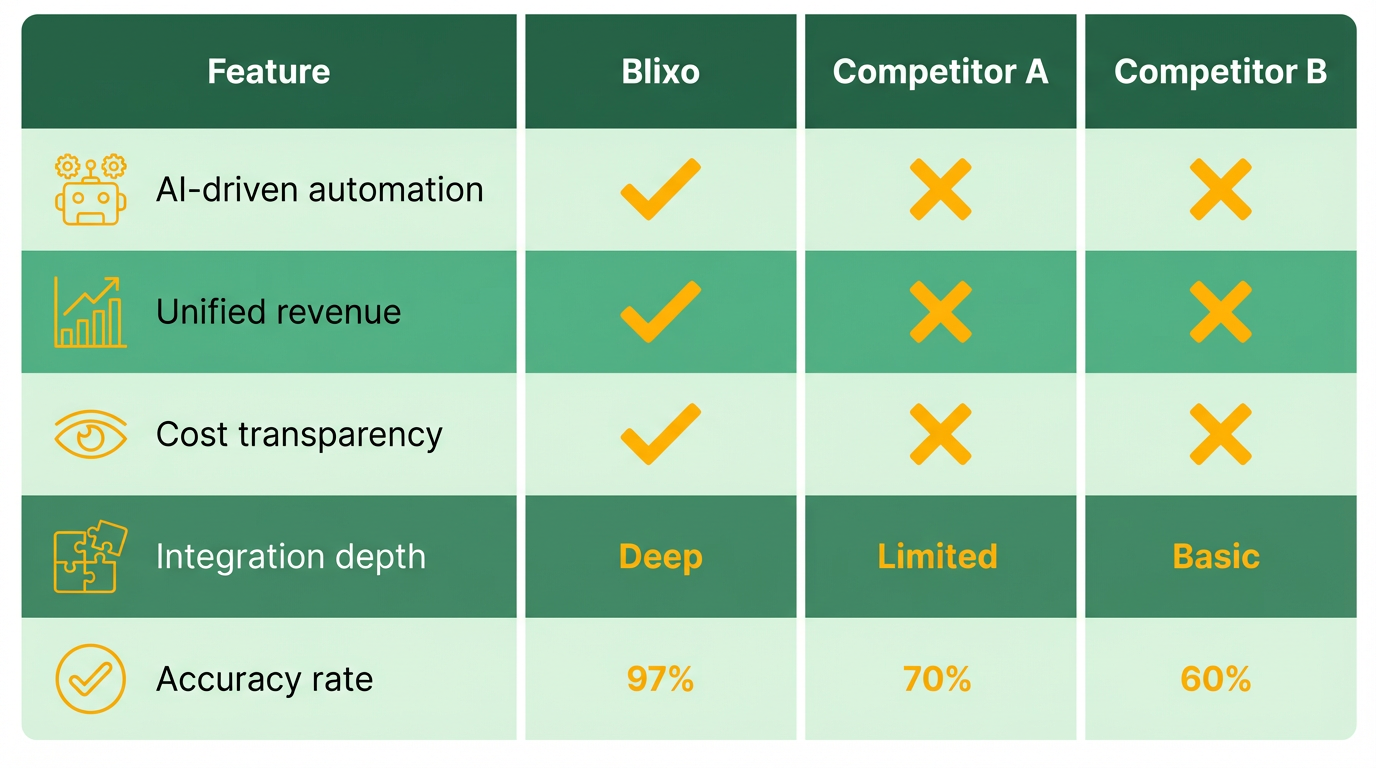
A direct comparison highlights Blixo’s strengths in automation and integration. Below is a summary of key differentiators:
| Feature | Blixo | Alternative Solutions |
|---|---|---|
| AI-Powered Matching | 97% accuracy, reduces manual work by 85% | Often basic OCR with 80–85% accuracy |
| Subscription Management | Included at no extra cost | Frequently sold as an add-on with additional fees |
| Collections Automation | Fully integrated, no extra costs | May require third-party tools or premium tiers |
| Accounting Integrations | Native sync with QuickBooks, Xero, and Sage | Limited or paid integrations |
| Real-Time Revenue Insights | Single-source dashboard for cash flow tracking | Fragmented data across multiple platforms |
Blixo also supports non-English and handwritten invoices via OCR and machine learning, a feature many generic providers lack. This flexibility ensures businesses with diverse invoice formats avoid delays. As detailed in the Integrating Blixo with Accounting, CRM, and Payment Systems section, native integrations with platforms like QuickBooks and Xero further streamline workflows. For instance, one company automated its AP workflows with Blixo, reducing processing time by 90% and freeing staff for strategic tasks.
Blixo’s pricing model prioritizes simplicity and scalability. Unlike many platforms that impose tiered pricing based on transaction volume or user count, Blixo offers a flat-rate structure with no hidden fees. This approach contrasts sharply with alternative providers, where costs can escalate unpredictably as businesses grow. For example, a midsize e-commerce company using Blixo’s subscription billing saved $12,000 annually by avoiding per-transaction charges from prior tools.
Customer support is another area where Blixo excels. The platform includes dedicated onboarding, 24/7 assistance, and a library of self-service resources. A financial institution in Turkey reported 30% faster audit completion after switching to Blixo, citing the team’s responsiveness as a key factor. As outlined in the Step-by-Step Setup: Getting Started with Blixo section, the onboarding process ensures businesses are equipped to use these support resources from day one. User testimonials reinforce this:
“Blixo streamlined our invoicing and payment processes so seamlessly that I can focus on my art instead of chasing payments.” – Vincent Mann, Founder of Globetown Media
For businesses evaluating alternatives, Blixo’s combination of 70% higher conversion rates, 30% improved retention, and measurable cost savings positions it as a standout choice. While other providers may offer similar tools, Blixo’s holistic approach to automation-from revenue generation to cash application-creates a unified workflow that minimizes complexity and maximizes efficiency.
Cost Savings and ROI of Automating Invoicing with Blixo
Manual vs. Automated Costs Manual invoicing costs vary based on labor rates, error resolution, and late fees. At an average wage of $30/hour, a team spending 20 hours weekly on invoicing could save $31,200 yearly by automating the process. Blixo’s automation also cuts error rates from 35% to just 3%, preventing costly rework. As mentioned in the Core Features of Blixo for Invoice Management section, these improvements stem from AI-driven validation tools that streamline accuracy and reduce manual intervention.
Breakdown of Savings by Feature
- Reduced Labor: Automating data entry and approvals saves 75–85% of time spent on manual tasks.
- Minimized Late Fees: Blixo’s multi-channel reminders reduce payment delays by 30%, cutting late fee costs by up to 40%.
- Faster Cash Flow: Automating billing reduces days sales outstanding (DSO) by 30%, accelerating revenue recognition.
- Error Reduction: AI-driven processing lowers error rates by 57%, avoiding disputes and rework. These features are detailed in the Core Features of Blixo for Invoice Management section, which outlines how Blixo addresses workflow inefficiencies.
Real-World ROI with Blixo
One business reduced its invoice processing time from 45 days to 3.1 days by adopting Blixo, achieving full ROI within six months. Building on concepts from the Step-by-Step Setup: Getting Started with Blixo section, this rapid implementation enabled the company to reinvest cash flow into growth initiatives. Small businesses using Blixo’s solution have reported a 30% reduction in invoicing and collections time, translating to $15,000–$25,000 in annual savings for teams with moderate invoice volumes.
What Makes Blixo’s ROI Measurable? Unlike generic providers, Blixo offers transparent cost tracking and performance metrics to quantify savings. As discussed in the Comparing Blixo to Other Invoice Automation Platforms section, this level of cost transparency ensures businesses can directly measure labor and error-related savings against implementation investments. For example, a retail chain automated its vendor payments with Blixo, cutting approval cycles from 14 days to 2.5 days and reducing reconciliation staff by 40%. The savings from streamlined operations offset implementation costs in under four months.
Integrating Blixo with Accounting, CRM, and Payment Systems
Integrating Blixo with your existing systems streamlines invoice workflows and reduces manual tasks. Start by identifying compatible platforms-Blixo supports accounting tools like QuickBooks, CRM systems such as Salesforce, and payment processors including Stripe. These integrations automate data flow between platforms, ensuring real-time updates and reducing errors. Below, we break down the process for a popular accounting system, troubleshoot common issues, and share a real-world example. As mentioned in the Why Automate Your Invoice Workflow Matters section, automation transforms how businesses manage cash flow, making integrations critical for efficiency.
Which Systems Can You Integrate with Blixo?
Blixo works seamlessly with widely used accounting, CRM, and payment platforms. Key supported systems include:
- Accounting: QuickBooks, Xero
- CRM: Salesforce, HubSpot
- Payment Systems: Stripe, PayPal
These integrations let you sync invoice data, customer details, and payment statuses automatically. For example, when a payment clears in Stripe, Blixo updates your accounting system in real time. Building on concepts from the Core Features of Blixo for Invoice Management section, these integrations use AI-driven tools to address fragmented workflows and manual errors.
How Do You Integrate Blixo with QuickBooks?
Start by connecting Blixo to QuickBooks in five straightforward steps:
- Log in to Blixo: manage to the Integrations section and select QuickBooks.
- Authorize Access: Use your QuickBooks credentials to grant Blixo read/write permissions.
- Map Data Fields: Align Blixo’s invoice fields (e.g., customer names, amounts) with QuickBooks’ corresponding fields.
- Test the Sync: Send a sample invoice through Blixo to verify it appears in QuickBooks.
- Enable Automation: Set rules, like auto-generating invoices when a sales order is created in QuickBooks.
For detailed guidance on invoice approval workflows, see this resource.
What Are Common Integration Issues and Fixes?
Even smooth integrations face occasional hiccups. Address these problems proactively:
- Authentication Errors: Double-check API keys or login credentials. Regenerate tokens if expired.
- Data Sync Delays: Ensure both systems are on the same time zone and check for internet connectivity issues.
- Mismatched Fields: Revisit your data mapping in Blixo’s settings to correct misaligned fields.
- Failed Transactions: Review error logs in Blixo’s dashboard to identify failed payments or invoices.
If troubleshooting fails, Blixo’s support team offers step-by-step assistance to resolve conflicts quickly.
What Does a Successful Integration Look Like?
One company automated its invoice process by linking Blixo with QuickBooks and Stripe. Before integration, their team spent 20 hours weekly manually entering data. After connecting Blixo, invoice creation and payment tracking became fully automated, saving 15 hours per week. Payments from Stripe now update QuickBooks instantly, reducing reconciliation time by 70%.
This example highlights how Blixo’s integrations cut administrative work and improve accuracy. As detailed in the Cost Savings and ROI of Automating Invoicing with Blixo section, such efficiencies align with the broader cost reductions seen across automated workflows. By syncing systems, businesses gain real-time visibility into cash flow and reduce errors caused by manual data entry.
Start with one integration, like QuickBooks, then expand to other systems as needed. Use Blixo’s intuitive tools to customize workflows and ensure every platform works in harmony.
Step-by-Step Setup: Getting Started with Blixo
Setting up Blixo begins with a streamlined onboarding process designed to integrate seamlessly into your existing financial workflows. By automating invoice creation, payment collection, and reconciliation, Blixo reduces administrative costs by up to 30% and minimizes errors. Below is a step-by-step guide to configuring the platform, testing its features, and using its capabilities for maximum efficiency.
How Do You Onboard with Blixo?
The onboarding process starts with connecting your accounting systems to Blixo. As mentioned in the Integrating Blixo with Accounting, CRM, and Payment Systems section, the platform integrates with tools like QuickBooks and Xero to eliminate data silos, ensuring real-time synchronization of financial data. Next, map your accounts receivable workflows to identify high-impact automation areas-such as automated reminders or cash application-tailored to your business needs.
To begin:
- Create an account: Sign up via Blixo’s website and verify your email.
- Connect accounting software: Authorize Blixo to access your accounting platform using OAuth or API keys.
- Upload invoice templates: Configure invoice formats to match your branding and legal requirements.
- Assign user roles: Define permissions for team members to control access to sensitive financial data.
A representative from Blixo will guide you through the setup, ensuring your workflows align with best practices. For example, one medium-sized enterprise improved on-time payments by 25% after implementing a self-service portal during onboarding.
How Do You Configure Blixo for Your Workflow?
Building on concepts from the Core Features of Blixo for Invoice Management section, Blixo’s customization options let you automate repetitive tasks while maintaining control over critical decisions. Key configuration steps include:
- Automated reminders: Set rules for sending payment reminders based on due dates, reducing payment delays by 30% for small businesses.
- Dynamic discounting: Enable early payment incentives to accelerate cash flow, as seen in a Miami-based startup that boosted sales conversion by 70%.
- Exception handling: Configure workflows to flag discrepancies, such as mismatched payments, and assign resolution priorities.
The platform’s machine learning engine improves over time, matching unapplied payments to invoices in seconds. To secure data, Blixo uses 256-bit encryption, ensuring compliance with industry standards. For businesses with complex needs, the self-service portal can be customized to allow clients to view statements, make payments, or dispute charges without IT intervention.
How Do You Test and Optimize Blixo’s Features?
After configuration, test Blixo with a small set of invoices to validate its performance. As outlined in the Best Practices for Maximizing Invoice Automation with Blixo section, start by:
- Running a dry run: Process 10–15 sample invoices through Blixo to verify accuracy in cash application and reconciliation.
- Monitoring payment timelines: Track whether automated reminders reduce delayed payments compared to manual follow-ups.
- Analyzing reports: Use Blixo’s dashboards to measure metrics like days sales outstanding and payment error rates.
During testing, evaluate how AI-driven insights identify patterns in client payment behaviors, enabling proactive adjustments to collection strategies. For instance, adjusting the timing of late fees or refining communication preferences can improve client responsiveness. Refine automation rules based on test results to balance efficiency with customer experience.
Real-World Example: A Small Business Success Story
A small business using Blixo automated reminders and cash application to achieve a 30% increase in payment collection efficiency. By eliminating manual data entry, the team reallocated 15 hours monthly to strategic tasks. As Vincent Mann, founder of Globetown Media, notes, “Blixo is the ultimate solution for invoicing and payment management-say goodbye to administrative headaches.”.
By following these steps, businesses can transform their invoice workflows, reduce operational inefficiencies, and focus on growth.
Best Practices for Maximizing Invoice Automation with Blixo
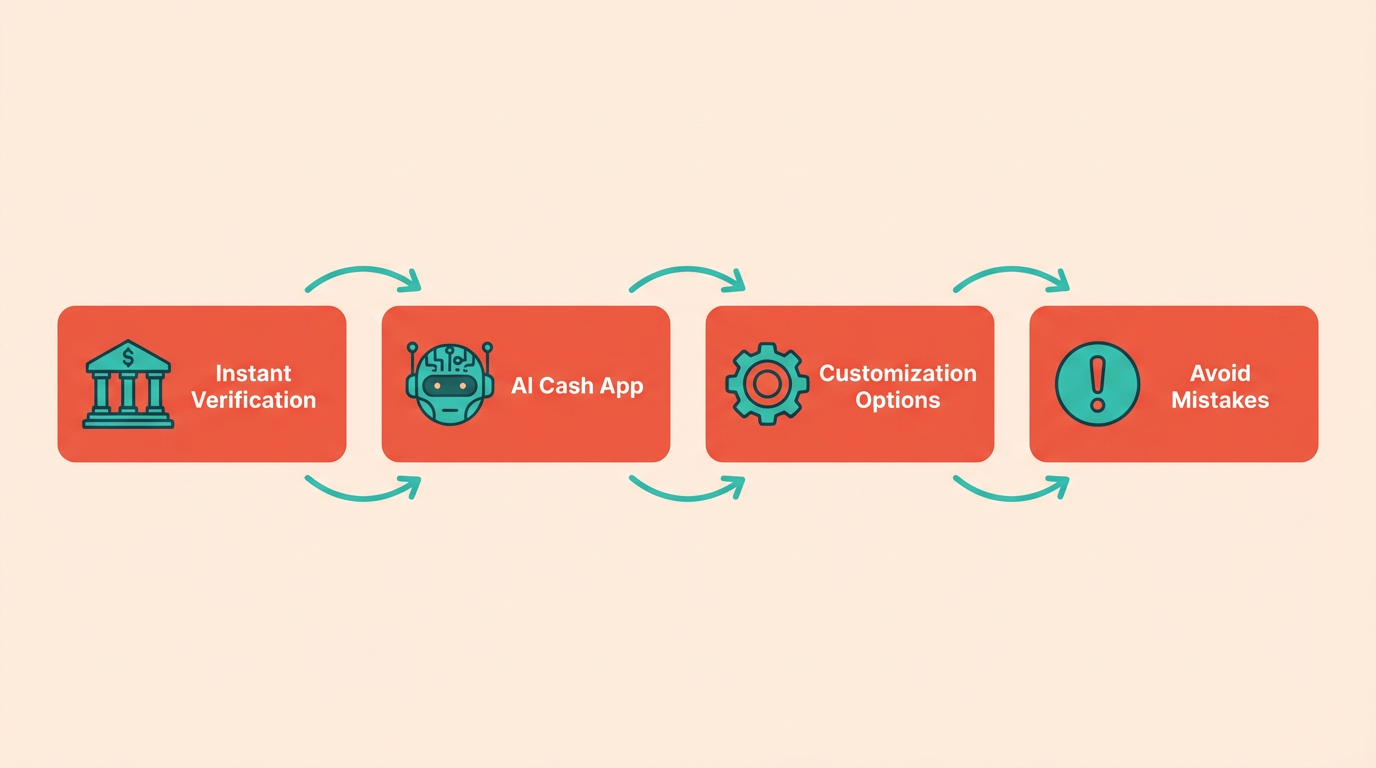
To get the most out of Blixo’s invoice automation, focus on streamlining workflows, customizing tools to your business needs, and avoiding common setup mistakes. Start by using Blixo’s instant bank account verification and AI-powered cash application to eliminate manual checks and speed up payment processing. These features are detailed in the Core Features of Blixo for Invoice Management section, which outlines how Blixo addresses key invoicing challenges.
How Do You Optimize Your Invoicing Workflow?
Blixo’s automated retries and smart payment reminders ensure invoices are processed faster. When a payment is declined, the system schedules retries at optimal times and sends targeted reminders, cutting the need for manual follow-ups. For example, one company reduced its average payment cycle by 40% by enabling these features. Pair this with remote check deposit to digitize paper payments, matching them to the correct invoices automatically. This reduces reconciliation time and minimizes errors from manual data entry. Building on concepts from the Integrating Blixo with Accounting, CRM, and Payment Systems section, these optimizations align with centralizing financial operations for efficiency.
To further streamline workflows, use Blixo’s factory feature to secure upfront payments for services or goods. This shifts financial risk to the platform and guarantees cash flow for your business. Smaller firms, in particular, benefit from this by avoiding credit risks while maintaining steady operations.
What Customization Options Exist for Your Business?
Blixo allows you to tailor automation to your specific needs. For instance, configure the system to apply cash to invoices using rules that match your accounting practices. If your business handles high volumes of checks, set up rules to prioritize remote deposits and automate matching. Larger enterprises might integrate Blixo with existing ERP systems to centralize financial operations, while startups can use basic automation to reduce overhead. As outlined in the Integrating Blixo with Accounting, CRM, and Payment Systems section, seamless integration is critical for maximizing automation benefits.
Customization isn’t just about features-it’s about aligning the platform with your team’s workflow. Train staff to use Blixo’s dashboards for real-time visibility into accounts receivable, enabling proactive decision-making. For example, a mid-sized vendor used Blixo’s customizable alerts to catch discrepancies early, reducing disputes by 30%.
What Pitfalls Should You Avoid?
One common mistake is underestimating the importance of integration. Blixo works best when connected to your accounting software and banking systems. Without this, you risk duplicated data entry and missed automation opportunities. As outlined in the Step-by-Step Setup: Getting Started with Blixo section, proper onboarding ensures these connections are established effectively. Another pitfall is not training teams to use advanced features like AI-powered reconciliation. A business that skipped training initially saw only partial benefits but later achieved 90% automation after retraining staff.
Also, avoid treating Blixo as a one-size-fits-all solution. A generic provider might enforce rigid workflows, but Blixo adapts to your scale and complexity. For instance, one business initially resisted customizing workflows to match Blixo’s capabilities, only to later realize they were underutilizing the platform. Regularly audit your automation settings to ensure they evolve with your business needs.
By combining these strategies, you’ll maximize Blixo’s value while minimizing friction in your invoicing process. Start small, test features like instant verification and automated retries, then expand to advanced tools as your team gains confidence. The result? Faster payments, fewer errors, and a financial operation that scales with your business.
Frequently Asked Questions
1. What are the financial risks of manual invoicing?
Manual invoicing costs U.S. businesses $1.3 trillion annually due to errors and delays. 39% of invoices contain mistakes, causing disputes and lost productivity. Solutions like Blixo reduce errors by 57%.
2. How does automation improve invoice processing time?
Automation cuts invoice processing time from 45 days to 3.1 days, accelerating cash flow. Manual input by 82% of teams creates inefficiencies, while tools like Blixo streamline workflows.
3. How much time can invoice automation save yearly?
Automating 1,000 invoices saves 200+ hours annually on reconciliation. Manual processes waste hours correcting errors, while Blixo reduces errors by 57% and improves efficiency.
4. What impact does automation have on payment delays?
Invoice automation prevents 35% of payment delays, ensuring operational continuity. Manual handling increases missed payment risks, but Blixo’s tools help avoid delays for smoother cash flow.
5. Can invoice automation improve cash flow efficiency?
Yes, automation boosts cash flow efficiency by up to 50%. A law firm using Blixo achieved this improvement by eliminating manual cash application tasks.
6. How do errors in manual invoicing affect businesses?
Manual invoicing errors occur in 39% of invoices, causing disputes and delays. Blixo reduces errors by 57%, minimizing time spent on corrections and improving payment accuracy.
7. What are the benefits of automated cash application?
Automated cash application accelerates payment tracking and reduces manual tasks. Blixo’s system helped a law firm cut reconciliation time in half, improving cash flow efficiency.