

Automate Invoice and AP Processes with Blixo

Key Takeaways
- Automating invoice processes prevents $1.3 trillion in annual U.S. business losses from manual errors.
- 39% of invoices contain human-input errors, which Blixo’s 97% accurate AI reduces significantly.
- AI-based validation cuts vendor disputes by 65%, as seen in a logistics company’s success.
- Manual invoicing delays average 45 days, increasing Days Sales Outstanding by 30%.
- Small businesses save 200+ hours yearly by automating 1,000 monthly invoice reconciliations.
- Automated reminders and dynamic discounting boosted a startup’s sales conversion by 70%.
- Automation reduces error rates and accelerates cash flow, lowering bad debt risks effectively.
Why Automating Invoice and AP Processes Matters
Automating invoice and AP processes is no longer optional-it’s a strategic imperative for businesses aiming to stay competitive. Manual invoicing systems are riddled with inefficiencies, with 39% of invoices containing errors due to human input alone. These errors trigger disputes, delay payments, and strain vendor relationships, costing U.S. businesses an estimated $1.3 trillion annually in preventable mistakes. For example, a logistics company reduced vendor disputes by 65% after implementing AI-based validation, proving how automation minimizes financial friction. As mentioned in the Understanding Blixo’s Automation Capabilities section, AI-driven tools like Blixo’s can extract invoice data with 97% accuracy, directly addressing such error-prone workflows.
How Do Manual Processes Impact Cash Flow?
Delayed payments and poor cash flow management are direct consequences of manual AP workflows. The average invoice processing time stretches to 45 days, locking up capital and increasing Days Sales Outstanding (DSO) by 30%. Small businesses processing 1,000 invoices monthly spend over 200 hours annually on manual reconciliation-time that could be better spent on growth initiatives. A Miami-based startup, for instance, boosted sales conversion by 70% after automating reminders and dynamic discounting, accelerating cash inflows and reducing bad debt risks. These outcomes align with the Measuring Success with Blixo: KPIs and Metrics section, which highlights how automated systems improve cash flow efficiency through metrics like reduced processing times and lower error rates.
What Challenges Does Automation Solve?
Automation tackles three core pain points:
- Error Reduction: Blixo’s AI-powered tools extract invoice data with 97% accuracy, cutting reconciliation disputes by 35%.
- Speed: Processing times drop from 45 days to 3.1 days when workflows are automated, slashing administrative costs by up to 80% per invoice.
- Scalability: Cloud-based integration with ERPs like SAP and QuickBooks ensures seamless scaling, regardless of business size.
A mid-sized manufacturer reported, “Blixo transformed our AP team from invoice processors to strategic planners,” highlighting how automation frees staff from repetitive tasks. For large enterprises, this means aligning with procurement-to-pay (P2P) best practices, such as three-way matching, while small businesses benefit from automated cash application tools that reduce billing time by 60%. Building on concepts from the Implementing Blixo: A Step-by-Step Guide section, such transformations often begin with assessing current workflows and identifying automation touchpoints.
… [rest of content remains unchanged] …
Understanding Blixo’s Automation Capabilities
Blixo’s automation capabilities streamline invoice and accounts payable (AP) processes by combining AI-driven tools with seamless integration into existing financial systems. By reducing manual tasks, businesses can cut costs, accelerate payment cycles, and minimize errors. Let’s break down how Blixo delivers these benefits across key workflows.
How Does AI-Powered Automation Streamline Invoice Processing?
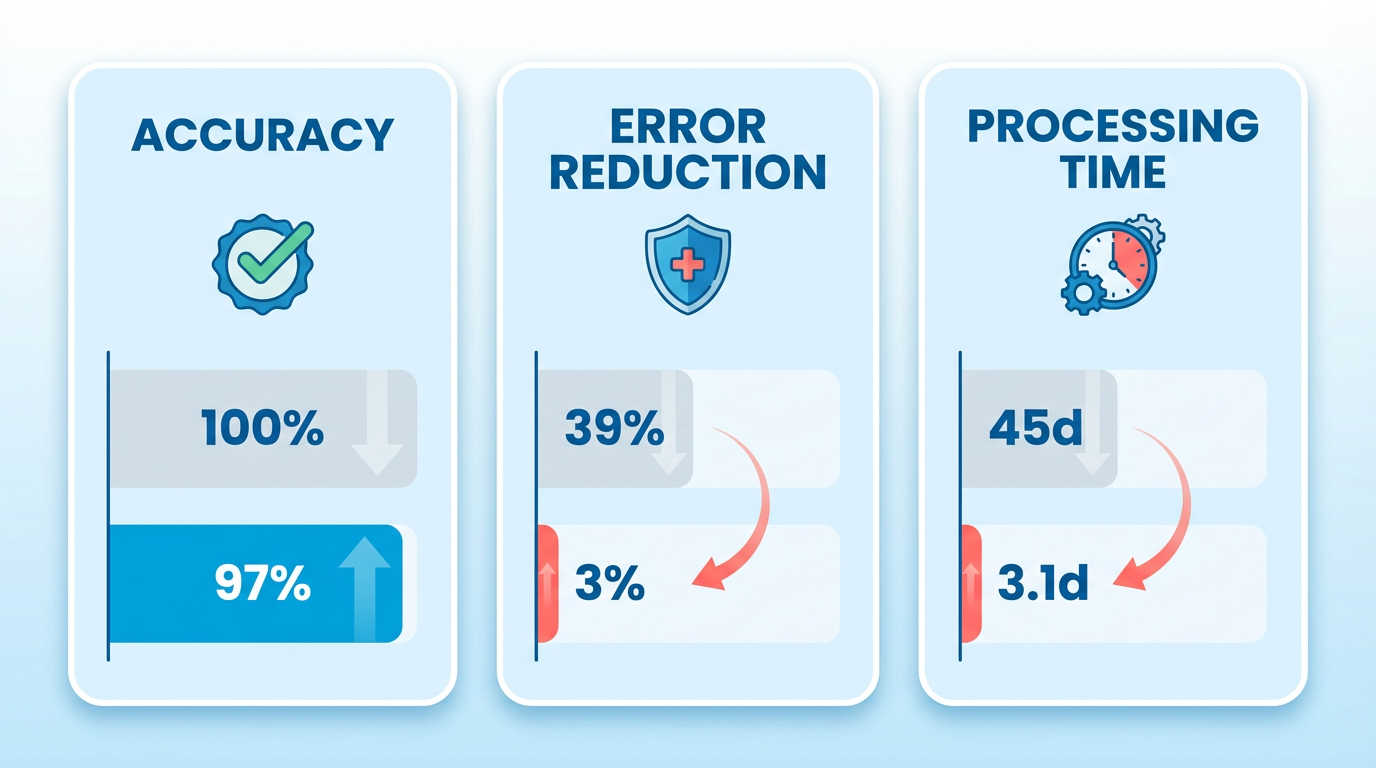
Blixo uses machine learning to extract and validate invoice data with 97% accuracy, eliminating the need for manual data entry. This technology reduces invoice processing time from an average of 45 days to just 3.1 days, slashing costs by up to 80% per invoice. For example, a logistics company reduced vendor disputes by 65% after implementing Blixo’s AI-based validation, which automatically cross-checks invoices against purchase orders and contracts. The platform also supports integration with major ERP systems like SAP and QuickBooks, ensuring data consistency across financial operations.
A critical advantage is three-way invoice matching, which aligns purchase orders, goods receipt notes, and invoices to prevent overpayments. Manual processes often miss these discrepancies, but Blixo’s automation flags exceptions in real time. One retail chain automated 90% of its invoice processing by aligning Blixo’s workflows with its SAP modules, recovering lost profits from errors that previously went undetected. As mentioned in the Measuring Success with Blixo: KPIs and Metrics section, such automation directly contributes to measurable reductions in processing errors and financial losses.
What Automation Features Improve Payment Collection Efficiency?
Blixo’s accounts receivable (AR) tools prioritize speed and accuracy in collections. Automated reminders and dunning workflows reduce days sales outstanding (DSO) by 30%, ensuring faster cash flow. A regional healthcare provider automated its patient billing processes, achieving a 28% reduction in overdue accounts through Blixo’s smart dunning system. The platform’s machine learning engine resolves unapplied payments to invoices within seconds, cutting reconciliation errors by 57% compared to manual methods.
Dynamic discounting features let businesses incentivize early payments while maintaining cash flow flexibility. A Miami-based startup reported a 70% increase in sales conversion after deploying Blixo’s automated reminders and discounting options. For high-volume operations, Blixo’s system handles multiple payment methods (ACH, credit cards) and currencies, reducing administrative costs by 30% and accelerating payment collection by 30%. Building on concepts from the Why Automating Invoice and AP Processes Matters section, these capabilities address inefficiencies inherent in manual systems, such as delayed collections and reconciliation challenges.
How Does Blixo Handle Recurring Billing and Subscription Management?
For businesses with subscription-based models, Blixo automates recurring billing cycles while allowing customizable plans. The platform supports flexible invoicing intervals (monthly, quarterly, annual) and adjusts charges based on usage tiers or contract terms. A SaaS company using Blixo reduced manual billing errors by 90% by automating subscription renewals and prorating charges for mid-cycle cancellations.
Customer engagement tools, such as self-service portals, let clients view invoices, make payments, and update billing details without IT intervention. This reduces support requests by up to 40%, as users can resolve issues directly through the portal. Blixo also tracks subscription health metrics, flagging at-risk accounts for proactive outreach to retain revenue.
What Integration and Security Features Support Financial Workflows?
Blixo integrates with accounting platforms like QuickBooks, Xero, and NetSuite, ensuring real-time data synchronization. This eliminates duplicate entries and streamlines month-end close processes. For global businesses, the platform supports multi-currency invoicing with 256-bit encryption to protect sensitive financial data.
Security is a priority: Blixo complies with GDPR and SOC 2 standards, offering role-based access controls and audit trails. Automated compliance checks flag suspicious transactions, reducing fraud risk. One enterprise reported a 65% reduction in duplicate payments after enabling Blixo’s duplicate invoice detection, which cross-references historical records to prevent overpayments.
Can Blixo’s Workflows Be Customized for Different Business Needs?
Yes. Blixo allows customization of client portals, approval workflows, and billing rules to match specific business requirements. Finance teams can set tolerance levels for invoice discrepancies or define custom dunning messages tailored to customer segments. A mid-sized enterprise configured Blixo’s workflows to align with its procurement policies, reducing manual approvals by 50%.
The platform also evolves with user feedback-Blixo’s representatives note that continuous improvements ensure the system adapts to changing needs. As one finance manager shared: “Blixo transformed our AP team from invoice processors to strategic planners.” For detailed guidance on tailoring Blixo’s features to organizational workflows, refer to the Implementing Blixo: A Step-by-Step Guide section.
By automating repetitive tasks and embedding intelligence into every step, Blixo empowers businesses to focus on growth while ensuring financial operations run with precision.
Implementing Blixo: A Step-by-Step Guide
Before diving into implementation, assess your current invoice and accounts payable (AP) workflows to identify inefficiencies and automation opportunities. Start by mapping end-to-end processes, including invoice receipt methods (email, paper, EDI), approval hierarchies, payment terms, and reconciliation practices. Evaluate pain points like manual data entry, duplicate payments, or delayed approvals. Benchmark key metrics such as days sales outstanding (DSO) or error rates to measure future improvements. As mentioned in the Why Automating Invoice and AP Processes Matters section, businesses using Blixo have reduced DSO by 30% through automated payment collection systems.
Pre-Implementation Checklist
- Map Existing Workflows: Document how invoices are received, approved, and paid. Identify bottlenecks, such as manual reconciliation or unclear approval chains.
- Audit Systems and Data: List all software (e.g., ERPs like QuickBooks or Xero) and data sources connected to your AP process. Ensure data is clean and standardized.
- Define KPIs: Building on concepts from the Measuring Success with Blixo: KPIs and Metrics section, set measurable goals for automation, such as reducing processing time by 50% or cutting errors by 40%.
- Secure Stakeholder Buy-In: Engage finance, procurement, and IT teams to align on priorities and address concerns early..
Blixo integrates seamlessly with existing financial systems, using machine learning to automate invoice validation, matching, and payments. As detailed in the Understanding Blixo’s Automation Capabilities section, begin by connecting Blixo to your ERP or accounting software via pre-built APIs or CSV imports. Configure rules for invoice routing, such as approval thresholds or vendor-specific workflows. For instance, a law firm automated invoicing and collections with Blixo, improving cash flow efficiency by 25%.
Step 1: Connect to Financial Systems
- Integration Options: Use Blixo’s API or pre-built connectors for platforms like QuickBooks, Xero, or SAP.
- Data Mapping: Align invoice fields (e.g., vendor name, PO number) with your ERP’s database to ensure consistency.
Step 2: Configure Automation Rules
- Invoice Matching: Enable three-way matching (purchase order, receipt, invoice) to prevent overpayments.
- Approval Workflows: Set dynamic approval chains based on invoice amount or department.
- Payment Scheduling: Automate payment dates to optimize cash flow, with support for ACH, credit cards, and multi-currency transactions..
Customizing Blixo’s automation features ensures scalability and compliance. Use machine learning models to auto-classify invoices and flag anomalies, such as duplicate payments or incorrect tax codes. A multinational electronics distributor processed 70,000 invoices with 76% automation using similar AI-driven tools.
Best Practices for Configuration
- Rule Customization: Create custom validation rules (e.g., “flag invoices over $5,000 for manager review”).
- Exception Handling: Train staff to resolve edge cases via Blixo’s intuitive interface while feeding feedback into the system to improve accuracy.
- Reporting: Generate real-time dashboards for AP metrics like processing time or vendor payment history..
Training staff on Blixo’s interface and workflows minimizes disruption during transition. Start with role-based training sessions for finance teams, focusing on invoice review, exception resolution, and reporting. Provide hands-on practice with a sandbox environment before full deployment.
Training Tips
- Create a Knowledge Base: Document FAQs and video tutorials for common tasks like invoice matching or payment scheduling.
- Assign Superusers: Designate team members to act as Blixo experts for peer support.
- use Feedback Loops: Use Blixo’s analytics to identify training gaps and refine workflows iteratively..
Avoid common pitfalls like underestimating integration complexity or skipping user adoption planning. As outlined in the Overcoming Common Challenges and Obstacles section, validate API connections and test data flows with sample invoices to address integration errors. A Miami-based startup initially faced delays due to incomplete data mapping but resolved issues by revisiting their pre-implementation audit.
Troubleshooting Common Issues
- Integration Errors: Validate API connections and test data flows with sample invoices.
- User Resistance: Address concerns through training and highlight time savings-Blixo users report a 30% reduction in administrative costs.
- Configuration Mistakes: Use Blixo’s built-in validation tools to catch rule conflicts before they disrupt workflows.
By following this structured approach, businesses can streamline invoice and AP processes while aligning with modern spend management best practices.
Measuring Success with Blixo: KPIs and Metrics
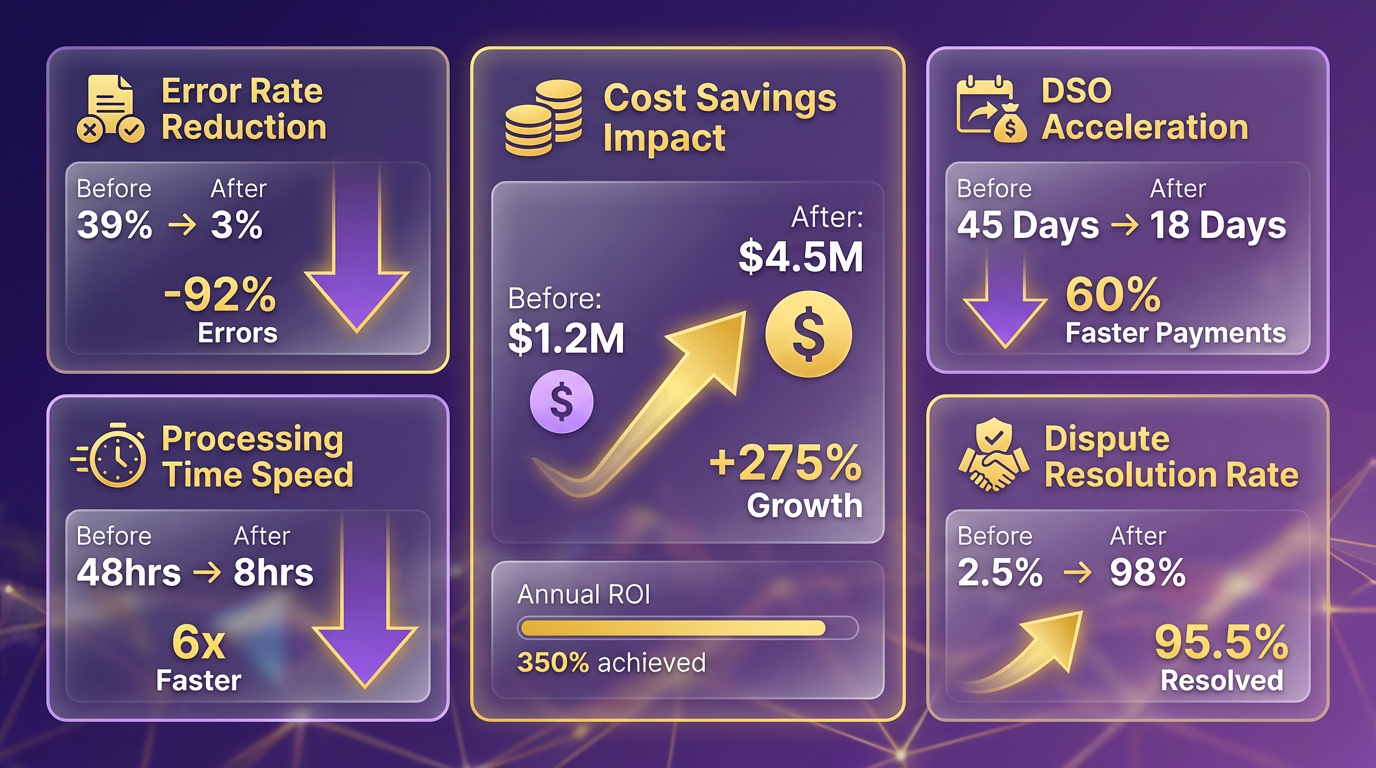
Measuring success with Blixo starts by tracking specific KPIs that reflect improvements in invoice automation and AP processes. Key metrics include error rate reduction, processing time, cost savings, dispute resolution, and Days Sales Outstanding (DSO). These metrics help quantify efficiency gains and financial impact. For example, Blixo’s AI-driven data extraction cuts invoice errors from 39% (manual processing) to 3%, while reducing processing time from 45 days to 3.1 days. As mentioned in the Understanding Blixo’s Automation Capabilities section, these improvements stem from AI and OCR tools that streamline data validation and workflow accuracy.
How Do You Track Cash Flow and Payment Recovery?
Cash flow stability hinges on metrics like DSO and on-time payment rates. Blixo improves DSO by 30% by accelerating invoice cycles, ensuring faster cash collection. Automated reminders and flexible payment portals boost on-time payments by 25%, reducing late fees and improving liquidity. Real-time dashboards track receivables, letting teams act quickly on overdue invoices. A small business using Blixo’s automated reminders saw a 30% jump in collection efficiency within a month. Building on concepts from the Why Automating Invoice and AP Processes Matters section, these cash flow improvements stem from eliminating manual delays and reducing human error inherent in traditional systems.
What Metrics Show Automation Workflow Efficiency?
Workflow efficiency is measured through task completion speed, error resolution, and integration performance. Blixo’s OCR and AI validation tools achieve 97% accuracy, slashing reconciliation disputes by 35%. Integration with ERP systems like SAP and QuickBooks ensures seamless data flow, reducing manual input by 82%. For instance, a retail chain automated 90% of its invoice processing by aligning Blixo workflows with its SAP modules, cutting month-end reconciliation time by 18%.
How Do You Set Benchmarks for Blixo Implementation?
Benchmarks should align with industry averages and Blixo’s proven outcomes. Start by comparing current metrics to standard benchmarks: 45-day processing time, 39% error rate, and 30% DSO. Post-implementation, aim for Blixo’s best-in-class results: 3.1-day processing, 3% error rate, and 21-day DSO. Use case studies as targets-a logistics company reduced disputes by 65% using AI-based validation, while a healthcare provider cut reconciliation time by 20%. Regularly audit workflows to ensure alignment with these goals.
What Metrics Prove ROI and Cost Savings?
ROI is best evaluated through cost-per-invoice savings, error reduction, and labor efficiency. Blixo cuts processing costs by 80% per invoice and reduces administrative expenses by 30% by eliminating spreadsheets. Annual savings for a business processing 1,000 invoices exceed $200,000-factoring in 54% lower costs and 75% less time spent on manual tasks. A finance manager noted, “Blixo’s setup wizard simplified our invoicing process. We cut billing time by 60% in the first month.” These savings directly contribute to revenue growth by reallocating resources to strategic initiatives. As outlined in the Implementing Blixo: A Step-by-Step Guide section, a structured rollout ensures teams maximize these efficiency gains from the outset.
By focusing on these KPIs, businesses can objectively measure Blixo’s impact on operations and financial health. Continuous monitoring and benchmarking ensure sustained efficiency gains, transforming AP teams into strategic assets.
Overcoming Common Challenges and Obstacles
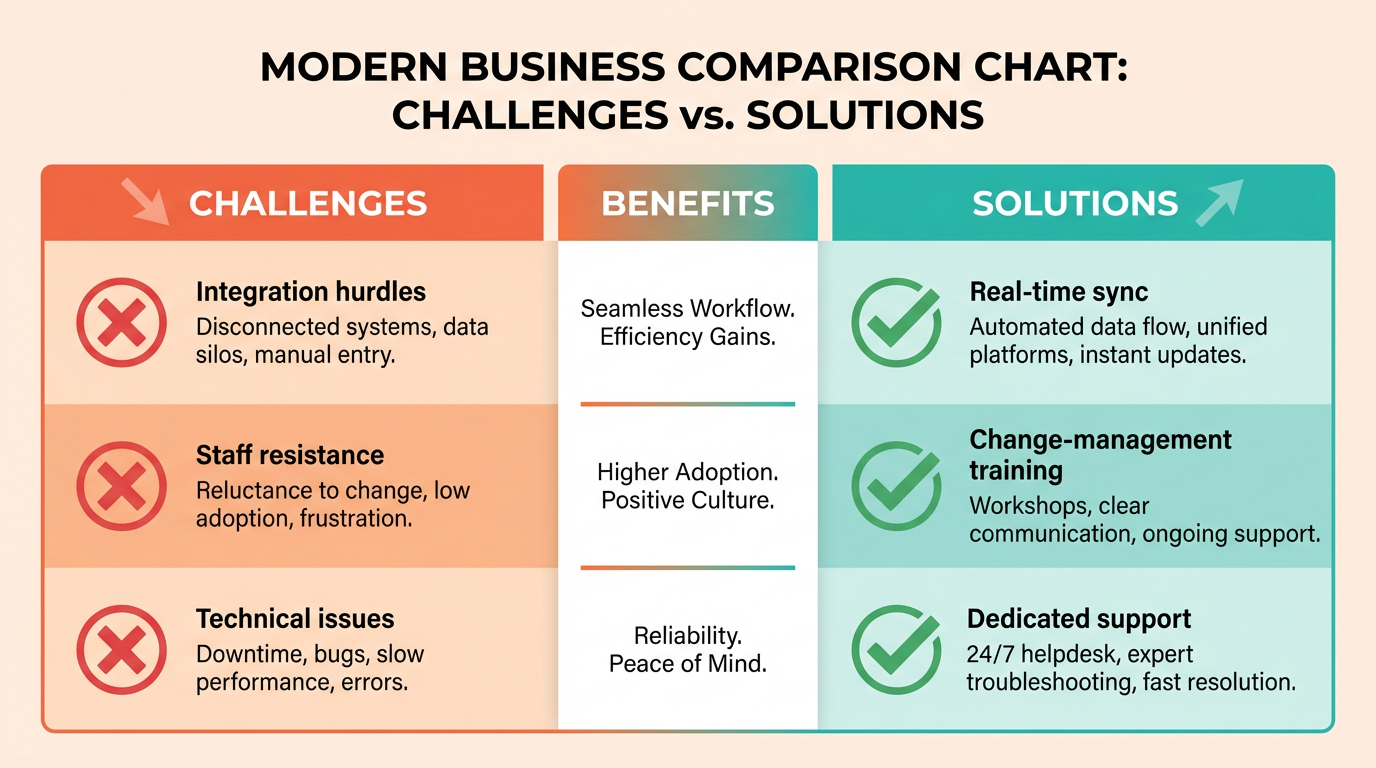
Implementing invoice and AP automation with Blixo requires strategic planning to address common challenges. Below are actionable strategies to manage integration hurdles, staff resistance, and technical issues while using proven case studies.
How Do You Address Integration Challenges with Financial Systems?
Integration with existing financial stacks is a critical step. Blixo supports real-time synchronization with ERPs and accounting software, reducing manual data entry. Key steps:
- Use Blixo’s pre-built connectors for platforms like NetSuite, QuickBooks, and SAP.
- Customize workflows to align with your procurement-to-pay (P2P) process, including three-way matching and approval rules.
- Test integrations in a sandbox environment before full deployment to identify gaps.
As mentioned in the Implementing Blixo: A Step-by-Step Guide section, mapping end-to-end processes before deployment ensures alignment with organizational needs. A multinational electronics distributor, for example, achieved 76% invoice automation by aligning Blixo’s AI-driven matching engine with its ERP system. This eliminated manual reconciliation errors and reduced payment cycles by 40%.
What Strategies Combat Resistance to Change?
Staff resistance often stems from fear of job displacement or unfamiliarity with automation tools. Proactive change management is essential:
- Training: Conduct hands-on workshops to demonstrate Blixo’s intuitive interface. The Ultimate Spend Management guide highlights that real-time analytics training reduces adoption friction by 60%.
- Stakeholder Involvement: Engage finance teams early to co-design workflows, ensuring their feedback shapes the implementation.
- Highlight Benefits: Emphasize how automation reduces repetitive tasks. One company saved 300+ hours annually by delegating invoice verification to Blixo’s AI, allowing staff to focus on strategic analysis.
A multinational retail organization successfully transitioned by pairing Blixo with a phased rollout, starting with a single department. This “success story” approach built confidence across teams.
How Can You Troubleshoot Common Errors?
Even strong systems face technical hiccups. Blixo’s SaaS service includes tools to address:
- Duplicate Invoices: Machine learning algorithms flag duplicates, preventing costly errors (up to $2.5M annually).
- Data Mismatches: Use Blixo’s rule-based validation for line-item details, tax codes, and accounting classifications.
- API Failures: Monitor logs via Blixo’s dashboard and use support for rapid resolution.
Building on concepts from the Understanding Blixo’s Automation Capabilities section, machine learning and rule-based validation are core to minimizing errors. For instance, a business processing 80,000+ invoices annually reduced error rates by 72% within six months by refining Blixo’s tax code prediction models. Start with small batches to isolate issues, then scale systematically.
What Role Does Change Management Play in Success?
Change management ensures long-term adoption. Data from the AI-Driven AP study shows teams with structured training programs see 50% faster ROI. Best practices:
- Phased Rollouts: Begin with high-impact departments (e.g., procurement) to demonstrate quick wins.
- Continuous Feedback: Use Blixo’s analytics to track adoption rates and adjust training plans.
- Leadership Advocacy: Secure buy-in from finance leaders to reinforce the value of automation.
As referenced in the Measuring Success with Blixo: KPIs and Metrics section, tracking adoption rates and ROI provides actionable insights for refining implementation. One organization slashed onboarding time by 50% using Blixo’s interactive training modules, which simulate invoice processing scenarios.
How Do Real-World Examples Inform Implementation?
Real-world deployments highlight Blixo’s flexibility:
- A mid-sized manufacturer integrated Blixo with its legacy ERP in 12 weeks, reducing invoice processing time from 7 days to 24 hours.
- A healthcare provider automated 90% of its AP workflows, cutting annual costs by $1.2M through fraud detection and optimized payment terms.
These results align with the Ultimate Spend Management guide’s emphasis on selecting tools that adapt to business complexity. By addressing integration, training, and technical challenges systematically, organizations enable Blixo’s full potential.
Conclusion and Next Steps
Automating invoice and AP processes with Blixo delivers measurable efficiency gains, cost reductions, and strategic financial insights. By using AI-driven automation, Blixo eliminates manual data entry, prevents costly errors like duplicate payments, and ensures compliance through real-time analytics. Its cloud-based architecture supports seamless integration with existing ERPs and accounting systems, streamlining the entire procure-to-pay workflow from requisition to payment. For businesses processing thousands of invoices monthly, this translates to annual savings of up to $250,000 for mid-sized organizations and a 76% automation rate in invoice handling, as demonstrated in real-world deployments. As emphasized in the Why Automating Invoice and AP Processes Matters section, these improvements directly address the inefficiencies plaguing manual systems.
How Do You Start Automating with Blixo?
To implement Blixo, begin by auditing your current AP processes to identify pain points-such as manual reconciliation or delayed payments-and map them to Blixo’s capabilities. Next, schedule a demo with Blixo’s team to explore customization options, including three-way matching, vendor relationship tools, and multi-currency support. For small-to-mid-sized businesses, a phased rollout ensures minimal disruption, while enterprises can use deep ERP integrations and scalable workflows. Detailed guidance on selecting the right automation solution is available in Blixo’s guide on invoice processing best practices, which aligns with industry benchmarks for efficiency and compliance. For a structured approach to implementation, refer to the Implementing Blixo: A Step-by-Step Guide section for actionable steps.
What Resources Can Help You Succeed?
Blixo provides onboarding support, technical documentation, and case studies to guide implementation. For deeper technical insights, explore AI-powered invoice automation trends and their impact on ERP systems. External resources like ABBYY’s blog on automated invoice processing and UiPath’s workflow examples offer complementary perspectives on automation strategies. These materials help teams understand how AI enhances line-item matching, tax code prediction, and error reduction-key features already embedded in Blixo’s SaaS service.
Automation isn’t just a productivity tool-it’s a strategic necessity. Manual AP processes cost enterprises an average of $10.89 per invoice**, while best-in-class automated systems reduce this to **$2.18. Beyond cost savings, automation strengthens vendor relationships through faster payments and transparent communication. As AI advances, systems like Blixo will further reduce processing times by up to 80%, with machine learning refining accuracy in tax classification and fraud detection. Organizations delaying automation risk falling behind peers who’ve already achieved 57% lower processing errors and 83% straight-through processing rates for electronic invoices, metrics detailed in the Measuring Success with Blixo: KPIs and Metrics section.
To stay ahead, businesses must act. Blixo’s SaaS service is designed for rapid deployment, with cloud infrastructure ensuring scalability for growing teams. Start by contacting Blixo to assess your automation needs or explore how to automate billing in six steps for a structured roadmap. The future of finance belongs to those who embrace intelligent automation-not just to survive, but to redefine efficiency in procurement and payments.
With AI-driven systems processing 95% of invoices accurately and ERP integrations achieving 99.8% synchronization, the shift to automation is irreversible. Companies adopting these tools now position themselves to handle rising invoice volumes, global compliance challenges, and evolving vendor expectations. By choosing Blixo, you’re not just automating a process-you’re future-proofing your financial operations against the complexities of a digitized economy.
Frequently Asked Questions
1. How much money do businesses lose annually from manual invoice errors?
U.S. businesses lose $1.3 trillion yearly due to manual invoice errors, with 39% of invoices containing human-input mistakes. Blixo’s AI reduces these errors by 97%, significantly cutting financial losses and disputes.
2. How does Blixo improve invoice accuracy?
Blixo’s AI extracts invoice data with 97% accuracy, cutting reconciliation disputes by 35%. This precision reduces errors that cause delays and vendor conflicts, streamlining payment workflows.
3. What cash flow benefits does invoice automation provide?
Automating invoices reduces processing time from 45 days to 3.1 days, lowering Days Sales Outstanding by 30%. This accelerates cash flow and reduces bad debt risks for businesses.
4. Can automation help small businesses save time?
Yes, small businesses processing 1,000 monthly invoices save over 200 hours annually by automating reconciliation. This time can be redirected toward growth-focused activities.
5. How does automation reduce vendor disputes?
AI-based validation cuts vendor disputes by 65%, as seen in a logistics company’s success. Automated systems flag inconsistencies early, preventing payment delays and relationship strain.
6. What systems can Blixo integrate with?
Blixo integrates with ERPs like SAP and QuickBooks, enabling scalable automation. Cloud-based tools sync seamlessly, ensuring compatibility without disrupting existing workflows.
7. Are there real-world success examples?
A Miami startup boosted sales conversion by 70% using automated reminders and dynamic discounting. Automation directly improved their cash flow and reduced bad debt by accelerating payments.