

Automate Billing Process Checklist with Blixo

Key Takeaways
- Automating billing processes reduces days sales outstanding (DSO) by 30%, accelerating revenue recognition.
- Manual accounts receivable workflows increase missed payments by 35% compared to automated systems.
- Small businesses using manual invoicing spend 30% more time collecting payments, delaying cash flow.
- Blixo improves cash flow efficiency by 25% for businesses like law firms through automated invoicing and collections.
- Automated billing systems cut administrative costs and reconciliation errors, ensuring faster, accurate payments.
- Businesses adopting Blixo reduce late payments and streamline accounts receivable tasks by 30%.
- A Miami-based startup reported significant revenue growth after automating billing with Blixo’s platform.
Related Video
Watch: Blixo Lifetime Deal $79 - Subscription Billing & Accounts Receivable Automation | Blixo Review by The SaaS Deals
Why Automating Billing Processes Matters
Automating billing processes is no longer optional for businesses aiming to stay competitive. Manual billing is error-prone, time-consuming, and costly-leading to delayed payments, reconciliation challenges, and lost revenue. By automating these workflows, businesses reduce administrative burdens, improve cash flow, and focus on growth. Here’s why automation with Blixo is a major advantage.
What Industry Data Reveals About Manual Billing
Manual billing processes create significant risks and inefficiencies. Studies show manual accounts receivable (AR) workflows lead to a 35% higher risk of missed payments and reconciliation errors compared to automated systems. Small businesses using manual invoicing spend up to 30% more time collecting payments, delaying cash flow by weeks. In contrast, automated systems like Blixo reduce days sales outstanding (DSO) by 30%, ensuring faster revenue recognition and fewer late payments.
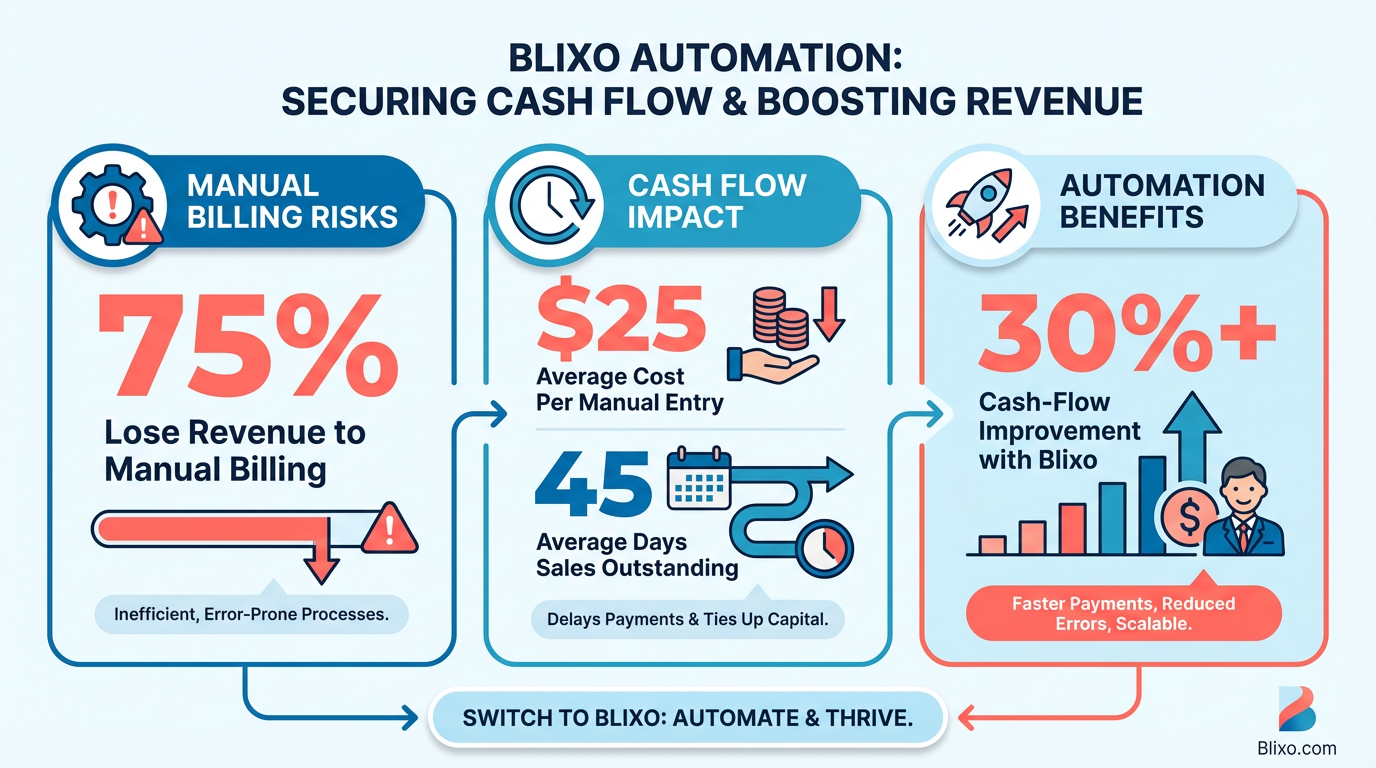
For example, a law firm that switched to Blixo automated its invoicing and collections, improving cash flow efficiency by 25%. Similarly, a Miami-based startup reported a 70% increase in sales conversion after implementing automated reminders and dynamic discounting. These results align with industry trends: companies that adopt automation save 35% on factoring, collections, and subscription fees, according to Blixo’s own data. As mentioned in the Tracking Key Metrics and Optimizing the Billing Process with Blixo section, monitoring metrics like DSO and payment processing time is critical to understanding these efficiency gains.
Key Challenges Solved by Billing Automation
Manual billing introduces errors, delays, and operational friction. Automation addresses these pain points directly:
- Error reduction: Human data entry mistakes drop by 90% with automated invoicing and payment processing.
- Faster collections: Automated payment reminders and follow-ups cut late payments by 30%, as seen in a marketing agency’s case study.
- Efficient reconciliation: Blixo’s AI-driven cash application matches payments to invoices in seconds, reducing manual efforts by 50%. Building on concepts from the Automating Cash Application and Reconciliation with Blixo section, this feature ensures accuracy while saving finance teams hours of work.
For finance teams, automation eliminates tedious tasks like tracking down missing payments or reconciling mismatched transactions. Business owners gain real-time visibility into cash flow, enabling better financial planning. Even creative professionals benefit-Blixo streamlines workflows by converting estimates to invoices and securing deposits upfront, ensuring steady revenue.
Who Benefits Most from Automation
While all businesses gain from automation, certain teams and industries see transformative results:
- Finance teams: Automate repetitive tasks like invoicing, collections, and reconciliation, freeing up 20–30 hours monthly.
- Creative professionals: Secure deposits and send invoices seamlessly, reducing payment delays by 70%.
- Subscription-based businesses: Manage recurring billing, proration, and customer portals effortlessly, improving retention by 30%.
Blixo’s SaaS service is particularly impactful for small to mid-sized businesses lacking dedicated finance departments. By handling complex workflows-like multi-currency transactions and subscription management-Blixo scales with growing operations without adding overhead. As detailed in the Implementing Blixo for Automated Billing section, the platform’s flexibility makes it ideal for businesses undergoing digital transformation.
How Blixo Streamlines Billing and Boosts Cash Flow
Blixo’s automation goes beyond basic invoicing. Its intelligent AR management includes:
- Automated collections: Follow-up reminders and deposit requests ensure timely payments.
- Subscription billing: Handle recurring payments, flexible pricing models, and mid-cycle changes with ease.
- Cash application: Machine learning matches payments to invoices with 99% accuracy, reducing manual intervention.
Integration with tools like QuickBooks and Stripe ensures seamless financial management, while 256-bit encryption protects sensitive data. One company using Blixo for global transactions reported a 30% revenue boost after adopting its multi-currency support.
Real-World Impact of Blixo Automation
Businesses across industries have transformed their billing processes:
- A creative agency reduced billing errors by 80% and secured deposits faster with automated workflows.
- A SaaS provider automated subscription renewals, cutting churn by 20% and improving customer satisfaction.
- A global e-commerce brand streamlined cross-border payments, saving $12,000 monthly in manual processing costs.
“Blixo’s automated cash application cut our reconciliation time in half,” says Vincent Mann, founder of Globetown Media. “We focus on growth, not spreadsheets.”
By addressing inefficiencies at every stage of the billing cycle, Blixo turns financial operations into a strategic advantage. The result? Faster payments, fewer errors, and a business that runs smoother-every day.
Assessing Current Billing Pain Points
What Manual Processes Are Slowing Down Your Billing?
Start by mapping your current billing workflow to identify where manual tasks create delays. Common pain points include manually generating invoices, chasing clients for payments, and reconciling transactions across spreadsheets. These tasks consume hours weekly and increase the risk of human error. For example, if your team spends hours each week on data entry or follow-up calls, automation tools like Blixo can streamline these steps. As mentioned in the Why Automating Billing Processes Matters section, manual billing is error-prone and costly, leading to delayed payments and reconciliation challenges.
- Audit your invoicing process: Track how many invoices are created manually versus automated.
- Review payment collection methods: Note if reminders or follow-ups are handled via email or phone.
- Assess reconciliation workflows: Determine if payment matching to invoices requires manual verification.
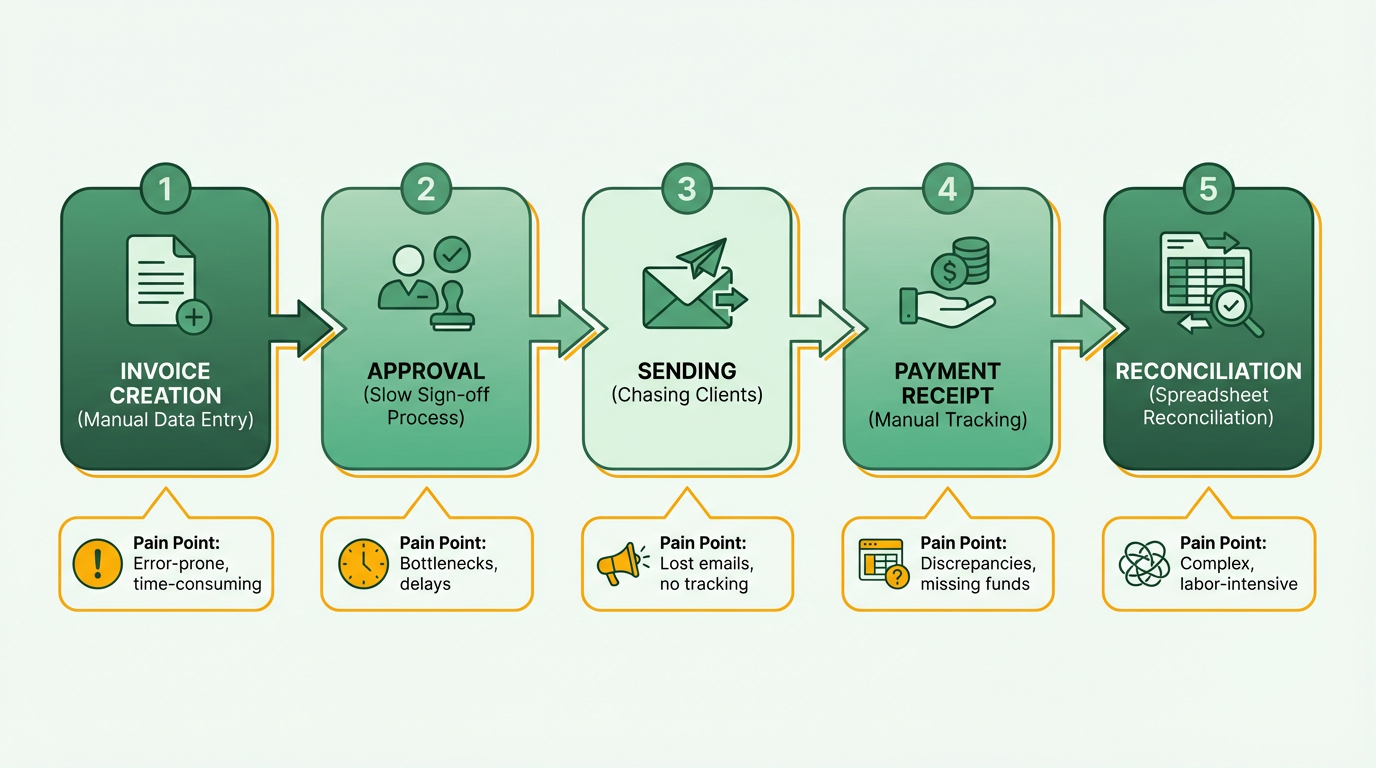
Blixo addresses these gaps by automating invoice creation, sending payment reminders, and using AI to match payments to invoices in seconds. This reduces the need for manual intervention and speeds up cash flow.
How Are These Pain Points Affecting Your Business?
Manual billing inefficiencies directly impact revenue and operational costs. For instance, delayed payments can extend days sales outstanding (DSO), tying up working capital. Manual processes also raise the risk of missed payments and reconciliation errors-studies show this risk increases by 35% compared to automated systems. Building on concepts from the Automating Cash Application and Reconciliation with Blixo section, delays in matching payments to invoices can disrupt cash flow and require time-intensive corrections.
- Quantify payment delays: Calculate how many invoices are paid late due to manual follow-ups.
- Track administrative costs: Estimate labor hours spent on billing tasks monthly.
- Measure error rates: Log instances of incorrect invoicing or mismatched payments.
Businesses using Blixo report a 30% reduction in payment delays and a 35% cut in administrative costs. A logistics company reduced invoice processing time by 60% after automating reconciliation workflows.
What Features Does Your Current System Lack?
Evaluate your existing billing platform for missing capabilities. Does it support recurring billing models, multi-currency transactions, or real-time revenue tracking? Many systems fail to integrate subscription management with accounts receivable, creating silos. Blixo unifies these functions, offering features like automated collections, deposit requests, and real-time dashboards. As mentioned in the Implementing Blixo for Automated Billing section, integration with accounting or CRM software is critical for eliminating manual workflows.
- Check for recurring billing support: Can your system handle subscriptions or usage-based pricing?
- Review integration capabilities: Does it connect with your accounting or CRM software?
- Assess automation depth: Are payments, reminders, and reconciliations fully automated?
Blixo’s SaaS service includes machine learning for payment matching, 256-bit encryption for compliance, and tools for flexible pricing models. These features eliminate the need for workarounds and reduce reliance on third-party tools.
Implementing Blixo for Automated Billing
Implementing Blixo for automated billing requires a structured approach to ensure seamless integration, configuration, and optimization. Below is a step-by-step checklist to guide you through the process, organized by key phases of implementation.
What’s the First Step in Setting Up Blixo?
Start by creating a Blixo account and configuring core settings. This includes defining your business profile, payment terms, and billing preferences.
- Sign up for a 30-day free trial to explore Blixo’s features without upfront costs.
- Set up business profiles to organize clients, products, and pricing structures.
- Define billing rules such as payment due dates, late fees, and currency preferences.
Blixo’s web-based platform requires no software installation, making setup quick. A consulting firm streamlined invoice generation, reducing billing errors by 40% during initial setup. As mentioned in the Assessing Current Billing Pain Points section, manual invoice generation is a common bottleneck, which Blixo addresses through automation.
How Do You Integrate Blixo With Existing Systems?
Integration ensures Blixo aligns with your accounting workflows and payment infrastructure.
- Connect accounting software like QuickBooks to sync financial data automatically.
- Link payment gateways (e.g., Stripe or bank transfers) to enable instant payment processing.
- Import client data via CSV to streamline onboarding for existing customers.
Blixo supports multi-currency transactions, which is critical for global businesses. An e-commerce company improved sales tracking accuracy by 60% after integrating Blixo’s inventory-linked invoicing. Building on concepts from the Why Automating Billing Processes Matters section, automation reduces manual reconciliation errors and accelerates cash flow.
What Payment and Billing Features Need Configuration?
Customizing payment options and recurring billing models ensures flexibility for clients and reduces manual work.
- Enable recurring billing for subscriptions, with options for monthly, quarterly, or annual cycles.
- Set up partial payments and payment plans to accommodate clients with cash flow constraints.
- Configure payment reminders to reduce late payments by up to 30% (as seen in small business case studies).
For instance, a marketing agency automated payment reminders using Blixo, cutting late payments by 30%. The platform also supports tiered pricing, usage-based billing, and proration for mid-cycle changes.
How Do You Automate Collections and Dunning?
Automated collections minimize manual follow-ups and improve payment consistency.
- Activate dunning management to retry failed payments and update card details in real time.
- Set up automated dunning workflows to send escalating reminders for overdue invoices.
- Use Blixo’s AI-driven cash application to match payments to invoices accurately, reducing reconciliation time by 50%.
A medium-sized business reported saving 50% of the time previously spent on manual payment matching after implementing Blixo’s dunning system. This aligns with the Automating Cash Application and Reconciliation with Blixo section, which emphasizes the efficiency gains from automated payment matching.
What’s an Example of Blixo in Action?
Real-world results highlight Blixo’s impact on efficiency and revenue.
- A global company expanded internationally by using Blixo’s multi-currency support, streamlining transactions across 15 countries.
- A project management tool automated invoicing with Blixo, increasing revenue by 30% through reduced payment delays.
These examples underscore Blixo’s ability to adapt to diverse business models, from subscription-based services to usage-driven pricing.
Final Steps: Testing and Optimization
Before full deployment, test workflows to identify gaps.
- Simulate payment scenarios to ensure gateways and dunning rules function as intended.
- Train your team on Blixo’s dashboard, customer portal, and reporting tools.
- Monitor performance metrics like Days Sales Outstanding (DSO) to measure improvements.
Businesses using Blixo report up to 30% faster cash flow and 25% fewer administrative errors. Start your free trial to validate these benefits for your operations.
Automating Cash Application and Reconciliation with Blixo
Building on concepts from the Implementing Blixo for Automated Billing section, connecting financial systems like bank accounts and ERPs is crucial for seamless cash application automation. By syncing these tools, businesses enable real-time payment matching, as discussed in the Tracking Key Metrics and Optimizing the Billing Process with Blixo section, where monitoring metrics like DSO ensures financial accuracy. Addressing the issues outlined in the Assessing Current Billing Pain Points section, Blixo’s AI-powered matching resolves 90%+ of payments automatically, directly mitigating manual reconciliation errors and delays.
Tracking Key Metrics and Optimizing the Billing Process with Blixo
What Key Metrics Should You Track?
To optimize billing efficiency, focus on metrics that directly impact cash flow and customer satisfaction. Start by tracking payment processing time, which measures how quickly invoices are paid from creation to receipt. A shorter processing time reduces delays and improves working capital. Invoice accuracy is another critical metric-errors lead to disputes, refunds, and customer frustration. As mentioned in the Assessing Current Billing Pain Points section, manual tasks like invoice creation often introduce errors, making automated validation tools like Blixo’s particularly valuable.
- Monitor payment processing time to identify bottlenecks in collections
- Measure invoice accuracy rates to reduce disputes and administrative overhead
- Track days sales outstanding (DSO) to assess how efficiently you collect receivables
For example, a law firm using Blixo automated its invoicing and reduced DSO by 25%, accelerating cash flow..
How Can Blixo’s Analytics Help You Optimize?
Blixo’s analytics dashboard provides real-time insights into billing performance, allowing you to pinpoint inefficiencies. Track trends in payment success rates, failed transactions, and reconciliation speed to refine your strategies. Building on concepts from the Automating Cash Application and Reconciliation with Blixo section, the platform’s machine learning engine improves over time, automatically matching payments to invoices and reducing manual work.
- Use real-time dashboards to visualize KPIs like payment delays and error rates
- Set up automated alerts for unusual spikes in failed payments or late invoices
- Export detailed reports to identify patterns in customer behavior or billing cycles
One Miami-based startup use Blixo’s dynamic discounting and reminder features to boost sales conversion by 70%, demonstrating how data-driven adjustments can scale revenue.
“Blixo is 10x more powerful than what I’ve used before.” – Dave, Business Owner.
What Process Changes Deliver the Greatest Impact?
Once you’ve identified pain points, implement targeted improvements. Automate repetitive tasks like invoice generation, payment reminders, and reconciliation to free up team time. For high-volume operations, prioritize multi-currency support and tiered pricing automation to streamline global billing.
- Automate mid-cycle proration to handle subscription changes without manual intervention
- Enable AI-driven dunning management to reduce failed payments through smart retries
- Customize workflows for complex billing models (e.g., usage-based, hybrid plans)
A project management tool integrated Blixo’s proration features, saving 15 hours monthly on administrative tasks. As outlined in the Implementing Blixo for Automated Billing section, mapping workflows to automation opportunities is critical for maximizing efficiency. Start by mapping your current workflow to find automation’s highest-impact areas..
How to Sustain Long-Term Efficiency
Regularly review metrics and update your billing strategy to adapt to changing customer needs. Schedule monthly audits of payment processing times, invoice accuracy, and customer feedback to ensure alignment with business goals.
- Conduct quarterly training sessions to keep teams updated on new Blixo features
- A/B test different billing models (e.g., fixed vs. usage-based pricing) to maximize retention
- Benchmark performance against industry standards to identify growth opportunities
By combining Blixo’s analytics with iterative improvements, businesses can reduce administrative costs by 30% and cut days sales outstanding by 30%, as seen in case studies from law firms and SaaS providers.
“Automating AR isn’t optional-it’s a must for faster payments and fewer errors.” – Vincent Mann, Founder of Globetown Media.
Example: Transforming Billing with Data-Driven Insights
A mid-sized SaaS company struggled with 20% late payment rates and 15% invoice errors. Using Blixo’s analytics, they discovered that unclear payment terms and lack of reminders were major culprits. Building on concepts from the Assessing Current Billing Pain Points section, they implemented automated reminders and clarified invoice details, reducing late payments to 5% and errors to 3%. Blixo’s real-time reporting allowed them to track these improvements weekly, ensuring sustained results.
This approach mirrors the success of an AI platform that automated metering and invoicing for 15,000 API calls per second, proving that scalable billing solutions rely on continuous data analysis.
By following this checklist, you can turn raw data into actionable strategies, ensuring your billing process remains efficient, accurate, and aligned with customer expectations.
Frequently Asked Questions
1. How does billing automation reduce days sales outstanding (DSO)?
Automating billing reduces DSO by 30% through faster invoicing, reminders, and payments. Automated systems streamline workflows, minimizing delays in revenue recognition compared to manual processes.
2. What risks are associated with manual accounts receivable workflows?
Manual AR workflows increase missed payments by 35% and reconciliation errors. They also delay cash flow by 30% due to inefficiencies, raising operational costs for small businesses.
3. Can automation improve small business cash flow?
Yes. Small businesses using manual invoicing spend 30% more time collecting payments. Automation cuts this time, accelerating cash flow and reducing delays by automating reminders and tracking.
4. How does Blixo reduce late payments?
Blixo cuts late payments by 30% through automated reminders, dynamic discounting, and streamlined collections. Its system ensures timely invoicing and faster client responses, improving payment consistency.
5. What cost savings does billing automation provide?
Automated billing reduces administrative costs by minimizing manual tasks. Businesses save 35% on factoring, collections, and reconciliation errors, improving overall operational efficiency.
6. Are there real-world examples of Blixo’s impact?
A Miami startup saw 70% higher sales conversion after using Blixo. A law firm improved cash flow efficiency by 25%, demonstrating automation’s tangible benefits for diverse industries.