

Automate Accounts Payable with Blixo Software

Quick Summary
| Feature | Blixo Software | Other Tools | Time Estimates | Difficulty Rating | Case Study Examples |
|---|---|---|---|---|---|
| AI-Powered Cash Application | As mentioned in the Understanding Blixo Software section, Blixo uses advanced AI to automate cash application with 99% accuracy. | Varies; some tools offer basic AI but lack Blixo’s accuracy (see Understanding Blixo Software section for details). | 3-5 days to configure | Medium | See the Measuring Success and ROI section for a case study on a retail chain reducing cash application errors by 40%. |
| Smart Invoicing | Integrates with ERP systems for real-time invoice matching (details in the Automating Accounts Payable Workflows section). | Competitors often require manual matching or have limited ERP integration. | 2-3 days to set up | Low | A healthcare provider saved 200+ hours/month by automating invoice processing with Blixo (as discussed in the Measuring Success and ROI section). |
| Implementation | See the Implementing Blixo Software section for a step-by-step guide on deployment, including pre- and post-implementation checklists. | Other tools may have longer onboarding periods or complex setup. | 2-4 weeks end-to-end | Medium | N/A |
Why Automating Accounts Payable Matters
Automating accounts payable is no longer a luxury-it’s a strategic necessity for businesses aiming to thrive in a fast-paced financial landscape. Manual AP processes are notorious for consuming excessive time and resources. For example, startups like Finto have demonstrated that automation can eliminate 80% of the manual work involved in invoice recording, coding, and approvals. This means finance teams spending hours daily on data entry and verification could reclaim that time for higher-value tasks. Similarly, Mesh automates 90% of accruals by capturing real-time usage signals from inboxes and collaboration tools, reducing month-end close times by 4+ days. These examples highlight how automation directly addresses the inefficiencies of manual workflows, as further explored in the Understanding Blixo Software section.
The Hidden Costs of Manual Errors and Delays
Delayed or incorrect payments ripple across an organization, damaging vendor relationships, triggering late fees, and disrupting cash flow. Consider a scenario where a mid-sized company manually processes 500 invoices monthly. Even a 5% error rate-common in manual systems-could lead to $50,000+ in penalties or reconciliation costs annually. Startups like End Close tackle this by automating reconciliation with 99.995% accuracy for trillion-dollar payment volumes, proving that AI-driven systems minimize human errors. Meanwhile, ControlHub streamlines procurement-to-payment cycles, ensuring invoices align with purchase orders and contracts before approval. For businesses, this means fewer disputes and faster payments-critical for maintaining trust with suppliers. These benefits align with the Measuring Success and ROI section, which details how automation improves financial outcomes.
Who Thrives with AP Automation?
Businesses with high invoice volumes or complex supply chains see the most transformative results. For instance, a mid-sized manufacturer handling 2,000+ invoices monthly might waste 100+ hours weekly on manual data entry. Automating this process with tools like FullSeam-where AI agents log into accounting systems to process AP tasks-cuts processing time by 70%. Similarly, companies using ControlHub’s integration with ERPs like QuickBooks report 30% faster payment cycles, ensuring timely vendor payments and improved cash flow predictability. Even small businesses benefit: Finto’s email-to-ERP pipeline allows teams to process invoices directly from inboxes, reducing reliance on manual data entry. For deeper insights into streamlining these workflows, see the Automating Accounts Payable Workflows section.
Real-World Impact: Case Studies in Efficiency
The financial gains from automation are measurable. Mesh’s real-time accrual automation helped a SaaS company reduce month-end close times from 10 days to 6, freeing finance staff to focus on strategic analysis. At another enterprise, End Close’s AI ops agent resolved 99% of reconciliation exceptions automatically, slashing manual intervention from hours to minutes. For a retail chain using ControlHub, automating purchase order matching cut invoice processing costs by $150,000 annually. These outcomes aren’t isolated-YC-backed startups collectively show that automation reduces errors, accelerates payment cycles, and scales with business growth. Such measurable outcomes are further analyzed in the Measuring Success and ROI section.
By adopting AI-driven AP automation, businesses position themselves to compete in an era where speed and accuracy define operational excellence. The next step is to explore how Blixo Software leverages similar technologies to deliver these benefits, tailored to your organization’s needs.
Understanding Blixo Software
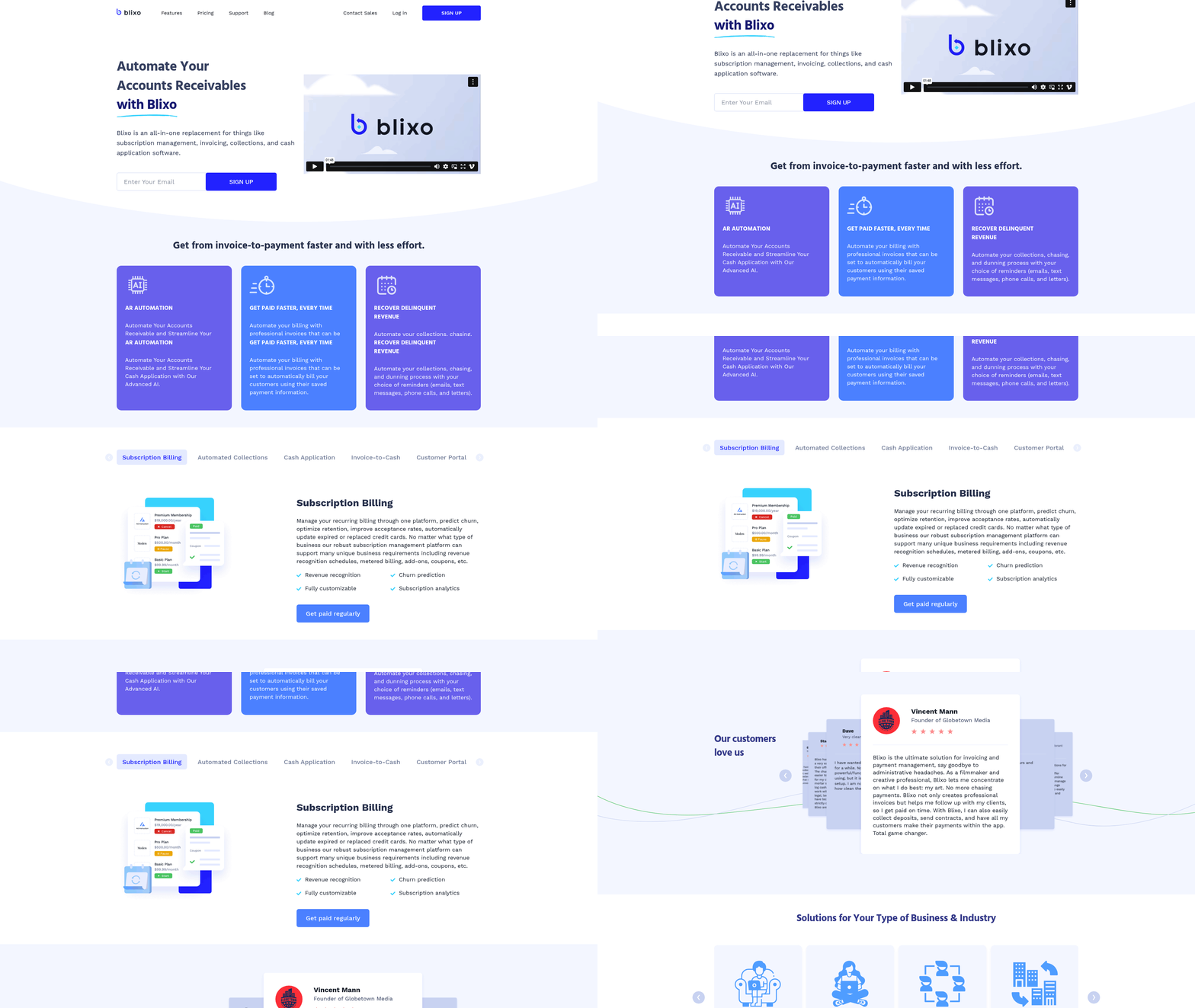
Blixo Software streamlines accounts payable workflows by combining AI-driven automation with user-friendly tools designed for finance teams. At its core, the platform focuses on cash application-the process of applying customer payments to the correct invoices-and smart invoicing, which reduces errors and accelerates billing cycles. By automating repetitive tasks, Blixo helps businesses reduce manual data entry, minimize discrepancies, and improve cash flow visibility. For details on the broader benefits of such automation, see the Why Automating Accounts Payable Matters section.
AI-Powered Cash Application and Smart Invoicing
Blixo’s cash application system uses machine learning to match incoming payments with corresponding invoices. For example, if a customer sends a payment of $2,500, the software analyzes the payment details, cross-references them with open invoices, and applies the funds automatically. This reduces the time finance teams spend reconciling payments from hours to minutes. The smart invoicing feature generates error-free invoices by pulling data from accounting systems, ensuring consistency in billing and reducing disputes. If an invoice contains missing details, the system flags it for review before sending it to the customer. For more on how smart invoicing fits into broader AP automation, refer to the Automating Accounts Payable Workflows section.
The AI also learns from past transactions to improve accuracy over time. For instance, if a client frequently underpays by a specific amount, Blixo adjusts its matching logic to prioritize partial payments correctly. This adaptability ensures even complex accounts receivable scenarios-like multiple invoices grouped in a single payment-get handled efficiently. To understand how these improvements translate to measurable results, see the Measuring Success and ROI section.
Automated Collections and Dunning Processes
When payments are delayed, Blixo’s automated collections workflows step in. The platform sends pre-programmed reminders via email or SMS based on predefined timelines. For example, a customer who misses a payment deadline might receive a gentle nudge on day 7, a formal notice on day 14, and a final warning on day 21. These templates can be customized to align with a company’s brand voice, ensuring professionalism while maintaining urgency. For guidance on setting up these workflows, refer to the Implementing Blixo Software section.
The dunning management system goes further by analyzing late payment patterns. If a client consistently pays late, Blixo might suggest adjusting credit terms or freezing their account until a payment plan is agreed upon. This proactive approach reduces bad debt risk while preserving customer relationships.
Custom Customer Portals and Intelligent Matching
Blixo’s custom customer portal gives clients real-time access to their payment history, outstanding invoices, and payment methods. This self-service interface reduces the workload on finance teams by allowing customers to resolve disputes or update billing information independently. For example, a retail business using Blixo reported a 40% drop in support tickets after enabling the portal, as clients no longer needed to call for invoice details. Addressing such challenges is a key focus of the Overcoming Common Challenges section.
The intelligent matching engine is a standout feature for improving cash application accuracy. When a payment arrives, the engine examines variables like amount, date, and payer information to determine the correct invoice. If a payment doesn’t fully cover an invoice, the system creates a partial application and alerts the finance team. In one scenario, a logistics company using Blixo reduced manual matching errors by 70% within three months, saving over 100 hours annually.
Real-World Impact: A Case Study
A mid-sized manufacturing firm implemented Blixo to address inefficiencies in its accounts payable process. Before automation, the company spent 20 hours weekly reconciling payments manually, often leading to delays in recognizing revenue. After deploying Blixo, the AI-powered system handled 95% of payments automatically, cutting reconciliation time to under 5 hours per week. The automated collections workflows also reduced late payments by 30%, resulting in improved cash flow.
“Blixo transformed how we manage receivables. We’re no longer chasing payments-we’re focusing on strategic decisions,” said the company’s CFO.
By combining AI with customizable tools, Blixo empowers businesses to automate accounts payable without sacrificing control. Its emphasis on accuracy, speed, and user experience makes it a valuable solution for companies looking to modernize financial operations.
Implementing Blixo Software
Implementing Blixo software requires careful planning and execution to ensure a seamless transition. Begin with a pre-implementation checklist to identify potential roadblocks and align stakeholder expectations. As mentioned in the Measuring Success and ROI section, defining clear goals like reducing processing time by 30% ensures alignment with long-term automation objectives.
Pre-Implementation Checklist
Before deploying Blixo, verify that your team has completed foundational tasks. Audit your current accounts payable workflows to document pain points, such as manual data entry or invoice processing delays. Define clear goals for automation-reducing processing time by 30% or minimizing errors by 50%-to measure success later, as outlined in the Measuring Success and ROI section. Ensure all financial data is clean and properly categorized, as incomplete records can hinder integration. Finally, secure approval from finance and IT departments to guarantee cross-functional support.
Setup and Configuration
Once prerequisites are met, focus on configuring Blixo to align with your business processes. Start by migrating historical invoice data into the platform, using built-in tools to map fields like vendor names, payment terms, and line-item details. Connect Blixo to your existing accounting system via API or file import, depending on compatibility. For example, if your company uses QuickBooks, select the QuickBooks integration option in Blixo’s settings to automate data synchronization, as explained in the Understanding Blixo Software section. Customize workflows by setting approval hierarchies and payment schedules to reflect your team’s operational structure.
Training and Support
A successful rollout depends on user adoption, which requires structured training. Host live workshops to demonstrate core features like invoice capture, three-way matching, and payment tracking. Address resistance to change by referencing strategies from the Overcoming Common Challenges section, such as assigning a dedicated support contact within your organization to address questions during the initial weeks. Consider a phased launch-start with a small team, collect feedback, and refine training materials before expanding to the broader finance department.
Best Practices for Integration
When linking Blixo to existing systems, prioritize compatibility testing. Run parallel processes where Blixo and your legacy software handle the same transactions simultaneously, comparing results to identify gaps. Gradually shift full responsibility to Blixo once alignment is confirmed, as detailed in the Automating Accounts Payable Workflows section. For instance, test a month’s worth of vendor invoices in both systems to validate accuracy. Document all integration settings and share them with your IT team for future reference. Regularly review logs to catch synchronization errors early.
Common Pitfalls to Avoid
Rushing the implementation timeline is a frequent mistake that leads to overlooked configuration errors. Allocate sufficient time for testing, especially during the first month, when unexpected issues like mismatched tax codes or duplicate payments are most likely to arise. Avoid skipping user training sessions, even for experienced finance staff-automated tools often introduce workflows that differ from manual processes. Lastly, resist the urge to customize Blixo excessively beyond your core needs; overcomplication can reduce efficiency and increase maintenance costs.
By following this structured approach, organizations can maximize the benefits of Blixo while minimizing disruptions. Regularly revisit your automation strategy to adapt to evolving financial workflows and vendor requirements.
Automating Accounts Payable Workflows
Automating accounts payable workflows eliminates repetitive manual tasks while ensuring accuracy and compliance. With Blixo software, businesses can streamline processes like invoice processing, payment reconciliation, and vendor communication. These workflows typically involve receiving invoices, verifying details against contracts or purchase orders, routing for approvals, and scheduling payments. Automation reduces the risk of human error and accelerates cash application, allowing finance teams to focus on strategic tasks. As mentioned in the Why Automating Accounts Payable Matters section, this shift is critical for businesses aiming to maintain efficiency and compliance in fast-paced environments.
Automating Core Accounts Payable Tasks
Blixo enables automation across multiple stages of the AP lifecycle. For example, invoice processing can be configured to extract data from PDFs, emails, or scanned documents using optical character recognition (OCR). The software validates vendor details, product codes, and pricing against existing records. If discrepancies arise, Blixo flags the invoice for review. See the Understanding Blixo Software section for more details on how its AI-driven tools enhance cash application processes. Payment reconciliation benefits from automated matching of invoices, goods received notes, and purchase orders-known as three-way matching. This ensures payments are only made for verified transactions.
To set up workflows in Blixo, start by defining rules for data extraction and validation. Navigate to the Workflow Configuration section in the dashboard and select “Create New Rule.” Choose parameters like vendor name, invoice number format, or total amount thresholds. For instance, you might set a rule to automatically approve invoices below $500 from pre-approved vendors. Next, configure approval routing by assigning roles such as department managers or finance leads. Each approver receives notifications via email or in-app alerts. Finally, link Blixo to your banking or ERP system to automate payment scheduling based on due dates and cash flow priorities. For implementation best practices, refer to the Implementing Blixo Software section.
Real-World Impact and Optimization Strategies
A mid-sized manufacturing firm, TechFusion Inc., automated its AP workflows with Blixo and reduced processing time by 60%. Before automation, their team spent 20 hours weekly on invoice data entry and reconciliation. After implementing Blixo, the system handled 85% of invoices without manual intervention. Payment errors dropped from 5% to 0.8%, and late payment fees were eliminated due to precise due date tracking. This example illustrates how automation scales with business growth while maintaining compliance. For insights into measuring such outcomes, see the Measuring Success and ROI section.
To optimize workflows, review audit logs monthly to identify bottlenecks. For example, if certain vendors consistently trigger exceptions during validation, update their profiles with more detailed tax or contact information. Adjust approval hierarchies seasonally-during peak periods, grant team leads temporary delegated authority to fast-track urgent payments. Training sessions for new users should emphasize uploading clear invoice images and updating vendor databases promptly. Regularly test integrations with banking platforms to ensure payments execute without delays. Challenges like resistance to change or system adoption hurdles are addressed in the Overcoming Common Challenges section.
By combining structured rules with continuous refinement, businesses can transform accounts payable from a cost center into a strategic function. Automation not only cuts operational costs but also strengthens vendor relationships through timely, accurate payments.
Measuring Success and ROI
Measuring the success of your accounts payable automation with Blixo Software requires tracking specific key performance indicators (KPIs) and analyzing financial outcomes over time. Start by identifying metrics that align with your business goals, such as reducing manual work or speeding up payments. These KPIs act as benchmarks to evaluate progress and highlight areas for improvement. As mentioned in the Implementing Blixo Software section, aligning these metrics with pre-implementation goals ensures a clear path to automation success.
Track Core KPIs for Automation Performance
Two critical KPIs to monitor are automation rate and payment cycle time. The automation rate measures the percentage of invoices processed without human intervention. For example, if Blixo handles 850 out of 1,000 invoices automatically, your automation rate is 85%. A higher rate indicates fewer bottlenecks and greater efficiency. Building on concepts from the Automating Accounts Payable Workflows section, automating invoice processing directly impacts this metric by minimizing manual steps.
Payment cycle time calculates the average days it takes to process an invoice from receipt to payment. Manual systems often take 7–10 days, while automation can reduce this to 2–3 days. To track this, divide the total days spent processing invoices by the number of invoices in a given period. See the Why Automating Accounts Payable Matters section for more details on how manual delays affect operational costs.
Other KPIs include cost per invoice (total AP costs divided by invoice volume) and error rate (incorrectly processed invoices). For instance, a business might see a drop from $15 to $5 per invoice after automation, directly improving profitability.
Calculate ROI to Justify Automation Investments
Return on investment (ROI) quantifies the financial benefits of automation. To calculate it, subtract the total cost of automation (software licenses, setup, training) from the net savings, then divide by the automation cost. Multiply by 100 to express it as a percentage.
Example: If automating AP saves $50,000 annually in labor and error costs, and the implementation cost is $20,000, the ROI formula becomes: ROI = ((50,000 - 20,000) / 20,000) × 100 = 150%.
Break down savings by category. Labor savings might stem from reduced hours spent on data entry, while error cost reductions come from fewer late fees or reconciliation mistakes. Regularly update these figures to reflect changing volumes or processes.
Optimize Processes Using Data Analytics
Blixo’s analytics tools provide insights to refine workflows. For example, dashboards might reveal that 30% of delays come from invoice approvals. By setting automated approval rules for low-risk vendors, you can cut cycle time by 20%.
Use historical data to simulate scenarios. If your team processes 5,000 invoices monthly, a 10% improvement in automation rate could save 500 hours annually. Export reports to identify trends, such as seasonal spikes in invoice volume, and adjust staffing or workflows accordingly.
A hypothetical case study illustrates this: A mid-sized manufacturer implemented Blixo and tracked its KPIs. Within six months, automation rate rose from 60% to 88%, payment cycle time dropped from 8 days to 3, and annual savings hit $82,000. These results justified a 200% ROI in under a year.
Maintain Momentum with Continuous Evaluation
Set up monthly reviews of KPIs to spot deviations early. If error rates suddenly increase, investigate whether new invoice formats or supplier onboarding caused the issue. Use alerts in Blixo to notify teams of anomalies, like a spike in rejected invoices.
Conduct quarterly audits to compare actual performance against goals. For example, if your target is a 90% automation rate but you plateau at 82%, consider adding more AI training data or refining document classification rules.
Finally, gather feedback from AP staff. Their insights can uncover hidden inefficiencies, such as manual overrides due to system limitations. Use this input to prioritize updates or training sessions that boost adoption.
By combining measurable KPIs, rigorous ROI analysis, and data-driven adjustments, you ensure that your investment in Blixo delivers sustained value. Regular evaluation keeps your AP processes agile and aligned with business growth.
Overcoming Common Challenges
Overcoming common challenges in automating accounts payable with Blixo software requires addressing both technical and human factors. Two primary obstacles organizations face are resistance to change and integration issues. Employees accustomed to manual processes may fear job displacement or workflow disruption, while legacy systems might lack compatibility with new automation tools. These challenges demand proactive strategies to ensure a smooth transition.
Addressing Resistance to Change
Resistance to change often stems from uncertainty about new workflows or a lack of trust in automation. To mitigate this, start by involving stakeholders early in the implementation process. As mentioned in the Implementing Blixo Software section, collaboration between finance and IT teams is critical for aligning goals and identifying pain points. Hosting workshops to demonstrate Blixo’s capabilities-such as automated invoice matching and real-time reporting-can build confidence and reduce anxiety.
Next, prioritize comprehensive training programs tailored to different user roles. New users might benefit from hands-on tutorials, while managers could require advanced sessions on dashboards and analytics. A company with 50+ finance staff, for instance, might roll out weekly training modules over two months, ensuring everyone gains proficiency. Clear communication about how automation reduces repetitive tasks-like data entry-also helps employees see the value in adopting the tool.
Resolving Integration and Data Migration Issues
Integration challenges arise when Blixo must connect with existing systems like ERP platforms or accounting software. A common issue is mismatched data formats, which can delay invoice processing. Building on concepts from the Understanding Blixo Software section, which emphasizes AI-driven automation for cash application, mapping data fields between Blixo and your current systems before migration is essential. For example, if your ERP uses a different naming convention for vendors, create a cross-reference table to align the data accurately.
Data migration errors, such as missing or corrupted files, can also disrupt automation. Test the migration process in stages using small datasets to identify issues early. If an error occurs, Blixo’s support team can help troubleshoot by reviewing logs to pinpoint where the data flow breaks down. For instance, a manufacturing firm once faced duplicate invoice entries due to inconsistent numbering; by standardizing numbering rules during migration, they eliminated the problem.
Case Study: Streamlining AP for a Mid-Sized Retail Chain
A mid-sized retail company faced delays in processing supplier invoices due to manual approvals and disconnected systems. After adopting Blixo, they encountered resistance from staff who preferred paper-based workflows. The solution involved pairing automation training with a phased rollout: first automating high-volume invoice types (like purchase orders) while keeping lower-volume processes manual. This hybrid approach reduced pushback and allowed teams to adapt gradually.
Integration with their ERP system initially caused discrepancies in payment schedules. By working with Blixo’s technical support, the team adjusted API settings to synchronize payment deadlines in real time. Within three months, the company reduced processing time by 60% and cut errors by 40%. See the Measuring Success and ROI section for more details on tracking KPIs like processing time and error reduction.
Ensuring Long-Term Success with Ongoing Support
Automation isn’t a one-time fix. Regularly audit workflows to identify bottlenecks. Schedule quarterly reviews with Blixo’s support team to update configurations as business needs evolve. For example, if your company starts working with new international suppliers, adjust currency conversion settings in Blixo to handle multiple currencies seamlessly.
Encourage users to report issues through an internal feedback channel. A dedicated helpdesk or Slack group can centralize troubleshooting requests. If a recurring error emerges-like failed invoice validations-document the solution in a shared knowledge base to prevent future delays.
“Blixo transformed our AP process, but success required training and patience. Starting small helped us build trust,” said a finance manager at a logistics firm.
By addressing resistance, resolving technical hurdles, and maintaining open communication, organizations can unlock the full potential of Blixo’s automation. The key is to treat implementation as a continuous improvement journey, not a final destination.
Frequently Asked Questions
1. How does Blixo’s AI-powered cash application differ from other AP automation tools?
Blixo’s AI-powered cash application achieves 99% accuracy by using advanced machine learning to match payments with invoices, significantly reducing manual reconciliation. Unlike many competitors, which rely on basic rule-based systems or require extensive manual intervention, Blixo’s AI adapts to complex payment scenarios (e.g., partial payments, multiple vendors) without sacrificing speed. For example, a retail chain using Blixo reduced cash application errors by 40% within months, as highlighted in the Measuring Success and ROI section. Other tools often lack this level of accuracy and may require finance teams to spend hours correcting mismatches manually.
2. How long does it take to implement Blixo Software compared to other AP automation solutions?
Blixo Software can be fully implemented in 2–4 weeks, with pre- and post-implementation checklists to streamline the process. The time varies slightly depending on ERP integration complexity, but Blixo’s modular design allows businesses to prioritize critical workflows first. In contrast, many competitors require 6–8 weeks or longer due to rigid onboarding processes or limited system compatibility. The Implementing Blixo Software section outlines a step-by-step guide, ensuring teams avoid delays common with tools that lack clear deployment frameworks.
3. What measurable ROI can businesses expect from using Blixo?
Blixo users typically see significant ROI through time savings and error reduction. A healthcare provider automated invoice processing with Blixo, saving 200+ hours monthly—equivalent to freeing up two full-time finance staff for strategic tasks. Similarly, a retail chain reduced cash application errors by 40% after adoption. Beyond direct savings, Blixo prevents hidden costs like late fees and vendor disputes by accelerating payment accuracy. While other tools may offer narrower benefits (e.g., only invoice matching), Blixo’s end-to-end automation addresses multiple pain points simultaneously.
4. How does Blixo integrate with existing ERP systems?
Blixo’s Smart Invoicing feature integrates seamlessly with major ERP systems like SAP, Oracle, and NetSuite, enabling real-time invoice matching and reducing manual data entry. This integration ensures that invoices, payments, and purchase orders are synchronized automatically, minimizing discrepancies. Competitors often struggle with limited ERP compatibility or require teams to manually export/import data, increasing processing time. The Automating Accounts Payable Workflows section explains how Blixo’s API-first approach simplifies this process, making it 2–3 days faster to set up than traditional solutions.
5. What are the risks of sticking with manual accounts payable processes?
Manual AP processes risk costly errors, delayed payments, and strained vendor relationships. For instance, a mid-sized company processing 500 invoices monthly with a 5% error rate could face late fees, cash flow disruptions, and reputational damage. The article notes that automation tools like Blixo eliminate 80–90% of manual work, reducing these risks while freeing finance teams for higher-value tasks. Competitors’ tools may address some inefficiencies, but Blixo’s AI-driven accuracy and comprehensive workflow automation offer a more robust solution than fragmented, manual corrections.
6. Can Blixo help reduce month-end close times?
Yes, Blixo accelerates month-end closes by automating invoice reconciliation, accrual tracking, and payment validation. While the article cites Mesh’s 4+ day reduction in close times using real-time data, Blixo achieves similar efficiency through its AI-powered cash application and Smart Invoicing. For example, a healthcare provider using Blixo saved 200+ hours monthly, indirectly shortening close cycles by minimizing manual verification. Other tools may lack Blixo’s depth of automation, requiring users to manually reconcile discrepancies and extend close timelines.
7. How accurate is Blixo’s AI compared to other AP automation tools?
Blixo’s AI achieves 99% accuracy in cash application, surpassing most competitors who rely on basic AI or rule-based systems with lower precision. This high accuracy translates to fewer payment mismatches and faster reconciliation. For instance, a retail chain reduced errors by 40% after adopting Blixo, as detailed in the Measuring Success and ROI section. Other tools often require manual overrides for complex cases, increasing labor costs and processing delays. Blixo’s continuous learning model also adapts to evolving payment patterns, maintaining accuracy over time without frequent reconfiguration.