

AR Automation Platforms Checklist for Timely Payments

Key Takeaways
- Timely payments are critical, with U.S. small businesses averaging 72 days to receive invoices, straining cash flow.
- High Days Sales Outstanding (DSO) indicates idle cash, directly linked to Deloitte’s findings on cash flow pressure causing business failures.
- Delayed payments force tough financial choices, as seen in manufacturing firms losing $500,000 monthly from 30-day delays.
- 85% of CFOs using AR automation report reduced DSO, improving liquidity and operational flexibility.
- Manual AR processes cause 50% more invoicing errors than automated systems, delaying collections and sparking disputes.
- AR automation platforms cut Days Sales Outstanding by 30-50% in 6-12 months, per industry benchmarks.
- Tracking DSO post-automation is essential, as it reveals $1.2 trillion in unpaid invoices tied up in U.S. businesses annually.
Why Timely Payments Matter
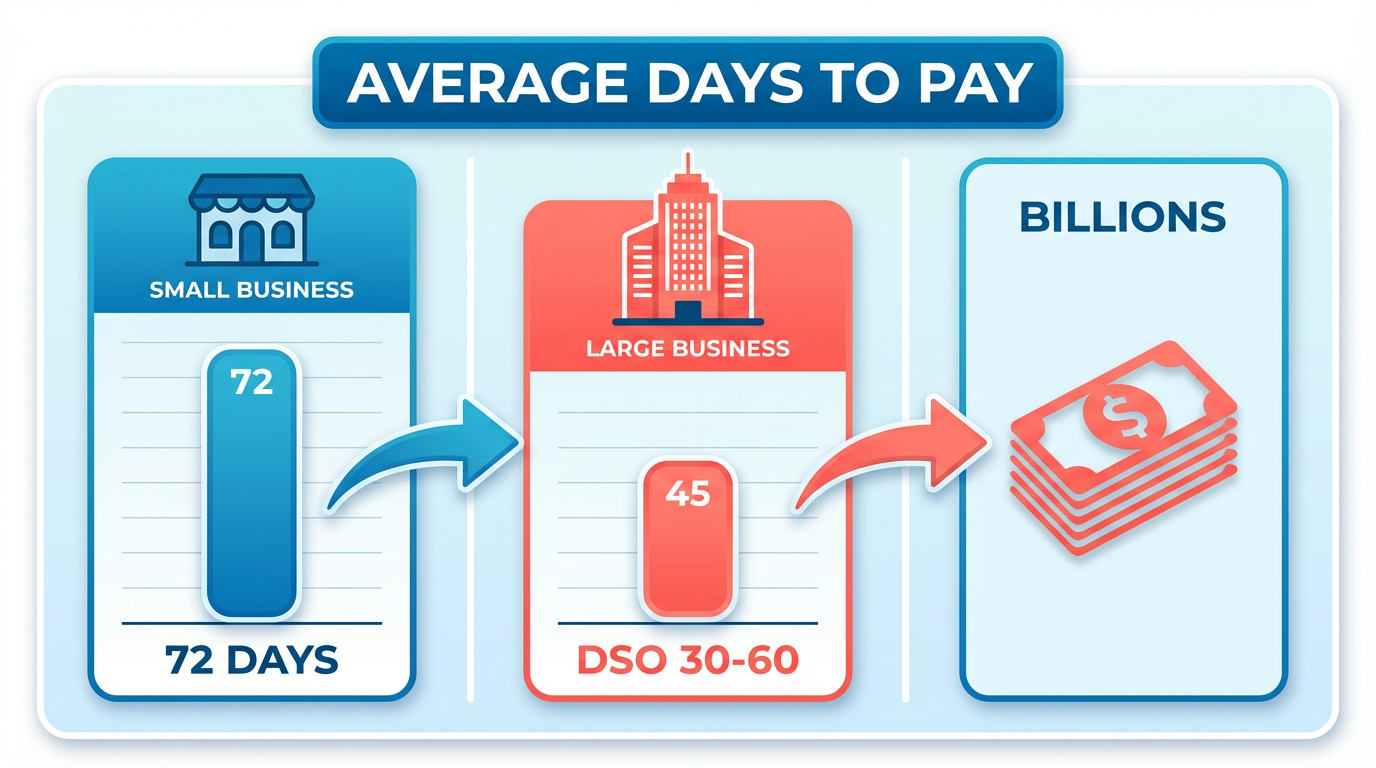
Timely payments are the lifeblood of business operations, directly impacting cash flow, customer relationships, and long-term financial stability. When invoices are paid late, companies face liquidity challenges that can disrupt budgets, delay supplier payments, and strain working capital. Industry data reveals stark consequences: small businesses in the U.S. wait an average of 72 days for payments, tying up billions in unpaid invoices. For enterprises, high Days Sales Outstanding (DSO)-a metric measuring how long it takes to collect receivables-signals cash sitting idle instead of fueling growth. Deloitte emphasizes that cash flow pressure is a leading cause of business failure, underscoring the urgency of efficient receivables management. As mentioned in the Monitoring AR KPIs After Automation section, tracking DSO is critical to understanding the health of receivables.
How Does Delayed Payment Affect Operations?
Delayed payments create a domino effect across departments. For example, a manufacturing firm with $5 million in monthly receivables facing a 30-day delay loses access to $500,000 in usable funds. This forces tough choices: should they borrow against future revenue, delay vendor payments, or halt new projects? The ripple effect is clear: 85% of CFOs at companies using AR automation report reduced DSO, directly improving liquidity. Manual processes exacerbate the problem, with errors in invoicing or payment tracking causing avoidable disputes that further delay collections.
What Benefits Do AR Automation Platforms Deliver?
Automating accounts receivable transforms reactive workflows into proactive, data-driven processes. SaaS providers like Blixo reduce manual tasks by 80%, freeing finance teams to focus on strategic planning. Key features-such as automated invoicing, real-time payment reminders, and self-service portals-cut DSO by accelerating collections. One company reduced its average payment time from 45 to 18 days by enabling customers to pay via integrated portals. Additionally, automation minimizes errors: 70 million transactions processed through AR platforms show a 99.9% accuracy rate in cash application, compared to error-prone manual reconciliation. Building on concepts from the Top AR Automation Platforms to Consider section, SaaS providers like Blixo combine AI-driven features to optimize efficiency.
Who Gains the Most from AR Automation?
Both small businesses and enterprises benefit, though their pain points differ. Small businesses, often lacking dedicated finance teams, gain from streamlined workflows that cut invoice processing time by 50%. A local service provider using AR automation slashed late payments by 40% by sending automated reminders. As highlighted in the Essential AR Checklist Items for Timely Payments section, automating invoice generation is a foundational step for small businesses to reduce delays. Enterprises, meanwhile, use AI-driven analytics to predict payment delays and optimize cash flow. High-volume industries, such as retail and healthcare, see the most impact: one major retailer automated $72 billion in annual receivables, reducing staff workload by 300+ hours monthly.
What Time Savings Justify Automation?
Manual AR tasks consume 20–30 hours weekly for finance teams. Automation cuts this time by 80%, recovering hundreds of hours annually. For instance, a mid-sized company reduced invoice processing from 4 hours/day to 15 minutes by automating data entry and payment tracking. These savings compound over time, allowing teams to focus on analytics, customer relationships, and growth strategies instead of chasing payments.
Real-World Impact: Case Studies in Action
A generic consumer goods company improved its order-to-cash cycle by 35% using AR automation, enabling faster supplier payments and better inventory management. Another example: a healthcare provider automated 90% of its invoicing, reducing bad debt by 25% through real-time payment tracking. These results align with industry benchmarks-3,000 organizations have adopted AR automation to process transactions faster and scale operations without proportional cost increases.
By prioritizing timely payments through automation, businesses enable trapped cash, reduce operational friction, and build stronger customer relationships. The next step is selecting a platform that integrates seamlessly with existing systems while offering scalability for future growth.
Essential AR Checklist Items for Timely Payments
Automate Invoice Generation and Distribution
Automating invoice creation and delivery reduces errors and ensures customers receive accurate, timely billing. Manual processes are prone to delays and mistakes, which can lead to late payments and strained client relationships. As mentioned in the Why Timely Payments Matter section, timely billing is critical for maintaining cash flow and customer trust.
- Set up automated invoice generation to eliminate manual data entry. Automated systems pull data directly from ERP or accounting software, reducing errors by up to 80% and speeding up the billing cycle.
- Enable digital invoice delivery through email or self-service portals. Studies show businesses using automated delivery methods see a 20% faster payment rate compared to traditional mail.
- Customize invoice templates to include clear payment terms, multiple payment options, and late fee policies. This transparency helps customers prioritize payments and reduces disputes.
“PayFabric is substantially faster than the AR process I was previously using. This is huge because I process payments for over 200 Universal-Unilink members.” – Pam Bedford, Universal-Unilink Purchasing Association.
Implement Automated Collection Workflows
Late payments increase Days Sales Outstanding (DSO) and disrupt cash flow. Automated dunning and reminders help recover receivables faster while maintaining professional communication. Building on concepts from the Monitoring AR KPIs After Automation section, tracking DSO metrics is essential to measure the effectiveness of collection strategies.
- Schedule tiered payment reminders (e.g., email, SMS, and phone follow-ups). Automated systems can reduce payment delays by 30% by sending timely, consistent alerts.
- Integrate AI-driven dunning strategies to analyze payment behavior and adjust reminder timing. For example, one company reduced DSO by 56% using predictive analytics to prioritize high-risk accounts.
- Offer flexible payment plans for overdue invoices. SaaS providers like Blixo allow businesses to negotiate structured payment terms, improving cash flow while preserving customer trust..
use Intelligent Payment Matching
Manual cash application is error-prone and time-consuming, but AI-powered matching engines streamline reconciliation and improve accuracy.
- Use AI to match payments to invoices automatically. This reduces manual reconciliation time by 70% and minimizes disputes caused by mismatched transactions.
- Enable real-time reconciliation alerts for discrepancies. For example, one provider processes $72 billion annually using automated matching, resolving 95% of issues without human intervention.
- Track reconciliation accuracy as a KPI. Businesses with advanced matching systems report a 98% first-pass resolution rate, directly improving cash application efficiency..
Streamline Recurring Billing and Subscriptions
Recurring invoicing reduces administrative workload and ensures steady revenue from subscription-based models.
- Automate subscription billing cycles to avoid missed charges. Tools that support monthly or quarterly invoicing can handle 3,000+ transactions with zero manual oversight.
- Allow customers to update payment details self-service. This lowers churn and reduces failed payments by 40%, according to a 2023 study of SaaS businesses.
- Flag inactive subscriptions for review. Automated systems can pause billing for dormant accounts, preventing customer frustration and revenue leakage..
Monitor AR KPIs for Continuous Improvement
Tracking key metrics like DSO and cash flow visibility ensures your AR strategy stays aligned with business goals. As outlined in the Monitoring AR KPIs After Automation section, consistent DSO tracking helps identify trends and areas for improvement.
- Calculate Days Sales Outstanding (DSO) monthly. A 2023 report found that 85% of CFOs with automated AR systems reduced DSO by 20–30 days.
- Audit payment processing costs. Manual processes cost 3x more per invoice than automated workflows, according to ERP integration studies.
- Generate real-time cash flow reports. Businesses using AR automation platforms see a 50% faster response to liquidity risks due to instant access to financial data.
By prioritizing these checklist items, businesses can reduce manual effort, accelerate payments, and maintain healthy cash flow. Blixo’s SaaS service, for instance, combines these features with transparent pricing and seamless ERP integration, making it ideal for scaling AR efficiency.
Top AR Automation Platforms to Consider
The best AR automation platforms streamline invoicing, collections, and cash application while reducing manual work. Blixo stands out by combining AI-driven features with user-friendly tools to accelerate on-time payments. Look for platforms that support automated invoice generation, recurring billing, and customizable payment reminders.
-
Automated invoicing and recurring payments SaaS providers like Blixo eliminate manual data entry by generating invoices based on predefined rules. This reduces errors and ensures consistent billing for subscriptions or long-term contracts. As mentioned in the Essential AR Checklist Items for Timely Payments section, automation minimizes delays and improves accuracy.
-
Smart collections and reminders Blixo uses AI to analyze payment patterns and send reminders at optimal times. This approach lowers late payment rates by up to 40% for mid-sized businesses.
-
Self-service customer portals Letting clients view invoices, dispute charges, and pay online improves satisfaction. Blixo’s portal supports multiple currencies and payment methods, including ACH and credit cards.
-
Real-time reporting Dashboards that track Days Sales Outstanding (DSO) and cash flow visibility help finance teams make data-driven decisions.
“Blixo’s automation cut our invoice processing time by 60%-we now focus on strategic planning instead of chasing payments,” says a finance manager from a mid-sized firm.
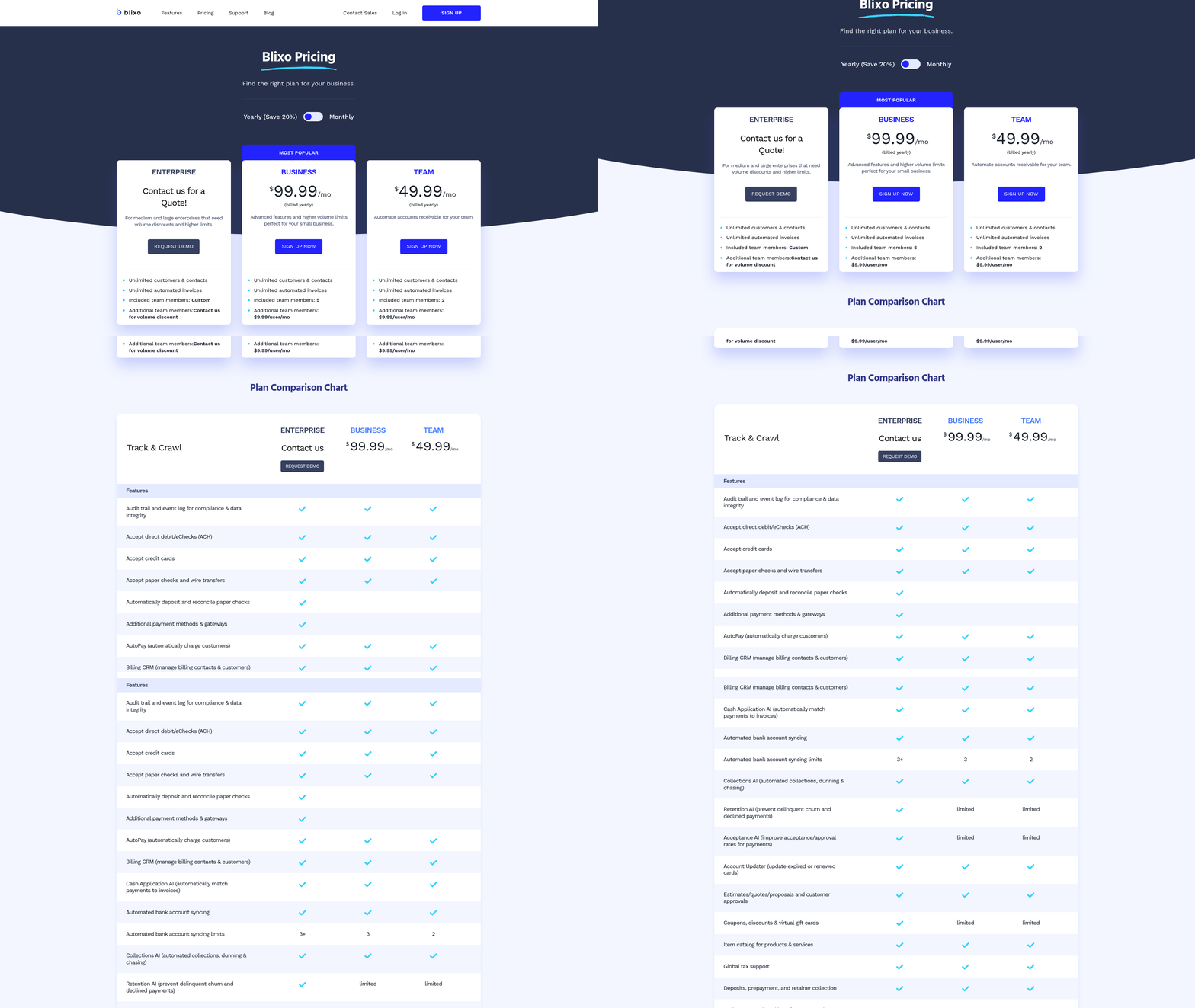
AR automation pricing varies between subscription plans and transaction-based fees. Blixo prioritizes clear, scalable pricing that adapts to business growth.
-
Monthly subscription plans Fixed fees for core features (e.g., $200/month) work best for businesses with steady transaction volumes. Blixo’s plans include unlimited users, making it ideal for growing teams.
-
Transaction-based pricing Pay-per-invoice models suit startups or companies with fluctuating activity. Blixo charges $0.50 per invoice processed, with no hidden fees.
-
Custom enterprise tiers High-volume users benefit from tailored pricing that includes advanced analytics and dedicated support.
-
Cost savings from automation Automating collections can reduce manual labor costs by 80%, as seen in case studies where companies saved $50,000+ annually. As highlighted in the Why Timely Payments Matter section, these savings directly enhance liquidity and operational efficiency.
Seamless integration with existing financial tools ensures smooth data flow and minimizes disruptions. Blixo connects with popular platforms like QuickBooks and Xero out of the box. Building on concepts from the Implementation Checklist for AR Automation section, integration success depends on aligning workflows with system capabilities.
- QuickBooks and Xero compatibility Sync invoices, payments, and customer data bidirectionally to avoid duplicate entries.
- Multi-system connectors Blixo integrates with ERPs like Sage Intacct and NetSuite, supporting real-time updates across workflows.
- No manual data entry Automated reconciliation reduces errors. One company reported a 90% drop in accounting discrepancies after integration.
- API flexibility Custom integrations with CRM or POS systems are possible via Blixo’s open API.
“Integration with our ERP was effortless-Blixo’s team guided us through setup in under a week,” shares a controller at a retail firm.
Protecting sensitive financial data is non-negotiable. Blixo employs industry-leading safeguards to meet global standards.
- End-to-end encryption AES-256 encryption secures data in transit and at rest, preventing breaches.
- GDPR and PCI compliance Blixo adheres to GDPR for EU customers and PCI DSS for handling credit card payments.
- Role-based access controls Limit permissions to sensitive actions (e.g., invoice approvals) to reduce insider risks.
- Audit trails and reporting Track changes to invoices or payments for compliance audits.
A platform’s ease of use and support quality directly impact adoption rates. Blixo’s design emphasizes simplicity and accessibility.
- Intuitive interface Drag-and-drop invoice templates and customizable dashboards reduce the learning curve.
- Onboarding and training Blixo provides onboarding sessions and video tutorials to ensure teams get started quickly.
- 24/7 customer support Access live chat and email support for urgent issues. Response times average under 15 minutes.
- User feedback loops Blixo updates features based on customer input, such as adding multi-language support for global clients.
“The support team resolved our integration issue overnight-unlike other providers we’ve used,” says a small business owner.
By focusing on these categories, businesses can select an AR automation platform that aligns with their operational needs while ensuring scalability and security. Blixo’s combination of AI-powered tools, transparent pricing, and seamless integration makes it a strong choice for companies seeking to optimize their receivables process.
Implementation Checklist for AR Automation
To ensure a smooth transition to AR automation, follow this structured approach that covers planning, setup, and ongoing optimization. Each step addresses critical areas to maximize efficiency, reduce errors, and improve cash flow..
What Should You Evaluate Before Implementation?
Begin by analyzing your current AR workflows to identify bottlenecks and inefficiencies. Manual processes often lead to delays, errors, and liquidity issues, especially when invoices take 72 days or longer to settle. Assessing these gaps ensures automation tools target the right areas.
- Map existing AR workflows Document every step from invoice generation to payment receipt. Highlight manual data entry, duplicate efforts, and communication gaps. For example, a business might find 50% of invoice handling time is wasted on manual validation. This aligns with the Essential AR Checklist Items for Timely Payments section, which emphasizes automating invoice generation to reduce errors.
- Identify high-risk areas for delays Look for steps prone to errors, such as inconsistent invoicing or missed payment reminders. A 20% reduction in payment delays can be achieved by automating reminders, as shown in case studies.
- Quantify current performance Measure key metrics like Days Sales Outstanding (DSO) and bad debt rates. A company with a DSO of 56 days may aim to cut this by 30% post-automation..
How to Choose and Configure an AR Automation Platform
Select a platform that aligns with your business size, payment preferences, and integration needs. The right software can reduce manual effort by 80% while supporting real-time tracking of customer payment behavior.
- Prioritize core features Ensure the platform offers automated invoicing, multi-currency support, and integration with your ERP or CRM. For instance, Blixo streamlines billing practices while enforcing consistent logic for customer segmentation, as discussed in the Top AR Automation Platforms to Consider section.
- Enable real-time reporting Dashboards that track DSO, payment delays, and cash flow trends help finance teams make data-driven decisions. Real-time visibility into customer behavior is critical for forecasting.
- Customize payment methods Support digital payment platforms and bank transfers to cater to client preferences. Automated systems can process transactions with 100% accuracy, eliminating reconciliation errors..
What Training and Adoption Strategies Work Best?
User resistance is a common hurdle during automation. Training should focus on practical workflows and emphasize how automation reduces their workload.
- Conduct role-specific training Accountants need to learn how to configure automated reminders and generate reports, while sales teams should understand how to track customer payment trends.
- Create a feedback loop Encourage staff to report usability issues during the first month of implementation. Addressing these early improves adoption rates.
- Highlight efficiency gains Share metrics like a 30% faster DSO or a 25% reduction in bad debt to show the tangible benefits of automation..
How to Monitor and Improve Performance
Automation is not a one-time fix. Regularly evaluating KPIs and refining workflows ensures long-term success.
- Track AR KPIs weekly Measure DSO, payment accuracy rates, and late payment trends. A sudden spike in delays might indicate a configuration error in the automation system. This builds on concepts from the Monitoring AR KPIs After Automation section.
- Audit system integrations Ensure data flows seamlessly between your AR platform, billing software, and accounting systems. Misaligned integrations can cause invoice discrepancies.
- Iterate based on feedback Use client surveys and internal feedback to refine invoicing templates, payment reminders, or reporting tools. One business reduced bad debt by 25% after adjusting its automated collections strategy.
By systematically addressing these steps, organizations can transform AR processes from reactive to proactive, ensuring faster payments and stronger financial health.
Monitoring AR KPIs After Automation
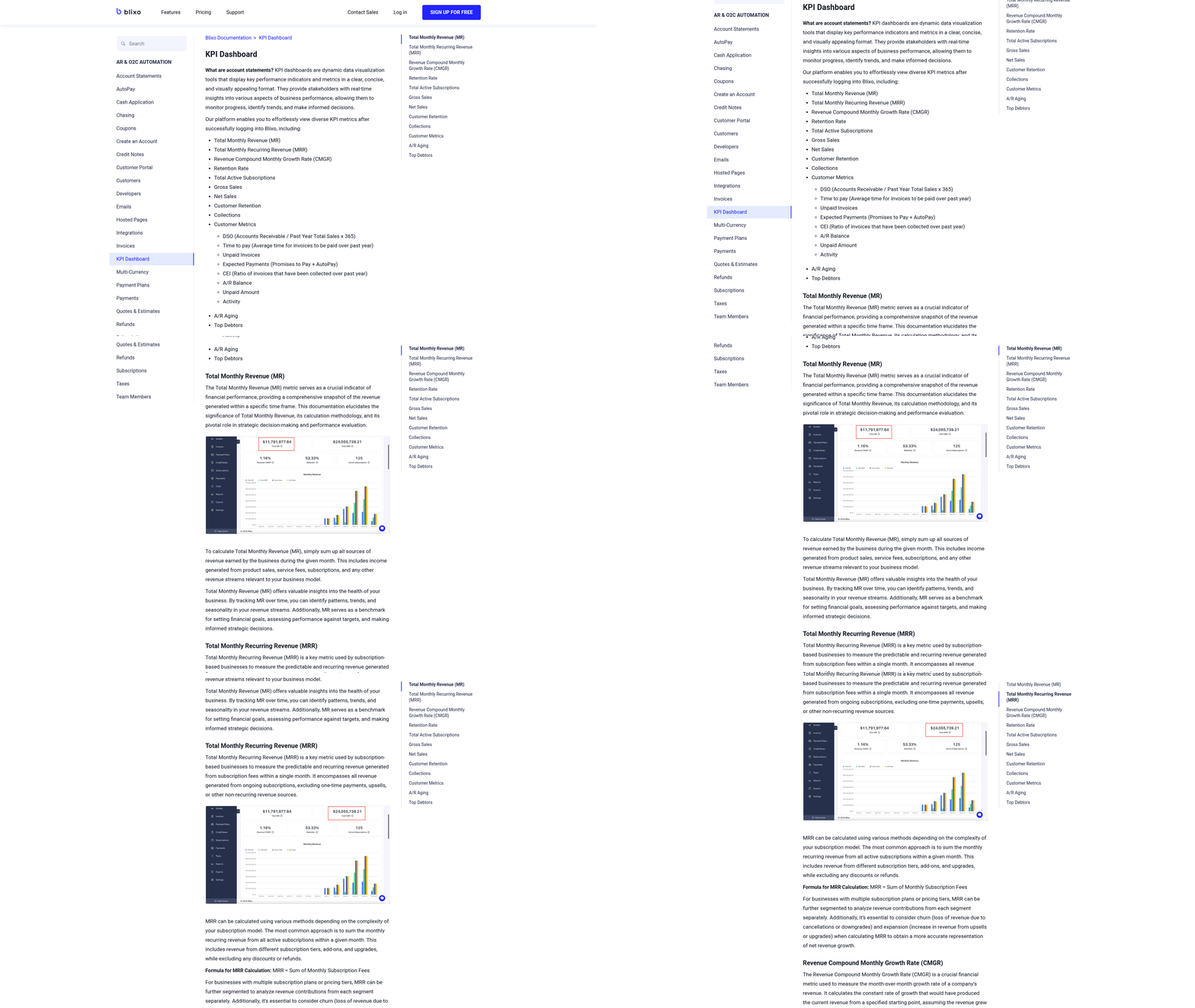
Monitoring AR KPIs after automation ensures your system delivers the intended efficiency gains and financial benefits. Start by tracking Days Sales Outstanding (DSO), which measures the average number of days it takes to collect receivables. As mentioned in the Why Timely Payments Matter section, reducing DSO directly improves cash flow and operational stability.
Next, evaluate invoice accuracy rates to ensure automation minimizes errors. Building on concepts from the Essential AR Checklist Items for Timely Payments section, automated systems streamline invoice generation and distribution, but ongoing monitoring confirms these processes maintain precision.
Finally, assess collections efficiency by tracking metrics like payment processing speed. The Implementation Checklist for AR Automation section emphasizes ongoing optimization, making these KPIs critical for identifying areas to refine workflows and maximize automation’s impact.
Frequently Asked Questions
1. What is the average time U.S. small businesses take to receive payments?
U.S. small businesses wait an average of 72 days for invoice payments, straining cash flow and operational budgets. This delay ties up billions in unpaid invoices annually.
2. How much revenue can a company lose from a 30-day payment delay?
A firm with $5 million in monthly receivables could lose $500,000 in usable funds from a 30-day delay, forcing costly financial decisions like borrowing or project halts.
3. What benefits do AR automation platforms provide?
AR automation reduces Days Sales Outstanding by 30-50% in 6-12 months, cuts invoicing errors by 50%, and improves liquidity, as seen in 85% of CFOs reporting faster collections.
4. Why is tracking Days Sales Outstanding (DSO) critical?
High DSO signals idle cash; tracking it reveals $1.2 trillion in unpaid U.S. invoices annually. Lower DSO improves cash flow and reduces business failure risks linked to cash shortages.
5. How do manual AR processes harm collections?
Manual systems cause 50% more invoicing errors than automated tools, leading to disputes and delayed payments. Automation streamlines workflows and reduces human error.
6. How quickly do AR automation platforms show results?
Industry benchmarks show AR automation platforms cut Days Sales Outstanding by 30-50% within 6-12 months, with 85% of users reporting measurable liquidity improvements.
7. What role do AR automation platforms play in dispute resolution?
By reducing invoicing errors by 50%, AR automation minimizes disputes. Platforms like Blixo use SaaS tools to ensure accuracy, speeding up collections and resolving conflicts proactively.